Open Stomp
Open tools for the SORAN Dual Stomp Lite guitar multi-effects pedal (USB 3962:2000, “JME STOMPBOX”):
- Open Stomp Manager, a desktop editor and live monitor for Linux, macOS and Windows. The vendor’s Stomp Manager only runs on macOS and Windows.
- open-stomp, the library it is built on: the pedal’s USB-MIDI protocol, reverse engineered, as a Rust crate with Python bindings.
- NAM and IR conversion that sounds closer to the real amp model and cab than the official app’s, measured on the pedal: how it works and the results.
- The protocol, documented in full, and how it was recovered.
Since 0.5
NAM imports that sound like the model, low end included
A bass DI re-amped through the pedal with four conversions of the same amp model, against the original model and cab IR in software. open-stomp 0.5 is the closest of the four in 87% of the recording.
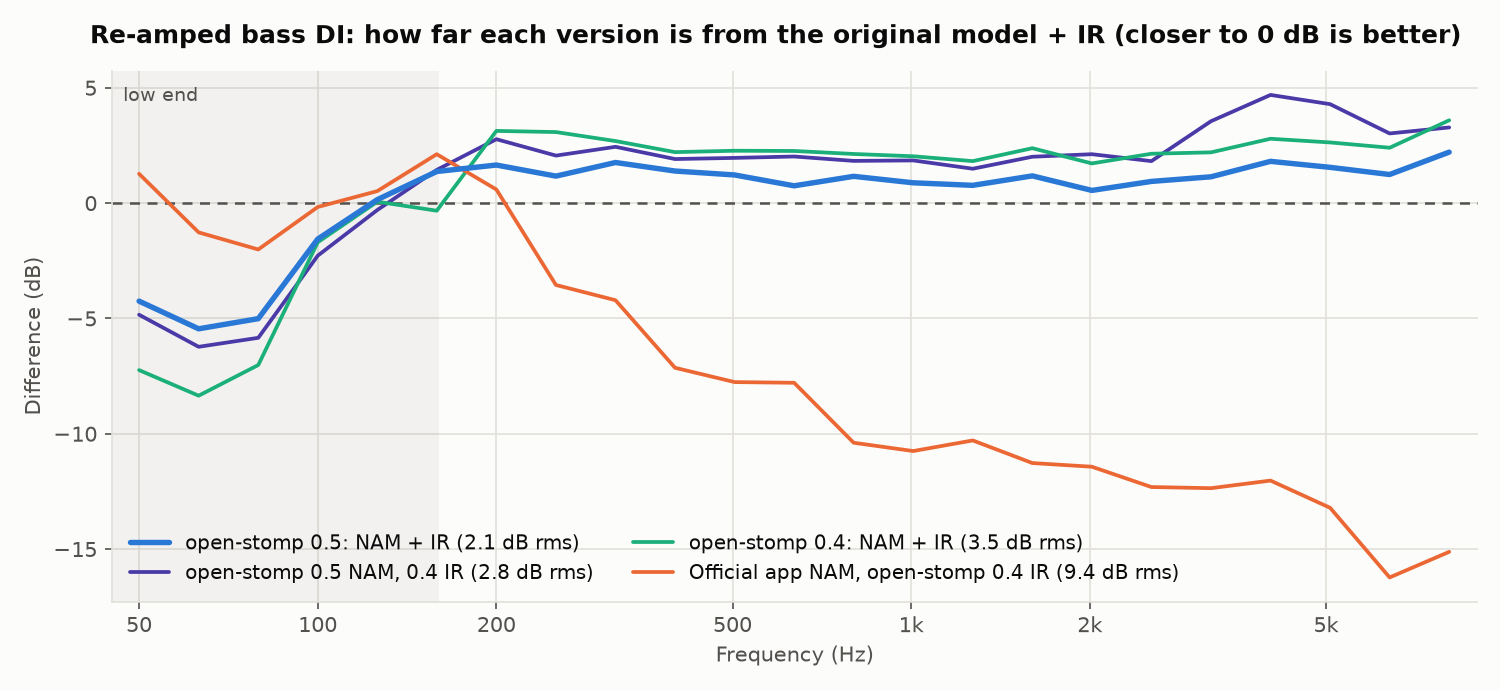
Probably also works with the Dual Stomp and Tiny Stomp (same firmware family, same vendor app). Only the Dual Stomp Lite on firmware V1.1.1 with Stomp Manager 1.0.2 has been tested.
What you can do
| Edit the pedal | Presets, models, blocks on/off, every knob, preset volume, save and rename, system settings, looper, drum machine, tuner |
| Import NAM models | Any .nam file into a user AMP slot, converted by fitting the pedal’s filters to the model through a simulation of the pedal |
| Import cab IRs | Any WAV into a user IR slot, fitted to the 384 samples the pedal actually plays |
| Watch the pedal | Everything that happens on it, in plain English (AMP · Mar J800 · GAIN = 64) |
| Write your own tools | The same features from Rust or Python, plus capture replay so you can develop without a pedal |
Where to start
- Just want to edit your pedal? Install the app, then read the user guide.
- Writing code? Rust or Python, then the library guide.
- Curious how the pedal works? Start with the protocol overview and NAM and IR uploads.
Source
- Library and these docs: github.com/JackMechem/open-stomp-lib
- App: github.com/JackMechem/open-stomp-manager
Both are open source (MIT OR Apache-2.0) and welcome contributions: see the contributing guides for the library and the app.
Legal
This is an independent interoperability project. It is not affiliated with or endorsed by SORAN, NUX/Cherub or JiYou. Product names are trademarks of their owners. The repositories contain no vendor binaries or firmware: only documentation, our own code, and captures of traffic between the author’s own pedal and app. Use at your own risk: writing bad data to a pedal could corrupt presets. Back them up first.
Install the app
Download a package for your system from the releases page:
| Platform | Package | Contents |
|---|---|---|
| Linux (x86_64) | …-linux-x86_64.tar.gz | the binary, a .desktop file and an icon |
| macOS 11+ (Apple Silicon and Intel) | …-macos-universal.zip | Open Stomp Manager.app |
| Windows 10+ (x86_64) | …-windows-x86_64.zip | open-stomp-manager.exe |
Then plug the pedal in over USB and start the app, in either order. It finds the pedal by itself and reads all 99 presets, the live sound and the settings. No driver is needed on any system: the pedal is a class-compliant USB audio and MIDI device.
Per platform
Linux. Unpack the archive and run open-stomp-manager. To get it in your application menu, copy the
.desktop file to ~/.local/share/applications/ and the icon to ~/.local/share/icons/. The app needs ALSA
(libasound), which every desktop distribution has.
macOS. The app is ad-hoc signed, not notarized. The first time, right-click it and choose Open, or run:
xattr -dr com.apple.quarantine "Open Stomp Manager.app"
Windows. A MIDI port can be open in only one program at a time, so quit the official Stomp Manager first.
Nix.
nix run github:JackMechem/open-stomp-manager            # the latest commit
nix run github:JackMechem/open-stomp-manager/v0.7.0     # a release
On NixOS, add it to a flake-based system:
# flake.nix
inputs.open-stomp-manager.url = "github:JackMechem/open-stomp-manager/v0.7.0";

# configuration.nix
environment.systemPackages = [ inputs.open-stomp-manager.packages.${pkgs.system}.default ];
Try it without a pedal
The app can replay a recorded session between the official app and the pedal:
open-stomp-manager --replay 01-main-session.log --speed 8
The capture logs are in the app repository’s
captures/logs.
Next
- The user guide covers everything in the window, including importing NAM models and IRs.
- To build it yourself, see building.
Use the Rust library
open-stomp is not on crates.io yet. Add it from GitHub, pinned to a release tag:
[dependencies]
open-stomp = { git = "https://github.com/JackMechem/open-stomp-lib", tag = "v0.6.1" }
Rust ≥ 1.88. On Linux the device feature needs the ALSA headers and ble the D-Bus headers:
sudo apt install libasound2-dev libdbus-1-dev    # Debian, Ubuntu
sudo dnf install alsa-lib-devel dbus-devel       # Fedora
nix develop                                      # in a checkout: cargo, rust-analyzer, ALSA, amidi
macOS and Windows need nothing extra.
Features
| Feature | Default | What it adds |
|---|---|---|
device | on | open_stomp::device, the connection engine (MIDI through midir: ALSA, CoreMIDI, WinMM) |
ble | on | Bluetooth LE MIDI: the engine also finds the pedal wirelessly (btleplug) |
nam | on | open_stomp::nam: run .nam models and convert them for the pedal; the optimised IR conversion |
With default-features = false you get the protocol layer alone: parsing, building and state tracking, no I/O and
no dependencies.
First program
Follow everything that happens on the pedal and change the live sound:
use open_stomp::device::{Config, Device, Update};
use open_stomp::{DeviceState, Module};

fn main() {
    let dev = Device::spawn(Config::default()); // finds and connects to the pedal by itself
    dev.select_preset(4);                       // P05
    dev.set_head(Module::Amp, 8, true);         // AMP on, model 8 (Mar J800)
    dev.set_param(Module::Amp, 0, 100);         // GAIN 100 (live only; nothing is stored until you save)

    let mut state = DeviceState::default();
    while let Ok(update) = dev.recv() {
        match update {
            Update::Reset => state = DeviceState::default(),
            Update::Message { origin, bytes, .. } => {
                let ev = state.apply(&bytes, origin);
                println!("{:8} {} = {}", ev.category.label(), ev.subject, ev.value);
            }
            _ => {}
        }
    }
}
Import a NAM model and a cab IR into user slots (slots are 0–9; this overwrites what’s there):
#![allow(unused)]
fn main() {
dev.import_nam_file(9, "Ampeg SVT.nam")?;      // optimised conversion, about a minute
dev.import_ir_file(9, "Ampeg 8x10.wav")?;      // optimised conversion, under a second
}
Without a pedal
A checkout includes capture logs of the official app talking to the pedal. The examples replay them:
git clone https://github.com/JackMechem/open-stomp-lib && cd open-stomp-lib
cargo run --example monitor -- --replay captures/logs/01-main-session.log --speed 8
cargo run --example decode -- captures/logs/01-main-session.log
With the pedal: cargo run --example monitor (add --listen to send nothing) and cargo run --example ports.
Next
- The library guide: the engine, state tracking, saving presets, settings, NAM and IR imports, your own MIDI transport, replay and testing.
- The API reference.
Use it from Python
The open_stomp Python package is the Rust library compiled in with PyO3: the same protocol, state tracking,
connection engine and NAM / IR conversion. Python ≥ 3.9.
Install
From a release wheel (no Rust needed). Download the wheel for your platform from the releases page and install it:
pip install open_stomp-0.6.1-*.whl
From source (Rust ≥ 1.88; on Linux also the ALSA and D-Bus headers, libasound2-dev libdbus-1-dev / alsa-lib-devel dbus-devel):
git clone https://github.com/JackMechem/open-stomp-lib
pip install ./open-stomp-lib/bindings/python
Check it:
python -c "import open_stomp; print(open_stomp.__version__)"
First script
from open_stomp import Device, DeviceState, Module

state = DeviceState()
with Device() as dev:                      # finds and connects to the pedal by itself
    dev.select_preset(4)                   # P05
    dev.set_head(Module.AMP, 8, True)      # AMP on, model 8 (Mar J800)
    for u in dev:                          # blocks; Ctrl-C to stop
        if ev := state.feed(u):
            print(ev)                      # AMP      Mar J800 · GAIN = 64
Import a NAM model and a cab IR into user slots (slots are 0–9; this overwrites what’s there):
dev.import_nam_file(9, "Ampeg SVT.nam")    # optimised conversion, about a minute
dev.import_ir_file(9, "Ampeg 8x10.wav")    # optimised conversion, under a second
Or convert without a pedal and look at the result:
from open_stomp import nam, ir

model = nam.Model.load("Ampeg SVT.nam")
c = nam.convert(model, measure="optimised")   # c.data: the 2048 floats the pedal gets
out = model.process(samples)                  # run the model on your own audio (mono, 48 kHz)
cab = ir.convert("Ampeg 8x10.wav", method="optimised")
Examples
A checkout has two ready-made scripts:
python bindings/python/examples/monitor.py            # follow the pedal (--listen, --replay, --all)
python bindings/python/examples/shell.py              # an interactive shell over the whole API
Next
The Python guide covers the whole API: the engine, state, controlling and saving, presets and settings, the catalogue, your own transport, capture replay and threading.
User guide
Open Stomp Manager is a live monitor and editor for the SORAN Dual Stomp Lite. This guide covers everything in the window. For installing see the README; for building from source see building.md.
- Connecting
- The window
- Presets
- Signal chain
- Block detail and knobs
- Saving
- Tuner, looper and drums
- Device and system settings
- Importing a NAM model
- Importing an IR
- Renaming a user slot
- Activity log
- Listen only
- Replaying a capture
- Keyboard shortcuts
- Command line
- Troubleshooting
Connecting
Plug the pedal in over USB and start the app, in either order. It finds the pedal by its MIDI port name (“JME STOMPBOX”) and connects by itself, and reconnects if you unplug and replug it. No driver is needed on any OS.
Wireless (Bluetooth)
With the pedal’s Wireless setting on, the app also finds it over Bluetooth, with no pairing: it shows up in the port list as JME STOMPBOX (Bluetooth) and the status shows a Bluetooth sign. Everything works as over USB: editing, presets, saving, settings, looper, drum and tuner. The differences:
- The startup sync takes about 20 seconds instead of under one, since every reply takes about 0.1 s over Bluetooth.
- Knob drags are sent at most every 15 ms, and only the latest value of a drag is kept when the link is busy.
- NAM and IR imports work (the official app doesn’t offer them over Bluetooth), but take about 10 seconds to upload instead of under one. The dialog says done when the upload is queued, so leave the pedal connected for those seconds.
- USB wins: if you plug the cable in while connected over Bluetooth, the app moves to USB.
- On macOS the app asks for Bluetooth permission the first time. If you refuse (or Bluetooth is off) it carries on with USB only.
On connect the app reads everything the official app reads: firmware and product name, system settings, user NAM/IR slot names, all 99 presets and the live edit buffer. The status shows Reading the pedal… with a progress bar; over USB it takes well under a second.
The top bar holds the controls:
| Control | What it does |
|---|---|
| Status | Searching for pedal…, Reading the pedal…, Connected V1.1.1 or Replaying · 40%. Its In and Out lights blink for every message received from and sent to the pedal |
| Port list | All MIDI input ports and the pedal over Bluetooth. Picking one connects to it; Not connected disconnects (and stops auto-connect until you pick a port again) |
| ⟳ | Re-read presets and state from the pedal (when connected) |
| Listen only | Never send anything to the pedal (below) |
| Replay capture… / Stop replay | Play back a recorded session instead of a pedal (below) |
| Activity | Show or hide the activity log (also Ctrl+L, ⌘L on macOS) |
In a narrow window the buttons show only their icons; hover one for its name.
Windows: a MIDI port can be open in only one program at a time. Quit the official Stomp Manager first.
The window
- Left: the preset list, P01–P99.
- Middle: the active preset (number, name, chips, volume), the signal chain, the detail of one block, then the tuner, looper and drum cards, then device info, system settings and user slots.
- Right (hidden until you open it with Activity or Ctrl+L): the activity log of everything that happens on the pedal. In a window narrower than about 1000 px it slides over the page instead.
Anything that changes on the pedal glows briefly where it is shown: the preset header, the block in the chain, the knob, the log row.
Presets
The list shows every preset name as read from the pedal. The active preset is highlighted and scrolled into view; an amber dot next to it means its live sound has unsaved edits.
- Click a preset to select it on the pedal. Unsaved edits to the previous preset are discarded (the log says so), exactly as on the pedal itself.
- Right-click a preset to save the current sound there (Saving).
- Search above the list (Ctrl+F, ⌘F on macOS) filters by name or slot (
lead,5,P05). Enter selects the first match, Esc clears the search.
The header shows the preset number, the name, and chips:
| Chip | Meaning |
|---|---|
● Edited | The live sound differs from what is stored in this slot |
Saved | The live sound is what is stored |
3/8 blocks on | How many effect blocks are switched on |
Pedal shows Amp | The page the pedal’s display is on |
Volume on the right is the preset volume: click or drag along it, scroll over it, or use the arrow keys.
If the app connected while the pedal had unsaved edits, it cannot tell which slot is active (the pedal has no way to report it) and the header says Waiting for the pedal… until the next preset change.
Signal chain
All blocks in the active preset’s chain order: Gate, then the seven effect blocks in the preset’s order, then Looper and Drum. Each shows the model and On/Off; switched-on blocks are coloured.
- Click a block to open it in the detail view below. This also makes the pedal’s display jump to that block’s page, as the official app does.
- Click the power light in a block’s top-left corner to switch it on or off.
- Click the open block again to go back to following the pedal.
Block detail and knobs
The detail card shows one block. By default it follows the pedal: whatever you touch on the pedal (or the pedal page you open) is shown. Once you click a block in the chain it is pinned; Follow pedal in the card’s header returns to following.
For effect blocks:
- The model name (with its number,
#08) opens the list of the block’s models, with user NAM/IR slot names for the AMP and CAB user models. - The On / Bypassed button switches the block on or off.
- Knobs: drag up or down, or scroll over them; hold Shift while dragging for fine steps; double-click a knob to set it to the middle (50; 0 on centred knobs such as EQ bands, which show ±). Arrow keys and Page Up/Down work once a knob has focus.
- Choice parameters (CAB mic and position, the Boost switch, some modulation shapes) show every option; click one.
Every change is sent at once as a live MIDI message, so you hear it right away, like turning the pedal’s own knobs. It is not stored until you save.
The Looper and Drum blocks open their controls (below); the Drum one also has the pattern picker.
Saving
When you can edit, the preset header has two buttons:
- Save stores the live sound in the active slot under its current name. It is highlighted when there are unsaved edits.
- Save as… opens a dialog to change the name (up to 16 characters, plain ASCII; other characters become
?) and the slot. Saving to another slot warns which preset it overwrites. Right-clicking a preset in the list opens the same dialog with that slot chosen. Enter in the name field saves.
Saving sends the exact sequence the official app sends (name, preset record, then selecting the saved slot), and the saved slot becomes active.
Preset and settings writes match the official app byte for byte but have not yet been run on hardware from this app. Back up your presets before relying on them.
Tuner, looper and drums
Tuner: switch the tuner on at the pedal. The card shows the note and how many cents sharp or flat, coloured by how close it is (green within ±5 cents). The pedal only reports pitch while its tuner is on.
Looper: state (Empty, Recording, Playing, Overdubbing, Stopped) and whether an overdub layer exists. Buttons:
| Button | Action |
|---|---|
| Rec / Play / Dub | The pedal’s main looper switch: start recording, close the loop and play, overdub, stop overdubbing |
| ■ | Stop |
| ↺ | Undo / redo the last overdub |
| 🗑 | Clear the loop |
Below them: record and playback levels, Sync on/off and Mode NR / AR.
Drums: pattern name, BPM, play/stop and level. Open the Drum block in the chain to pick a pattern (styles Pop to Metro, ten patterns each).
Device and system settings
The device card shows the product, firmware and app versions, and the pedal’s global settings once read:
- Input trim (−10 to +10 dB)
- Wireless and Loopback (USB audio loopback)
- Global EQ: bass, mid, treble (±). The pedal does not report global EQ changes made on the pedal itself over USB, so this can be out of date until the next re-sync (⟳).
- User slots: the names of the 10 user AMP (NAM) and 10 user CAB (IR) slots. Hover a slot for its import and rename buttons; Import NAM model… and Import IR… below the list pick the first empty slot.
Settings are written whole each time you change one, starting from the record the pedal sent, so values the app does not understand are kept.
Importing a NAM model
Import NAM model… (under the user slots, or the upload button on a user AMP slot) converts a .nam file and
uploads it to a user AMP slot, named after the file, like the official app does. Choose the file, the slot (it warns
before replacing one in use) and the conversion:
- Optimised (default, about a minute): open-stomp fits the pedal’s two filters through a simulation of the pedal until it sounds like the model. On hardware this is much closer to the real model than the official app’s conversion (results).
- Official app’s algorithm (a few seconds): the same conversion as the official Stomp Manager.
Normalise the level (on by default) plays every model at the same volume, like NAM plugins do, whatever level it was captured at. Without it, imports keep the model’s own level, as the official app’s do, which is often quiet. It only changes the volume, not the tone.
The conversion runs in the background with a progress bar and can be cancelled; the slot only changes once it has finished. You can close the dialog meanwhile: the result also appears in the activity log. You need to be connected with Listen only off. The model is selected on the AMP block as USER AMP NN.
Importing an IR
Import IR… (under the user slots, or the upload button on a user IR slot) uploads an impulse response to a user IR slot, named after the file (first 16 characters) like the official app does. Any WAV file works: 16/24/32-bit or float, any sample rate (resampled to 48 kHz), the first channel of a stereo file. Two conversions:
- Optimised (default): the pedal only plays the first 384 samples (8 ms) of an IR, so open-stomp fits those 384 samples to the whole IR. Much closer on the pedal, especially for IRs with a long tail or a delayed start (which the official conversion leaves 35–45 dB too quiet).
- Official app’s algorithm: exactly what the official Stomp Manager sends.
Select it on the CAB block as USER IR NN.
Renaming a user slot
Hover a user AMP or IR slot under User slots and click its pencil. Only the name changes; the slot’s sound stays exactly as it is. Names can be up to 16 characters, ASCII only. You need to be connected with Listen only off. The official app can’t do this.
Activity log
Every message to or from the pedal, as a readable line: time, Pedal (from the pedal) or Host (sent by this
app, or by the official app in a replay), category, what changed and the new value, e.g.
Pedal Amp Mar J800 · GAIN 51 → 64 ×4.
- Knob sweeps merge: consecutive changes to the same control within 2.5 s become one row showing from → to and how many messages it took.
- Filter chips show or hide categories: Presets, Effects, Looper, Drum, Tuner, Device, SysEx (request/reply plumbing, hidden by default), Redundant (values the pedal repeats after a preset change that were already known, hidden by default), and the direction (From pedal, From host).
- Search filters by text, e.g.
gain,looper,P05. - Header buttons: follow new events (scrolls along at the bottom; scrolling up stops it), show the raw MIDI bytes, copy the visible log as text, clear it, hide the panel.
- Hover a row for its raw bytes. You can also select and copy text from the rows.
The log keeps the latest 50,000 rows.
Listen only
Listen only makes the app completely passive: no startup reads, no edits, nothing is sent. Use it to watch what the pedal (or another editor) does without any interference. Turning it off re-reads everything from the pedal.
The app also falls back to listening when it could open the pedal’s input but not its output; the status says Listening (no output).
Replaying a capture
Replay capture… plays a recorded session (a capture log, see the
capture methodology) as if a
pedal were connected: the whole UI follows it, which is handy for trying the app without a pedal. Choose the file
(it starts on captures/logs/01-main-session.log when run from the repo) and a speed (1× to 16×), then Replay.
Gaps longer than 1.5 s are shortened. # MARK notes in the log appear as purple rows. Editing is off while replaying.
Keyboard shortcuts
| Keys | Action |
|---|---|
| Ctrl+L (⌘L) | Show or hide the activity log |
| Ctrl+F (⌘F) | Search the presets; Enter selects the first match, Esc clears |
| Arrow keys, Page Up/Down | Turn the focused knob or slider |
| Esc | Close a dialog |
Command line
open-stomp-manager [--replay <capture.log>] [--speed <x>] [--version] [--help]
| Option | |
|---|---|
--replay <file> | Start replaying a capture log right away (without connecting to the pedal) |
--speed <x> | Replay speed (default 4) |
-V, --version | Print the version and git commit |
-h, --help | Usage |
Troubleshooting
| Symptom | Try |
|---|---|
| Searching for pedal… forever | Check the USB cable and that the pedal is on. On Linux, amidi -l should list “JME STOMPBOX”. Pick the port by hand in the port list. For Bluetooth, check the pedal’s Wireless setting and that the app has Bluetooth permission (macOS: System Settings → Privacy & Security → Bluetooth) |
| Connected but nothing can be edited | Listen only is on, or the status says Listening (no output) (Windows: quit the official app) |
| No reply from pedal to … in the log | A read timed out (1 s). Usually harmless; ⟳ re-reads everything |
| The header says Waiting for the pedal… after syncing | The pedal had unsaved edits when the app connected; change preset once |
| Global EQ looks wrong | It was changed on the pedal; press ⟳ |
| Linux: the window stays blank or flickers | Usually NVIDIA with Wayland: start the app with WEBKIT_DISABLE_DMABUF_RENDERER=1 |
| Windows: the portable app doesn’t start | It needs Microsoft’s WebView2 runtime; the -setup.exe installs it |
| macOS says the app is from an unidentified developer | Right-click it and choose Open (see the README) |
Building, packaging and releasing
The app is a Tauri program: Rust runs the pedal engine (the open-stomp library) and the interface is React and TypeScript, styled with plain CSS, shown in the system’s web view. architecture.md describes how the two halves talk.
Getting the source
The library is a path dependency on a sibling checkout (app/src-tauri/Cargo.toml). Clone both side by side:
git clone https://github.com/JackMechem/open-stomp-lib
git clone https://github.com/JackMechem/open-stomp-manager
cd open-stomp-manager
Projects/
├── open-stomp-lib/        the library: protocol, state, connection engine, protocol docs
└── open-stomp-manager/    this repo
    └── app/               the app: package.json, src/ (React), src-tauri/ (Rust)
Changes to the library are picked up by the next build; there is nothing to publish in between.
Building
With Nix
nix run                       # build and run
nix build                     # result/bin/open-stomp-manager
nix develop                   # dev shell: Rust, Node, pnpm, WebKitGTK, ALSA, amidi
The flake fetches the library as the open-stomp-lib input (github:JackMechem/open-stomp-lib/stable, the
library’s newest release, pinned in flake.lock; nix flake update open-stomp-lib moves it). To build against your
local checkout instead:
nix run --override-input open-stomp-lib path:../open-stomp-lib
The frontend’s npm packages are pinned by app/pnpm-lock.yaml and fetched with a fixed hash (pnpmDeps in
flake.nix). After changing the lock file, set that hash to "", run nix build, and paste the hash Nix
prints. CI’s nix build job catches a stale hash.
Without Nix
You need Rust ≥ 1.95, Node ≥ 22 and pnpm (the version in app/package.json’s packageManager; corepack enable
picks it up). On Linux, also the WebKitGTK, ALSA and D-Bus headers:
sudo apt install libwebkit2gtk-4.1-dev librsvg2-dev libasound2-dev libdbus-1-dev pkg-config   # Debian, Ubuntu
sudo dnf install webkit2gtk4.1-devel librsvg2-devel alsa-lib-devel dbus-devel pkgconf         # Fedora
macOS and Windows need nothing extra (Windows 10 and 11 have WebView2).
cd app
pnpm install
pnpm tauri dev                                          # run, reloading as you edit
pnpm tauri dev -- -- --replay ../captures/logs/01-main-session.log --speed 8   # no pedal needed
pnpm tauri build                                        # release build and installers
Checks
(cd app && pnpm typecheck)                 # TypeScript
cargo clippy --workspace --all-targets -- -D warnings
cargo test --workspace                     # the hub's commands, the activity log, imports
(cd ../open-stomp-lib && cargo test)       # the protocol and engine tests, driven by capture logs
packaging/check-version.sh                 # version consistency
Developing
pnpm tauri dev (in app/) starts Vite and the app. Saving a .tsx or .css file updates the window at once and
keeps its state; saving a Rust file rebuilds and restarts the app. Right-click → Inspect opens the web inspector
(debug builds), which is the quickest way to try out CSS.
Starting on a replay (-- -- --replay <log>) doesn’t connect to the pedal, so it’s safe while another editor is
using it.
| Variable | Effect |
|---|---|
STOMP_DEV=log,import,import-ir,save,rename | Open the activity log or that dialog at startup |
STOMP_DEV=devtools | Open the web inspector at startup (debug builds) |
STOMP_DEBUG_IMPORT=<file.nam or .wav> | Convert the file at startup into USER AMP/IR 10, without uploading it |
Driving the app from scripts (Linux)
tools/dev/webdriver.py controls the real app through WebKitGTK’s WebKitWebDriver: click, drag, type, read the
state the frontend has (window.__stomp in debug builds) and take screenshots. tools/dev/shot.py uses it to
screenshot the app on a replayed capture, for the docs:
nix develop --command tools/dev/shot.py                    # target/shots/main.png
nix develop --command tools/dev/shot.py log --dev log      # with the activity log open
Platforms
| MIDI | Web view | Release downloads | |
|---|---|---|---|
| Linux (x86_64) | ALSA | WebKitGTK 4.1 | .deb, .rpm, .AppImage |
| macOS 11+ (Apple Silicon + Intel) | CoreMIDI | WKWebView | .dmg, and the .app as a .zip |
| Windows 10+ (x86_64) | WinMM | WebView2 | -setup.exe installer, portable .zip |
pnpm tauri build makes the installers for the platform it runs on, in target/release/bundle/. Their settings
(name, identifier, icons, Linux package dependencies, minimum macOS version) are in app/src-tauri/tauri.conf.json.
- Linux: the
.deband.rpmdepend on WebKitGTK, GTK, ALSA and D-Bus (D-Bus is for Bluetooth, through BlueZ). The AppImage bundles WebKitGTK, so it is much larger. The Nix package is built from the.deb’s contents and wrapped so GTK finds its schemas and modules. On NVIDIA with Wayland, a blank window usually needsWEBKIT_DISABLE_DMABUF_RENDERER=1. - macOS: a universal app (
--target universal-apple-darwin, needsrustup target add aarch64-apple-darwin x86_64-apple-darwin), ad-hoc signed (signingIdentity: "-"), not notarized.app/src-tauri/Info.plistadds the Bluetooth usage description; macOS kills an app that uses Bluetooth without one. - Windows: release builds use the GUI subsystem (no console window);
--help/--versionattach to the launching console. The installer downloads WebView2 if it’s missing (Windows 10 before 21H2); the portable.zipneeds it present.
Icons are generated by app/src-tauri/icons/make_icons.py.
Version
The version lives in one place, version under [workspace.package] in Cargo.toml, and follows
SemVer (0.x: anything may change). Tauri reads it from there for the installers. build.rs
adds the short git commit (STOMP_GIT_HASH, empty outside a git checkout) and the library version from
Cargo.lock; --version, the window title and the Device card show them.
Continuous integration
.github/workflows/ci.yml runs on every push and pull request, on Linux, macOS and Windows: the frontend type-check
and build, clippy with warnings as errors, tests, and a release build without installers. Other jobs check the
minimum Rust version, nix build (which also catches a stale npm hash in flake.nix), and
packaging/check-version.sh. Each job first clones open-stomp-lib next to the checkout, at the ref in
OPEN_STOMP_LIB_REF (top of the workflow).
The documentation site is built in open-stomp-lib from both repositories’ docs. When docs/, CHANGELOG.md or
Cargo.toml change on main, .github/workflows/docs.yml starts that build. It needs a DOCS_SITE_TOKEN secret:
a fine-grained token with Actions: Read and write on open-stomp-lib only. Without it the job skips with a
warning, and the site catches up at its daily rebuild.
Releasing
- If the app needs library changes, release the library first (tag it there) and set
OPEN_STOMP_LIB_REFin both workflows to that tag, so the release builds against a fixed library version. Once the library’sstablebranch has moved, runnix flake update open-stomp-libso the Nix build uses the same version (the release checks it). - Bump
Cargo.toml, add a## [x.y.z]section to CHANGELOG.md, update the version line at the top of the README, and runcargo buildsoCargo.lockfollows.packaging/check-version.shchecks all of this. - Commit, then
git tag vx.y.z && git push --tags..github/workflows/release.ymlrunstauri buildon Linux, macOS and Windows and publishes a GitHub release with the changelog section as its notes. The downloads are namedopen-stomp-manager-vx.y.z-<platform>.<ext>.
A pre-release is a tag with a suffix, vx.y.z-beta.n (with that version in Cargo.toml). It needs no README or
CHANGELOG changes (its notes are the [Unreleased] section) and is published as a GitHub pre-release. If it needs a
library pre-release, point the flake input at github:JackMechem/open-stomp-lib/unstable for it.
Channels. After each successful release, .github/workflows/channels.yml moves two branches
(packaging/update-channels.sh): stable to the newest release and unstable to the newest release or
pre-release. Ticking or clearing a release’s pre-release box, or deleting it, moves them again; Actions → Channels →
Run workflow re-syncs them by hand. A Nix config that follows github:JackMechem/open-stomp-manager/stable gets
each release with nix flake update; the library comes from this flake’s flake.lock.
Architecture
How the app is put together, for anyone changing it. Everything about the pedal itself (MIDI messages, records, state tracking, the connection engine) lives in the open-stomp library; see its library guide. The app is a Tauri program: a Rust side that owns the engine and the pedal state, and a React interface in the system’s web view.
Source files
app/src-tauri/src/ (Rust)
| File | What it holds |
|---|---|
main.rs | Command line, version strings, the Tauri commands (snapshot, command, log_rows, log_export), startup |
hub.rs | The hub thread: owns the Device engine and the DeviceState, applies updates, runs commands (Cmd), emits state events |
view.rs | The state cut into JSON sections for the frontend |
log.rs, logbook.rs | The activity log: rows, merging knob sweeps, filtering, text export, and the rows the frontend asks for |
import.rs | NAM / IR conversion on a worker thread, with progress and cancel |
app/src/ (TypeScript, React, CSS)
| File | What it holds |
|---|---|
store.ts | The frontend’s copy of the sections; useStore subscribes a component to just what it reads; send runs a command |
types.ts | The JSON shapes from view.rs and the commands in hub::Cmd; keep them in step |
ui.ts | UI-only state: the open dialog, whether the activity log shows |
App.tsx | Layout, the pinned / followed block, keyboard shortcuts, STOMP_DEV flags |
components/ | One component per area (TopBar, PresetList, CurrentPreset, Chain, Detail, Extras, DeviceCard, LogPanel, Dialogs) and the controls (Knob, Slider, ModelPicker), each with its own .css |
styles/global.css | Design tokens (colours, radii, spacing), the module colours, shared buttons and the highlight animation |
Data flow
 pedal ◀──▶ open-stomp Device engine thread (port scan, connect, sync, request queue)
                 │ Update (+ wake-up)                   ▲ Device helpers: select_preset, set_head,
                 ▼                                      │ set_param, save_preset, write_settings, …
            hub thread (hub.rs) ─────────────────────────┘
              Message → DeviceState::apply → Event → activity log, highlights
              every ≤16 ms: rebuild sections (view.rs), emit the changed ones
                 │ "state" event {seq, sections, activity, rx, tx}      ▲ invoke("command", Cmd)
                 ▼                                                      │
            store.ts ── useStore ──▶ components ── user input ── send ──┘
Hub::spawnstarts the engine withDevice::spawn_with_waker, whose wake-up sends a message to the hub’s channel. Frontend commands arrive on the same channel, so they run in order with the pedal’s updates.- The hub drains the engine’s
Updates:Message: applied to theDeviceState, which returns anEvent(category, subject, value). The event goes to the activity log and, unless redundant, becomes anactivityentry that makes the block, knob or preset header light up.Reset: a new session; theDeviceStateis replaced with a fresh one.Status,Sync,Ports: theconnsection.Mark,Info: notes in the log.
- After a batch, at most once per frame, the hub rebuilds every section, compares each with what it last sent, and
emits only the changed ones as one
stateevent. A section only changes when its contents do, so a knob sweep sends thelivesection, not the 99 presets. - On start, the frontend subscribes to
state, then asks for asnapshotof every section. Each section carries the number of the event that last set it, so a snapshot that arrives late can’t overwrite newer data.
Sections
| Section | Contents | Changes when |
|---|---|---|
conn | Connection status, ports, sync progress, listen-only, editable, canEditSound | Connecting, syncing, replay progress |
presets | All 99 names, the active preset, whether it’s edited | Preset changes, saves, sync |
live | The live sound: chain order, every block’s model, on/off and parameters, volume, the followed block | Every edit |
models | Model names per module, with user slot names | User slots change |
extras | Tuner, looper, drum machine | Those change |
device | Product, firmware, system settings, user slot names | Sync, settings writes, imports, renames |
log | Row count and a generation number | Every message |
import | The conversion in progress and the last outcome | Import progress |
catalog | Drum patterns, STOMP_DEV flags, versions | Never |
Why edits don’t touch the state
The pedal doesn’t echo what the host sends. The engine reports every message it sends back as an
Update::Message with Origin::Host, and the hub applies those exactly like pedal messages. So a knob turned in the
app updates DeviceState through the same path as a knob turned on the pedal, the log shows it as a Host row, and
there is one source of truth. Anything sent while listen-only or disconnected is refused by the engine (and the hub
doesn’t send it in the first place).
The knobs and sliders show their own value while you turn them and send at most one change per animation frame; when you let go they show the pedal’s value again once its echo has arrived.
Editing rules
editable: connected and not listen-only.canEditSoundalso needs the live preset to be known, because one head CC carries model and on/off together, so switching a block on needs its current model. The hub checks the same rules before sending.- Saving uses the live sound (the edit buffer with all edits) with the chosen slot and name, through
Device::save_preset. - Settings changes start from the record the pedal sent, change the given fields and
write_settingsthe whole record; the engine collapses queued settings writes into the newest. - Opening a block in the chain also sends the pedal-page CC, as the official app does.
- After a preset change from the pedal, its messages are held until it has been quiet for 0.15 s (at most 5 s), then applied together, so turning the preset knob several clicks jumps instead of stepping through every preset.
The activity log
The log stays on the Rust side (log.rs, logbook.rs), so the frontend never holds 50,000 rows. The panel asks for
the rows on screen (log_rows, with a few extra above and below) whenever the log section’s generation, the filter
or the scroll position changes.
- Merging: an event with a
coalescekey merges into a recent row with the same key (within 2.5 s, looking back past up to 12 hidden plumbing rows), updating its value, keeping the starting value (from) and counting messages (×4). - Filtering: the chips and search go to the hub (
SetLogFilter). The visible-row index list is cached by (log generation, filter). - Rows are capped at 50,000.
Highlights
Each activity entry bumps a counter in the store, keyed by module, parameter or preset header. A component renders
<span key={counter} className="glow" />; a new key remounts the element, which replays its CSS animation. The
In / Out lights in the top bar work the same way with the rx / tx counts.
Screenshots and tests
tools/dev/webdriver.py drives the real app through WebKitWebDriver (Linux). Debug builds expose the store as
window.__stomp, so scripts can wait for the pedal state instead of guessing timings. tools/dev/shot.py uses it
for the docs’ screenshots.
Adding a feature
- New pedal behaviour (a message, a record field, a command): add it to the library first, with a test against a capture if possible, then use it here.
- Showing something new: add it to a section in
view.rs(or a new section), mirror it intypes.ts, and read it withuseStorein a component. - Sending something new: add a
Cmdvariant inhub.rsthat calls aDevicehelper (so listen-only and the log keep working), mirror it intypes.ts, andsendit. The hub’s tests parse the frontend’s JSON for the trickier commands. - Styling: use the variables in
global.css. A block’s colour comes fromdata-module="amp"and is read asvar(--mod).
Changelog
All notable changes to Open Stomp Manager (named Dual Stomp Manager / stomp-manager up
to 0.2.0). The format follows
Keep a Changelog and the project uses
Semantic Versioning.
Unreleased
Changed
- README install notes: opening the unnotarized app on macOS 15 and newer (Open Anyway in Privacy & Security), and getting past Windows SmartScreen’s warning for the unsigned app.
[0.9.0] - 2026-10-25
Added
- Release channels: the
stablebranch follows the newest release andunstablethe newest release or pre-release (vx.y.z-beta.ntags, published as GitHub pre-releases). Follow one from Nix or cargo instead of a version tag. - License files: dual-licensed under MIT or Apache-2.0, at your option.
- A contributing guide (
CONTRIBUTING.md) and issue and pull request templates.
Changed
- New interface. The app is now built with Tauri: the same Rust engine, with a React interface in the system’s web view (WebKitGTK on Linux, WebView2 on Windows, WKWebView on macOS) instead of egui. Everything the egui app did is still there; the window is laid out the same way and adapts to narrow windows.
- New downloads:
.deb,.rpmand.AppImageon Linux, a.dmg(and the zipped app) on macOS, and an installer (plus a portable.zip) on Windows. On Linux the app now needs WebKitGTK 4.1; the packages pull it in. - Rewrote the README to be shorter and easier to follow.
- Developing:
pnpm tauri devinapp/reloads the window as you edit the interface (docs/building.md). The Nix dev shell has Node, pnpm and WebKitGTK;tools/dev/shot.pytakes screenshots through WebDriver, headless.
Removed
- The egui interface (
crates/open-stomp-manager). ItsSTOMP_SCREENSHOThook is replaced bytools/dev/shot.py, andtools/dev/watch.shbypnpm tauri dev.
0.8.1 - 2026-10-24
Changed
- Built against open-stomp-lib 0.6.1 (a CI-only patch; no library behaviour change from 0.6.0).
0.8.0 - 2026-10-23
Added
- Built against open-stomp-lib 0.6.0 (Bluetooth).
- Wireless: with the pedal’s Wireless setting on, the app also finds and connects to it over Bluetooth LE MIDI, with
no pairing (open-stomp
blefeature). It is listed in the port menu as “JME STOMPBOX (Bluetooth)” with a Bluetooth sign, the header says “· Bluetooth”, and everything works as over USB except that the sync takes about 20 s. Auto-connect and the port menu prefer USB. NAM/IR imports work over Bluetooth too (about 10 s per upload), which the official app doesn’t offer.
Changed
- macOS: the bundle’s Info.plist has a Bluetooth usage description (macOS kills an app that uses Bluetooth without one).
- Linux: building needs the D-Bus headers (
libdbus-1-dev) too. - Turning the pedal’s preset knob several clicks jumps to where it stopped instead of stepping through every preset on the way: after a preset change from the pedal, its messages are held until it has been quiet for 0.15 s (at most 5 s), then applied together. Over Bluetooth each click’s data trickles in for a few tenths of a second.
- The edit-buffer read is padded like the official app’s (open-stomp fix), so it can’t return a stale record.
0.7.1 - 2026-10-22
Added
- Rename… on user AMP and IR slots (right-click a slot under User slots): changes only the name, the sound stays
(open-stomp-lib 0.5.1’s
rename_user_amp/rename_user_ir; the official app can’t rename).STOMP_DEV=renameopens the dialog at startup.
Changed
- Built against open-stomp-lib 0.5.1 (0.5.0 brought the NAM low-end fix, 0.5.1 rename). NAM imports (optimised) are much closer to the model in the low end: the fit now weights every octave equally instead of leaving the bass almost unweighted. Re-amping a bass DI through the pedal, the error against the model and IR drops from 5.2 to 3.3 dB at 40–160 Hz and from 3.5 to 2.1 dB overall, together with the optimised IR import, whose fit now covers 30 Hz – 16 kHz.
0.7.0 - 2026-10-22
Added
- Built against open-stomp-lib 0.4.0.
- Import NAM model: Normalise level (on by default), every model at the same volume like NAM plugins, instead of the often quiet level the model was captured at. A pure volume change.
- Import IR… (menu, the user slots list, or right-click a user IR slot): pick a WAV impulse response and a slot; it is converted with open-stomp’s optimised IR conversion (default: fitted to the 384 samples the pedal plays, much closer to the real IR on the pedal) or exactly like the official app, and uploaded.
STOMP_DEV=import-iropens the Import IR dialog at startup.
0.6.0 - 2026-10-21
Added
- Import NAM model… (menu, the user slots list, or right-click a user AMP slot): pick a
.namfile and a slot; the model is converted in the background (progress bar, cancel) and uploaded. The default is open-stomp’s optimised conversion (about a minute, closer to the real model than the official app’s on hardware); the official algorithm is the fast alternative. Native file dialogs viarfd(XDG portal on Linux through a runtime-loaded libdbus, no GTK; the Nix package and dev shell provide libdbus). STOMP_DEV=importopens the import dialog at startup (for screenshots).
Changed
- Built against open-stomp-lib 0.3.0 (optimised NAM conversion).
- Debug builds compile the open-stomp library and
rustfftoptimised, so the NAM conversion stays usable.
0.5.0 - 2026-10-21
Added
- Preset search above the preset list: filter by name or slot (
lead,5,P05); Ctrl+F (⌘F) focuses it, Enter selects the first match, Esc clears it. - The open-stomp library version is shown in the version chip’s tooltip, the menu,
--versionand--help.
Changed
- The top bar is down to the app name, the status pill and one menu button. The menu holds the port picker, connect/disconnect, re-sync, listen only, replay and the activity log toggle.
- Calmer look: sentence-case headings and labels instead of all caps, and borders only on what should stand out (the active preset, the selected block, focused fields). The menu has proper padding.
- No monospace text: everything is set in Inter, with tabular digits built into the bundled font so changing numbers stay put. JetBrains Mono is no longer bundled.
- The activity log is hidden by default; open it from the menu or with Ctrl+L (⌘L on macOS), close it from its header.
- Builds against open-stomp-lib v0.2.0 (CI, releases and the Nix flake). The flake now locks
the library input instead of fetching the library’s latest
main.
0.4.0 - 2026-10-21
Changed
- The protocol library and the connection engine moved to a separate repository and crate,
open-stomp (
open_stomp), which the app now uses. It replacescrates/stomp-protoand the app’s owndevicemodule, carries the full protocol documentation plus a library guide, and the capture-driven tests. Building the app now needs a checkout ofopen-stomp-libnext to this repository (CI, the release workflow and the Nix flake fetch it; CI and releases pin open-stomp-lib v0.1.0). - Documentation split: the protocol and reverse-engineering docs (01–09) now live in open-stomp-lib and this repository links there. Its own docs are about the app: a user guide, building and architecture, and the README is rewritten around the app.
0.3.0 - 2026-10-21
Changed
- Renamed the project and app to Open Stomp Manager, to keep clear of the vendor’s
Stomp Manager name. The binary and crate are now
open-stomp-manager(wasstomp-manager), the macOS app isOpen Stomp Manager.app, the Linux desktop entry and icon areopen-stomp-manager, and the repository is JackMechem/open-stomp-manager.
Fixed
- Repository and release links pointed at the wrong GitHub account.
- The declared minimum Rust version is now 1.95 (what egui 0.36 requires; 1.88 never built).
0.2.0 - 2026-10-21
Added
- Editor: control the pedal from the app.
- Select presets; Save and Save as… (rename and/or store in another slot) using the official app’s exact message sequence.
- Pick effect models, switch blocks on/off, turn knobs (drag, scroll wheel, Shift for fine steps), set preset volume.
- Looper transport (rec/play/dub, stop, undo/redo, clear), levels, sync and mode; drum play/stop, pattern and level.
- System settings: input trim, global EQ, wireless, loopback.
- Opening a block in the app shows its page on the pedal, like the official app.
stomp-proto: preset and settings encoders (Preset::to_raw,Settings::to_raw) and themidi::hostcommand builders, tested byte-for-byte against the capture.- Cross-platform releases: CI on Linux, macOS and Windows; tag-triggered release builds
(Linux tarball, universal macOS
.app, Windows.exe); app icons for every platform. - Version display in the app (and the window title),
--version, and this changelog.
Fixed
- macOS: the pedal is detected when plugged in after the app starts (CoreMIDI hotplug notifications need a run loop on the MIDI thread).
- Windows:
--help/--versionprint to the terminal in release builds.
Protocol findings
- Host → pedal CCs
0x40(drum pattern) and0x42/0x43(loop levels) confirmed on hardware. - The first byte of the
0x12preset-name write is the active preset.
0.1.0 - 2026-10-21
Added
stomp-proto: protocol library (8-in-7 packing, SysEx framing, catalogue, preset/settings records, state tracker), tested against the capture logs.stomp-manager: live monitor GUI with auto-connect, read-only sync, active preset, signal chain, parameters, tuner/looper/drum, coalescing activity log and capture replay.
10 — Library guide (open-stomp)
The open-stomp crate (use open_stomp::…) is a Rust library for the SORAN Dual Stomp. It turns docs 02–05 into
code: it parses and builds every message, keeps a model of the pedal up to date from the traffic, paces SysEx
requests the way the pedal needs, and (with the device feature) runs the MIDI connection for you.
Open Stomp Manager is built on it. Anything the GUI does with the pedal, your program can do with the calls below. From Python, see 11.
- Adding it to a project
- Layers and modules
- Quick start: follow the pedal
- The device engine
- Following state with
DeviceState - Controlling the pedal
- Presets and settings records
- The catalogue
- Bring your own transport
- Capture logs and replay
- Threading, timing and platform notes
- Testing
- Safety
- API reference
Adding it to a project
[dependencies]
open-stomp = { git = "https://github.com/JackMechem/open-stomp-lib", tag = "v0.6.1" }
# or, with a local checkout next to your project:
open-stomp = { path = "../open-stomp-lib" }
# protocol only (no MIDI I/O, no dependencies):
open-stomp = { path = "../open-stomp-lib", default-features = false }
| Feature | Default | What it adds |
|---|---|---|
device | on | open_stomp::device: the engine thread (midir: ALSA on Linux, CoreMIDI on macOS, WinMM on Windows) |
nam | on | open_stomp::nam: run .nam models and convert them for the pedal (serde_json, rustfft) |
ble | on | The engine also finds the pedal over Bluetooth LE MIDI (Bluetooth; btleplug, tokio) |
Rust ≥ 1.88. On Linux the device feature needs the ALSA headers (libasound2-dev / alsa-lib-devel) and ble
needs the D-Bus headers (libdbus-1-dev / dbus-devel) and BlueZ; macOS and Windows need nothing extra. The pedal is class compliant, so no driver is needed anywhere.
Layers and modules
| Module | I/O | What it does | Docs |
|---|---|---|---|
pack | none | 8-in-7 bitstream pack / unpack for SysEx records | 03 |
midi | none | Msg::parse, frame, stream Assembler, req:: reads, host:: commands, hex | 02, 03 |
catalog | none | Module, CC map, model names, ParamDefs, drum patterns, note names | 02 |
records | none | Preset (110 B), Settings (17 B), user slot names, ASCII helpers | 04 |
state | none | DeviceState: applies every message, returns a readable Event | all |
queue | none | RequestQueue: one SysEx in flight, reply matching, timeouts, sync progress; handshake() | 03 |
upload | none | User AMP (NAM) / user IR upload framing: chunks, slot-info record, reassembly | 05 |
capture | none | Capture log reader | 07 |
nam | files | .nam model loading and inference (NeuralAmpModelerCore port), the NAM → pedal converter | 05 |
device | MIDI | Device: hotplug scan, auto-connect, startup sync, edits, replay | this doc |
The crate root re-exports the everyday types: Module, Msg, Assembler, Preset, Settings, DeviceState,
Event, Category, Origin, plus is_stomp_port and USB_ID.
Everything except device is pure: given the same bytes it gives the same result, which is why the capture logs in
captures/logs/ can be the test vectors for all of it.
Quick start: follow the pedal
use open_stomp::device::{Config, Device, Update};
use open_stomp::{Category, DeviceState};

fn main() {
    let dev = Device::spawn(Config::default()); // finds and connects to the pedal by itself
    let mut state = DeviceState::default();
    while let Ok(update) = dev.recv() {
        match update {
            Update::Reset => state = DeviceState::default(),
            Update::Message { origin, bytes, .. } => {
                let ev = state.apply(&bytes, origin);
                if ev.category != Category::Protocol && !ev.redundant {
                    println!("{:8} {} = {}", ev.category.label(), ev.subject, ev.value);
                }
            }
            Update::Info { text, .. } => eprintln!("{text}"),
            _ => {}
        }
    }
}
Turn a knob on the pedal and this prints e.g. AMP Mar J800 · GAIN = 64. The full version of this is
examples/monitor.rs: cargo run --example monitor.
The device engine
Device::spawn(config) starts a background thread and returns a Device handle. Talk to it with Commands (or the
helper methods) and read Updates back. The engine only moves bytes and paces requests; it doesn’t interpret them
for you beyond what pacing needs. That is DeviceState’s job, in your thread.
           Command / helpers                         midir (ALSA / CoreMIDI / WinMM)
 your code ─────────────────▶  engine thread  ◀──────────────────────────────▶ pedal
           ◀─────────────────   ├ port scan (hotplug, 1.5 s)
               Update           ├ Assembler (split SysEx → whole messages)
                                ├ RequestQueue (one SysEx in flight, 1 s timeout)
                                └ capture replay thread
Config
| Field | Default | Meaning |
|---|---|---|
client_name | "Open Stomp" | MIDI client name shown by the OS |
auto_connect | true | Connect to the first pedal-looking port, and again after it is replugged |
sync | true | May send anything at all (startup reads and edits). false = listen only |
reply_timeout | 1 s | How long a SysEx request waits for its reply/ack before the queue moves on |
scan_interval | 1.5 s | Port rescan period (hotplug detection) |
bluetooth | true | Also look for the pedal over Bluetooth (feature ble; ignored without it) |
Commands
Command | Helper | Effect |
|---|---|---|
Connect(port) | connect(port) | Connect to an input port by name (and the matching output); turns auto-connect back on |
Disconnect | disconnect() | Close the connection and turn auto-connect off |
Resync | resync() | Update::Reset, then the full startup read again |
SetSync(bool) | set_sync(on) | Allow/forbid sending; off also drops the queue |
Send(bytes) | send(bytes) | Send a live CC/PC now, bypassing the queue |
Write(msgs) | write(msgs) | Queue messages in order behind pending SysEx; writes wait for their ack |
Replay { path, speed } | replay(path, speed) | Disconnect and play a capture log instead of a pedal |
StopReplay | stop_replay() | Stop a replay |
Typed helpers built on send/write: select_preset(i), set_head(module, model, on),
set_param(module, slot, value), set_volume(v), show_page(module), looper_button(host::LOOP_*),
save_preset(source_slot, &preset), write_settings(&settings).
Sends are refused (with an Update::Info { error: true }) in listen-only mode or when no output port could be
opened.
Updates
Update | When |
|---|---|
Ports(names) | At start and whenever the set of MIDI input ports changes |
Status(Disconnected / Connected { port, output } / Replaying { file, progress }) | Connection state changes, replay progress |
Reset | A new session starts (connect, resync, replay): reset your DeviceState |
Sync { done, total } | Startup sync progress; (0, 0) = no sync running (finished, cancelled or disconnected) |
Message { at, origin, bytes } | One complete MIDI message, Origin::Pedal (received) or Origin::Host (sent by the engine, or by the official app in a replay) |
Mark { at, text } | A # MARK annotation in a replayed capture |
Info { at, text, error } | Something to tell the user: connected, unplugged, no reply, refused send |
at is a SystemTime: arrival time for live traffic, the original capture time for replays.
Receive with recv() (blocking), recv_timeout(d), try_recv(), or drain() (everything available now, for a
render loop). For a GUI, Device::spawn_with_waker(config, move || ctx.request_repaint()) runs your callback after
each update so the UI wakes up; the engine never touches your UI types.
Dropping the Device stops the engine, closes the ports and joins the thread.
What happens on connect
Update::Reset,Update::Status(Connected { … }).- If
syncis on and an output exists, the startup reads go into the queue (queue::handshake(), the official app’s sequence from 03): version, product name, settings, current state, drum, the 10 user IR slots, the 10 user AMP slots, the 99 presets, then the edit buffer, looper and tuner. 127 requests, each waiting for its reply. Update::Syncreports progress after each reply or timeout, ending with(0, 0).- From then on the engine forwards everything, and follows up on pedal notifications that carry no data: a preset saved on the pedal triggers a re-read of that preset and the edit buffer; toggling the tuner triggers a tuner read.
Presets are read before the edit buffer so DeviceState can identify the active slot by matching the edit buffer
against them. No read is known that returns the active slot directly (09). If the edit
buffer has unsaved edits the match fails and state.current stays None until the next preset change.
Following state with DeviceState
DeviceState::apply(&bytes, origin) applies one complete message from either direction and returns an Event:
Event field | Meaning |
|---|---|
category | Preset, Effect(Module), Volume, Navigation, Looper, Drum, Tuner, Settings, Device, Protocol, Unknown (label() for display) |
subject, value | Plain English, e.g. "Mar J800 · GAIN", "64" |
coalesce | A key: consecutive events with the same key are one gesture (a knob sweep) and can be merged in a log |
redundant | Changed nothing (the CC burst after a preset change repeating known values, unused param slots) |
raw | The message bytes |
What it tracks:
| Field | Source |
|---|---|
firmware, model_id, product | Version / product short frames ("V1.1.1", "JME-01", "JME STOMPBOX") |
presets[0..99] | 0x0B replies and writes |
current | Program changes; edit buffer matching after sync |
live, live_known | The edit buffer: the stored preset plus every CC since (heads, params, volume, rename) |
modified() | live sounds different from the stored preset |
page | CC 0x3B (the pedal’s display page) |
looper, drum, tuner | Their CCs and SysEx records |
settings | 0x14 replies and writes |
user_amps, user_irs | NAM / IR slot names (model_name() uses them for user models ≥ 30) |
The pedal never echoes host messages. The engine reports what it sends as Origin::Host messages, so applying
every Update::Message keeps DeviceState correct for your own edits too. If you send through another path, apply
your bytes yourself.
Controlling the pedal
Live control is plain MIDI on channel 2 (02): the pedal’s sound changes at once, like turning its knobs, but nothing is stored until you save.
#![allow(unused)]
fn main() {
use open_stomp::Module;
use open_stomp::midi::host;

dev.select_preset(4);                        // P05            C1 04
dev.set_head(Module::Amp, 8, true);          // Mar J800, on   B1 01 08
dev.set_param(Module::Amp, 0, 100);          // AMP GAIN 100   B1 12 64
dev.set_param(Module::Eq, 3, 60);            // EQ band 4 +10
dev.set_volume(80);                          // preset volume  B1 3A 50
dev.show_page(Module::Delay);                // pedal display jumps to DELAY
dev.looper_button(host::LOOP_REC_PLAY_DUB);  // B1 44 01
dev.send(host::cc(0x3F, 1));                 // drum on (any CC from docs/02)
}
set_head sets model and on/off together because they share one CC: to switch a block off without changing its
model, pass the current model (state.live.modules[m.index()].model).
Parameter slots are the app’s display order and map to CCs first + slot (Module::param_ccs()); slots a model
doesn’t use are accepted by the pedal but do nothing. Use m.params(model) to know which exist.
Saving a preset
#![allow(unused)]
fn main() {
let mut p = state.live.clone();      // the edit buffer, with all live edits applied
let source = state.current.unwrap(); // the slot the edits were made on
p.index = 21;                        // store to P22 (or keep `source` to overwrite)
p.name = "Lead".into();              // ≤ 16 printable ASCII; others become '?'
dev.save_preset(source, &p);
}
This queues the official app’s exact sequence (03): 0x12 name write (first byte = the
source slot), 0x0B preset write (waits for its ack), then a program change to the saved slot. It is tested byte for
byte against the captured save as.
Importing a NAM model
#![allow(unused)]
fn main() {
dev.import_nam_file(2, "Jcm800.nam")?;            // optimised conversion (~1 min, optimised build) + upload to USER AMP 03
}
This uses the optimised conversion (below), the closest to the model on hardware. For the official app’s algorithm
(a few seconds), use dev.import_nam_file_with(2, "Jcm800.nam", Measure::App).
Or step by step, e.g. to inspect or cache the result:
#![allow(unused)]
fn main() {
use open_stomp::nam::{Model, convert};

let mut model = Model::load("Jcm800.nam")?;
let c = convert(&mut model);                     // c.data: the 2048 floats, c.factor: 1.0
dev.import_user_amp(2, "Jcm800", &c.data, c.factor)?;
}
Model also runs the network on your own audio (model.process(&input, &mut output), mono, 48 kHz). convert
reproduces the official app’s algorithm; with our own test signal the resulting filters are within ~1–1.5 dB rms of
the app’s (the app’s own measurement noise, see 05).
For an exact match with the official app, use its own test signal from an installed Stomp Manager:
#![allow(unused)]
fn main() {
let x = convert::official_excitation("/Applications/Stomp Manager.app")?; // or find_official_excitation()
let c = convert::convert_with(&mut model, &x);                          // = the official conversion
}
This is opt-in; dev.import_nam_file never reads the official app.
Optimised conversion (the default for import_nam_file, about a minute per model): instead of copying the app’s
algorithm, fit the two filters with a simulation of the pedal until it sounds like the model
(05).
#![allow(unused)]
fn main() {
use open_stomp::nam::convert::Measure;

let c = convert::convert_measured(&mut model, &convert::excitation(), Measure::Optimised);
// or, with your own starting point and settings: nam::optimise::optimise(&mut model, &init_data, &options)
}
Level. Raw conversions keep the model’s own level, which on the pedal is often quiet (it depends on how the model
was captured; the official app does the same). dev.import_nam_file normalises it, like NAM plugins do:
nam::convert::normalise_level(&mut c, &mut model) scales G2 so every model plays at NORMALISED_LEVEL_DB. It is a
pure volume change. dev.import_nam_file_as(slot, path, measure, normalise) chooses.
nam::optimise::simulate(&data, &input) predicts what the pedal outputs for any upload (mono, 48 kHz, in the
re-amp rig’s input units).
Importing an IR
#![allow(unused)]
fn main() {
dev.import_ir_file(0, "My Cab.wav")?;             // optimised conversion + upload to USER IR 01, named "My Cab"
}
Or step by step: ir::Wav::load(path)?, ir::convert(&wav) (first channel, resampled to 48 kHz, the first 2048
samples reversed and scaled), then dev.import_user_ir(slot, name, &c.data). This is the official app’s conversion,
recovered from its code and identical to its uploads (05). ir::resample (windowed sinc),
ir::resample_like_app and Wav::to_bytes are there for your own processing.
The pedal only plays the first 384 samples (8 ms) of an IR, so long IRs, or IRs that start after a delay, lose a lot
on the pedal with the app’s conversion. ir::convert_optimised fits a 384-tap filter to the whole IR instead
(05); dev.import_ir_file uses it by default, and
dev.import_ir_file_with(slot, path, ir::Method::App) gives exactly the official conversion.
Uploading a user AMP or IR
#![allow(unused)]
fn main() {
// data: 2048 converted floats (from nam::convert / ir::convert, or a captured conversion).
dev.import_user_amp(2, "Jcm800", &data, 1.0)?;   // USER AMP 03: select model 32, slot info, 61 chunks
dev.import_user_ir(0, "My Cab", &data)?;         // USER IR 01: CAB page, model 30, 61 chunks, name
dev.delete_user_amp(2)?;
dev.rename_user_amp(2, "Marshall JCM800")?;     // only the name; the sound stays as it is
dev.rename_user_ir(0, "SVT 8x10 57")?;
}
These send the official app’s sequences, tested byte for byte against every captured import. They return an
UploadError for a slot outside 0–9 or data that isn’t 2048 finite floats. upload::Reassembler turns captured
chunks back into floats.
The official app can’t rename a slot. rename_user_amp and rename_user_ir send only the name record of an import
(the AMP slot-info write, the IR 0x09 name write) and re-read the slot; on the pedal the slot’s sound is unchanged
(05). Names are cut to 31 characters.
Changing system settings
Settings are written whole. Always start from the record the pedal sent, so unknown bytes survive:
#![allow(unused)]
fn main() {
let mut s = state.settings.clone().expect("synced");
s.input_trim = 13;     // 0–20 = −10…+10 dB
s.loopback = false;
dev.write_settings(&s);
}
Successive settings writes still in the queue collapse into the latest one, so a slider can write on every change.
Presets and settings records
Preset::from_packed(payload) decodes a 0x0B/0x0C body; to_packed() encodes it. The decoder keeps the full
110-byte record in raw and the encoder writes only known fields back over it, so bytes that are still unknown
(04, 09) round-trip untouched. When a module’s model changes, its
param-count byte is recomputed (records::param_count).
Preset field | Record |
|---|---|
index | byte 0 (0-based slot; always 0 in the edit buffer, DeviceState fixes it up) |
modules[8]: ModuleState { on, model, params[12] } | heads at 12–19, params per module (indexed by Module::index()) |
volume | 78 |
chain[7] | 83–89, module indices of the seven non-gate blocks |
name | 94–109 |
Settings decodes input_trim, eq_bass, eq_mid, eq_treble, wireless, loopback and keeps raw.
same_sound() compares two presets ignoring unused parameter slots.
The catalogue
#![allow(unused)]
fn main() {
use open_stomp::Module;
use open_stomp::catalog::ParamKind;

let m = Module::Mod;
for (i, name) in m.models().iter().enumerate() {
    let params: Vec<_> = m.params(i as u8).iter().map(|p| p.name).collect();
    println!("#{:02} {name}: {params:?}", i + 1);
}
let p = Module::Cab.param(3, 0).unwrap();     // CAB model 4, slot 0 = MIC
assert!(matches!(p.kind, ParamKind::Enum(_)));
assert_eq!(p.format(4), "SM57");
}
ParamKind is Knob (0–100), Bipolar (0–100, 50 = centre, shown ±) or Enum(choices). ParamDef::format gives
the value as the official app shows it. Module::from_param_cc(cc) maps a CC back to (module, slot).
drum_pattern_name(v) and NOTES cover the drum and tuner.
Bring your own transport
Without the device feature (or with a transport the engine doesn’t cover, such as a web page), drive the pure
pieces yourself (blemidi has the BLE-MIDI framing):
#![allow(unused)]
fn main() {
use std::time::{Duration, Instant};
use open_stomp::queue::{RequestQueue, follow_up, handshake};
use open_stomp::{Assembler, DeviceState, Msg, Origin};

let mut q = RequestQueue::new(Duration::from_secs(1));
let mut asm = Assembler::default();
let mut state = DeviceState::default();
q.start_sync(handshake());

loop {
    // 1. send whatever the queue releases (nothing while a request is in flight)
    while let Some(r) = q.pop() {
        my_midi_out(r.bytes());
        state.apply(r.bytes(), Origin::Host);
        q.sent(r, Instant::now());
    }
    // 2. feed incoming bytes (any chunking) through the assembler
    for bytes in asm.push(&my_midi_in()) {
        let msg = Msg::parse(&bytes);
        q.on_message(&msg);                  // releases the next request if this answers it
        for r in follow_up(&msg) { q.read(r); }
        state.apply(&bytes, Origin::Pedal);
    }
    // 3. move on from requests the pedal never answered
    q.expire(Instant::now());
}
}
Live CCs/PCs can be sent directly at any time. Put writes through q.write() so they don’t interleave with a pending
request.
Capture logs and replay
capture::parse(text) reads the log format the sniffer writes (07):
<unix ms> <TX|RX> <len> [<port>] <hex…> lines and # MARK <ms> <text> annotations, reassembled into whole
messages as Entry::Message { ms, origin, bytes } / Entry::Mark { ms, text }.
dev.replay(path, speed) plays a log through the engine with its original timing (gaps capped at 1.5 s) divided by
speed, emitting the same Updates as a live pedal. Use it to develop a front end with no pedal attached:
cargo run --example monitor -- --replay captures/logs/01-main-session.log --speed 8
cargo run --example decode -- captures/logs/01-main-session.log          # instant, no engine
Bluetooth
With feature ble and the pedal’s Wireless setting on, the engine also scans for the pedal over Bluetooth LE
MIDI. No pairing is needed. A pedal in range is listed in Update::Ports as "JME STOMPBOX (Bluetooth)"
(open_stomp::is_ble_port), and from there it works like a USB port: connect, sync, edits, uploads. Auto-connect
prefers USB, and moves to USB when the pedal is plugged in while connected over Bluetooth. A dropped link reports
“Bluetooth connection lost” and auto-connect reconnects once the pedal advertises again.
Differences from USB:
- Messages to the pedal go out at least 15 ms apart; an unpaced burst froze the pedal. A CC that only replaces the value of the CC queued just before it overwrites it, so dragging a slider never builds a backlog.
- Replies take about 95 ms (40–240 ms), so the startup sync takes about 19 s instead of under a second.
- NAM and IR imports work, though the official app doesn’t offer them over Bluetooth: about 10 s per upload instead of under one, since each of the ~62 chunks waits for its ack.
- macOS asks for Bluetooth permission the first time (an app bundle needs
NSBluetoothAlwaysUsageDescriptionin itsInfo.plist, or macOS kills it). If Bluetooth is off or refused the engine says so once and carries on with USB.
cargo run --features ble --example ble_check exercises all of it against a pedal and puts everything back.
Threading, timing and platform notes
- One engine thread per
Device; replays add one short-lived thread. midir’s input callback forwards raw bytes to the engine over a channel. - The engine loop ticks every 50 ms when idle; each request goes out as soon as the previous one is answered, as the official app does (its whole startup sync takes about 320 ms).
- macOS: CoreMIDI only tells a client about hotplugged devices through its creating thread’s run loop, so the engine turns its run loop once per tick. Without that, a pedal plugged in after start is never seen.
- Windows: a MIDI port can be opened by only one program at a time. Quit the official Stomp Manager first. Output port names can differ from input names, so the engine falls back to any pedal-looking output.
- Linux: ALSA sequencer ports, names like
JME STOMPBOX:JME STOMPBOX MIDI 1 24:0.
Testing
cargo test                       # unit tests + the capture-driven tests below
cargo test --no-default-features # protocol only
cargo clippy --all-targets -- -D warnings
| Test | Checks |
|---|---|
capture::tests::replay_main_session | The whole 2 h session applies cleanly: firmware, product, 99 named presets, settings |
capture::tests::records_round_trip | Every preset and settings record on the wire re-encodes byte for byte; param counts agree with the catalogue |
capture::tests::save_as_matches_capture | The captured save as is rebuilt from state alone |
capture::tests::preset_switch_applies_cached_preset | Program changes load the cached preset into the edit buffer |
tests/offline_pedal.rs | The full startup sync through RequestQueue against a fake pedal answering with the captured replies |
tests/device_replay.rs | The engine thread end to end via replay, including shutdown on drop |
queue::tests | Pacing, timeouts, settings coalescing, follow-up reads |
midi::tests, records::tests, pack::tests, catalog::tests | Builders and codecs against captured bytes |
Safety
Live CCs are harmless: they change the sound until the next preset change. Writes are not: save_preset and
write_settings overwrite what is stored on the pedal. Preset and settings writes are verified byte for byte against
the captured official app, but have not yet been run on hardware from this library (09).
Back presets up (read them, keep the Presets) before experimenting. Config { sync: false, .. } guarantees nothing
is ever sent.
API reference
cargo doc --open builds the full API documentation from the doc comments.
11 — Python guide
open_stomp for Python wraps the Rust library (10) with PyO3. Everything is the same code: the
protocol, DeviceState, the request queue and the connection engine. This guide shows the Python side; the Rust guide
has the background on each piece.
- Install
- Modules
- Quick start
- The device engine
- Following state
- Controlling the pedal
- Presets and settings
- The catalogue
- Bring your own transport
- Capture logs and replay
- Conventions
- Threads and Ctrl-C
- Testing and development
Install
pip install ./bindings/python # from a checkout of this repo (builds with maturin)
Needs Rust ≥ 1.88 and, on Linux, the ALSA and D-Bus headers (libasound2-dev libdbus-1-dev / alsa-lib-devel dbus-devel). Release wheels are
attached to the GitHub releases. Python ≥ 3.9.
Modules
The package mirrors the Rust crate. The most used types are also importable from open_stomp directly.
| Module | Contents | Rust |
|---|---|---|
open_stomp | Device, Update, DeviceState, Event, Origin, Module, ParamDef, Preset, ModuleState, Settings, Msg, Assembler, is_stomp_port, USB_ID, __version__ | crate root |
open_stomp.pack | pack, unpack | pack |
open_stomp.midi | Msg, Assembler, hex, frame, MFR, UID, PEDAL_CH, HOST_CH | midi |
open_stomp.midi.req | version(), product(), settings(), cur_state(), drum(), looper(), tuner(), edit_buffer(), ir_slot(i), preset(i), user_amp(i) | midi::req |
open_stomp.midi.host | cc, program, head, param, volume, page, looper_button, preset_name, preset_write, save_preset, settings_write, LOOP_* | midi::host |
open_stomp.catalog | Module, ParamDef, drum_pattern_name, NOTES, DRUM_STYLES, *_MODELS, MICS, POSITIONS | catalog |
open_stomp.records | Preset, ModuleState, Settings, preset_label, PRESET_COUNT, PRESET_LEN, DEFAULT_CHAIN | records |
open_stomp.state | DeviceState, Event, Origin, Looper, Drum, Tuner, looper_state_name | state |
open_stomp.queue | RequestQueue, Request, Done, handshake, follow_up | queue |
open_stomp.capture | parse, Entry | capture |
open_stomp.nam | Model, Converted, convert, excitation, TONE_BINS, FFT_SIZE | nam |
open_stomp.upload | Chunk, Reassembler, UserAmpInfo, user_amp_upload, user_amp_delete, user_ir_upload, user_ir_name, data_frames, check, floats_to_bytes, bytes_to_floats | upload |
open_stomp.device | Device, Update | device |
Quick start
from open_stomp import Device, DeviceState

state = DeviceState()
with Device() as dev:                  # finds and connects to the pedal by itself
    for u in dev:                      # blocks; Ctrl-C to stop
        ev = state.feed(u)
        if ev and ev.category != "protocol" and not ev.redundant:
            print(ev)                  # AMP      Mar J800 · GAIN = 64
bindings/python/examples/monitor.py is the full version (--listen, --port, --replay, --all).
bindings/python/examples/shell.py is an interactive shell over the whole API: inspect presets and state, send
live edits, back up, and save presets/settings (with confirmation). -c CMD runs commands non-interactively.
The device engine
Device(...) starts the engine thread immediately; it scans the MIDI ports, connects to the pedal, runs the startup
sync and reports everything as Updates.
Device(*, client_name="Open Stomp", auto_connect=True, sync=True, reply_timeout=1.0, scan_interval=1.5, bluetooth=True)
| Argument | Meaning |
|---|---|
client_name | MIDI client name shown by the OS |
auto_connect | Connect to the first pedal-looking port, and again after it is replugged |
sync | May send anything at all (startup reads and edits). False = listen only |
reply_timeout | Seconds a SysEx request waits for its reply before the queue moves on |
scan_interval | Seconds between port rescans (hotplug) |
bluetooth | Also find the pedal over Bluetooth LE MIDI (its Wireless setting): it appears as a port "JME STOMPBOX (Bluetooth)" (is_ble_port(name)) and works like USB, with slower replies (sync about 19 s). Auto-connect prefers USB. See the library guide |
Receiving:
| Call | |
|---|---|
for u in dev: | Block for each update; ends when the device is closed |
dev.recv(timeout=None) | Next update, or None after timeout seconds |
dev.try_recv() | Next update if one is waiting, else None |
dev.drain() | All waiting updates as a list (for a UI loop) |
Controlling the connection: connect(port), disconnect(), resync(), set_sync(on), replay(path, speed=4.0),
stop_replay(). Stop the engine with close() or by leaving the with block; after that every call raises
RuntimeError.
Update.kind says which fields are set:
kind | Fields |
|---|---|
"ports" | ports: MIDI input port names (at start and on every hotplug) |
"status" | status = "disconnected" / "connected" (port, output) / "replaying" (file, progress) |
"sync" | done, total: startup sync progress; 0, 0 = none running |
"message" | at, origin, bytes: one complete MIDI message, Origin.PEDAL or Origin.HOST |
"mark" | at, text: a # MARK note in a replayed capture |
"info" | at, text, error: connected, unplugged, no reply, refused send… |
"reset" | A new session (connect, resync, replay): reset your DeviceState |
at is Unix time in seconds like time.time() (the original capture time during replay).
Following state
DeviceState is the pedal model. state.feed(update) applies "message" updates and returns their Event, clears
the model on "reset", and returns None for anything else. state.apply(data, origin) applies raw bytes directly.
ev = state.apply(b"\xb0\x12\x40", Origin.PEDAL)
ev.category, ev.module, ev.subject, ev.value    # ('effect', Module.AMP, 'Black Twin · GAIN', '64')
Event | |
|---|---|
category | "preset", "effect", "volume", "navigation", "looper", "drum", "tuner", "settings", "device", "protocol", "unknown" |
module | The Module for effect events |
label, subject, value | Display text: "AMP", "Mar J800 · GAIN", "64"; str(ev) joins them |
coalesce | Same key on consecutive events = one gesture (knob sweep) |
redundant | Changed nothing |
origin, raw | Direction and bytes |
DeviceState attributes: firmware, model_id, product, presets (99 × Preset | None), current, live,
live_known, page, looper, drum, tuner, settings, user_amps, user_irs; methods modified(),
stored(i), preset_name(i), model_name(module, model), select_preset(i).
Attributes are snapshots.
state.live,state.presets[3],preset.modulesand so on return copies. Changing a copy never changes the model; the model changes only throughapply/feed. To edit, take a copy, change it, and send it (see saving).
Controlling the pedal
Live changes (heard at once, stored only when you save):
from open_stomp import Module
from open_stomp.midi import host

dev.select_preset(4)                         # P05
dev.set_head(Module.AMP, 8, True)            # Mar J800, on (model and on/off share one CC)
dev.set_param(Module.AMP, 0, 100)            # GAIN 100
dev.set_param(Module.EQ, 3, 60)              # EQ band 4 +10
dev.set_volume(80)
dev.show_page(Module.DELAY)                  # pedal display jumps to DELAY
dev.looper_button(host.LOOP_REC_PLAY_DUB)
dev.send(host.cc(0x3F, 1))                   # any CC from docs/02 (drum on)
To switch a block off without changing its model, pass the current one:
dev.set_head(m, state.live.module(m).model, False).
Sends are refused (an "info" update with error=True) in listen-only mode or without an output port. The engine
reports each message it sends as an Origin.HOST "message" update, so state.feed keeps the model in step with
your own edits.
Saving a preset
p = state.live                     # a copy of the edit buffer with all live edits
source = state.current             # the slot the edits were made on
p.index = 21                       # store to P22 (or keep `source` to overwrite)
p.name = "Lead"                    # <= 16 printable ASCII; others become '?'
dev.save_preset(source, p)         # name, record, then select the saved slot
Importing a NAM model
dev.import_nam_file(2, "Jcm800.nam")          # optimised conversion (~1 min, GIL released) + upload to USER AMP 03
dev.import_nam_file(2, "Jcm800.nam", measure="app")   # the official algorithm (~4 s)
Or step by step:
from open_stomp import nam

model = nam.Model.load("Jcm800.nam")
c = nam.convert(model, measure="optimised")   # or nam.convert("Jcm800.nam", ...); the default is "app"
dev.import_user_amp(2, "Jcm800", c.data, c.factor)
out = model.process(samples)                  # run the network on your own audio (mono, 48 kHz)
For an exact match with the official app, pass its own test signal, read from an installed Stomp Manager:
nam.convert(model, excitation=nam.official_excitation()) (or official_excitation("/path/to/Stomp Manager.app")).
This is opt-in; dev.import_nam_file never reads the official app.
The optimised conversion (the default for import_nam_file) fits the filters with a simulation of the pedal; see
05.
Converted also has every intermediate stage (levels, levels3, bla_db, g1_gains_db, g1_ir, g2_ir).
Importing an IR
dev.import_ir_file(0, "My Cab.wav")           # optimised conversion + upload to USER IR 01 ("My Cab")

from open_stomp import ir
c = ir.convert("My Cab.wav")                  # c.data: the 2048 floats; c.gain, c.ir
rate, channels = ir.load_wav("My Cab.wav")    # also ir.save_wav, ir.resample
The conversion is the official app’s, recovered from its code and identical to its uploads (05).
method="optimised" fits the 384 samples the pedal actually plays to the whole IR instead, much closer on the pedal
for long or delayed IRs (05); it is the default for
dev.import_ir_file (method="app" for the official conversion), while ir.convert defaults to "app".
Uploading a user AMP or IR
dev.import_user_amp(2, "Jcm800", floats)      # 2048 floats -> USER AMP 03 (factor=1.0 by default)
dev.import_user_ir(0, "My Cab", floats)       # USER IR 01
dev.delete_user_amp(2)
dev.rename_user_amp(2, "Marshall JCM800")     # only the name; the sound stays as it is
dev.rename_user_ir(0, "SVT 8x10 57")
nam.convert and ir.convert make the 2048 floats from .nam and .wav files; a captured
conversion can be recovered with upload.Chunk.parse + upload.Reassembler and uploaded to any slot. A bad slot or
data raises ValueError.
Changing system settings
s = state.settings                 # start from the pedal's record: unknown bytes survive
s.input_trim = 13                  # 0-20 = -10..+10 dB
s.loopback = False
dev.write_settings(s)
Preset and settings writes match the official app byte for byte but have not yet been run on hardware from this library. Back up your presets first (keep the
Presets fromstate.presets).
Presets and settings
from open_stomp import Module, Preset

p = Preset.from_packed(payload)    # a 0x0B/0x0C SysEx body; ValueError if it isn't one
p.name, p.index, p.volume, p.chain # chain: list of 7 Modules (GATE is always first, not listed)
p.module(Module.AMP)               # ModuleState(on=True, model=8, params=[...12 values])
p.set_module(Module.AMP, on=False, model=3, params=[50, 50, 50])
p.set_param(Module.AMP, 0, 100)
p.to_packed(), p.to_raw()          # bytes; unknown bytes of the original record are kept
p.same_sound(other)                # ignores unused parameter slots
Preset() is an empty preset. copy.copy/deepcopy and p.copy() work. Assigning a whole list to p.modules
also works. Settings has input_trim (+ input_trim_db), eq_bass, eq_mid, eq_treble, wireless,
loopback, raw, from_packed, to_packed, to_raw.
The catalogue
from open_stomp import Module

Module.AMP.models[8]               # 'Mar J800'
[p.name for p in Module.AMP.params(8)]   # ['GAIN', 'BASS', 'MIDDLE', 'TREBLE', 'PRESENCE', 'MASTER']
mic = Module.CAB.param(3, 0)
mic.kind, mic.choices[:2], mic.format(4) # ('enum', ['E906', 'M160'], 'SM57')
Module.from_param_cc(0x12)         # (Module.AMP, 0)
Module.AMP.head_cc, Module.AMP.param_ccs, Module.AMP.label   # 1, (18, 6), 'AMP'
Module is an int-like enum (int(Module.EQ) == 7, hashable); Module.ALL and Module.EFFECTS list them.
ParamDef.kind is "knob" (0–100), "bipolar" (0–100, 50 = centre) or "enum"; format(v) gives the value as
the official app shows it. catalog.drum_pattern_name(13) is "Rock 04"; catalog.NOTES names tuner notes.
Bring your own transport
The protocol pieces work on plain bytes, so you can drive the pedal through any MIDI library (mido,
python-rtmidi, Web MIDI via Pyodide, BLE-MIDI…):
from open_stomp import Assembler, DeviceState, Msg, Origin
from open_stomp.queue import RequestQueue, follow_up, handshake

q, asm, state = RequestQueue(timeout=1.0), Assembler(), DeviceState()
q.start_sync(handshake())

def pump():                                   # call regularly
    while (r := q.pop()) is not None:         # nothing while a request is in flight
        midi_out.send_message(list(r.bytes))
        state.apply(r.bytes, Origin.HOST)
        q.sent(r)
    q.expire()                                # move on from unanswered requests

def on_midi_in(data: bytes):                  # any chunking
    for msg in asm.push(data):
        q.on_message(msg)                     # releases the next request if it answers
        for r in follow_up(msg):
            q.read(r)
        state.apply(msg, Origin.PEDAL)
q.progress is (done, total) of the sync. For tests, sent(r, at=…) and expire(at=…) take a time in seconds
since the queue was created, so timeouts can be driven without sleeping.
Capture logs and replay
from open_stomp import DeviceState, capture

state = DeviceState()
for e in capture.parse(open("captures/logs/01-main-session.log").read()):
    if e.kind == "mark":
        print("=====", e.text)
    else:
        print(state.apply(e.bytes, e.origin))
dev.replay(path, speed) plays a log through the engine instead, with its timing, as if a pedal were connected.
Conventions
- Bytes in: every argument that takes MIDI data accepts
bytes,bytearrayor a list of ints. Bytes out: alwaysbytes. - Indices are 0-based: preset 0 is P01 (
records.preset_label(0) == "P01"), model 8 is shown as#09. - Errors: bad records raise
ValueError, out-of-range slotsIndexError, using a closedDeviceRuntimeError. Builders that cannot apply returnNone(host.head(Module.LOOP, …)). - Snapshots: objects returned from attributes are copies (see above).
Threads and Ctrl-C
The engine runs on its own thread. recv, iteration, close and the end of a with block release the GIL, so
other Python threads keep running, and they wake at least every 100 ms to let Ctrl-C raise KeyboardInterrupt. A
Device can be used from several threads (one receiving, others sending commands). The bindings also support
free-threaded Python.
Testing and development
cd bindings/python
pip install maturin pytest mypy
maturin develop                                            # build into the active venv
pytest                                                     # tests driven by captures/logs
python -m mypy.stubtest open_stomp --ignore-missing-stub   # the .pyi stubs match the module
| Test | Checks |
|---|---|
test_protocol.py | Packing, parsing, reassembly, command builders (captured bytes), catalogue, record encode/decode, copy semantics |
test_captures.py | The whole captured session applies cleanly; every record re-encodes byte for byte; the captured save as is rebuilt; the startup sync through RequestQueue against a fake pedal answering from the capture |
test_device.py | The engine end to end through replay, timeouts, close semantics |
Layout: bindings/python/src/*.rs (one file per Rust module), python/open_stomp/ (__init__.py and the .pyi
stubs), tests/, examples/. The Python package version is the workspace version in the root Cargo.toml.
API reference
Rust API reference (rustdoc): every module, type and function of the
open-stomp crate, built from the source with all features on.
To build it locally:
cargo doc --open
The Python package has typed stubs (.pyi) for the same API, so editors show the signatures and docstrings.
Browse them in bindings/python/python/open_stomp,
or in Python:
import open_stomp
help(open_stomp.Device)
Changelog
All notable changes to open-stomp. The format follows
Keep a Changelog and the project uses
Semantic Versioning.
Unreleased
Added
- Release channels: the
stablebranch follows the newest release andunstablethe newest release or pre-release (vx.y.z-beta.ntags, published as GitHub pre-releases). Follow one from Nix or cargo instead of a version tag. - License files: dual-licensed under MIT or Apache-2.0, at your option.
- A contributing guide (
CONTRIBUTING.md) and issue and pull request templates.
Changed
- Rewrote the README to be shorter and easier to follow.
- docs: open questions (docs/09) list what’s still unknown first, with solved ones under “Resolved”; the
protocol cheat sheet moved into docs/01; corrected the
blefeature (on by default) and the Linux D-Bus headers.
0.6.1 - 2026-10-24
Fixed
- CI only: the docs-site and release jobs now install the D-Bus headers the
bledefault feature needs on Linux. No library changes from 0.6.0.
0.6.0 - 2026-10-23
Added
- Bluetooth (the pedal’s Wireless setting), feature
ble: the engine also scans for the pedal over BLE-MIDI (btleplug: CoreBluetooth, BlueZ, WinRT) and lists it as a port"JME STOMPBOX (Bluetooth)", with no pairing. It works like USB: confirmed on the pedal for the full startup sync, effect on/off, parameters, volume, page, preset switching, preset and settings writes, drum and looper (examples/ble_check.rs), and NAM and IR imports (about 10 s each; the official app doesn’t offer imports over Bluetooth). Auto-connect prefers USB and moves to USB when the pedal is plugged in.Config::bluetooth(default on) turns it off; PythonDevice(bluetooth=...), which is built withble.is_ble_port,BLE_PORT_SUFFIX. blemidi: BLE-MIDI packet framing (encode with packing and SysEx splitting, decode with running status).
Changed
- Messages to a Bluetooth pedal go out at least 15 ms apart, and a CC replacing the one queued just before it overwrites it: an unpaced burst of 61 CCs froze the pedal until a power cycle.
- On Linux,
bleneeds the D-Bus headers (libdbus-1-dev); CI and the Linux wheel install them.
Fixed
- The edit-buffer read (
0x0C) is padded with 14 zero bytes like the official app’s. A bare request made the pedal take its parameters from whatever the previous message left in its buffer, giving empty or truncated replies.
0.5.1 - 2026-10-22
Added
- Rename user slots without touching their sound:
Device::rename_user_amp(slot, name)andDevice::rename_user_ir(slot, name)(Python too) send only the import’s name record (the AMP slot-info write, the IR0x09name write) and re-read the slot. The official app can’t rename; confirmed on the pedal (a slot’s sweep response before and after differs by at most 0.09 dB, rig noise; docs/05, “Renaming a slot”). Names are cut to 31 characters.
Changed
- The activity event for a user AMP slot-info write is “User AMP slot” (it was “User AMP import”), since a rename sends the same record; like “User IR slot”.
- README and docs site: the NAM and IR graphs re-measured on hardware in one session with the official app’s, 0.4’s
and 0.5’s conversions (
tools/pedalsim/readme_plots.py <session>, now with a dry-take reference instead of the Mac rig’s calibration); the real-playing comparison is on the README and the site’s front page.
0.5.0 - 2026-10-22
Added
- Documentation site (mdBook,
site/, published to GitHub Pages by.github/workflows/pages.yml): install guides, both repositories’ docs, the NAM / IR analysis with an interactive re-amp comparison, and the API reference.
Changed
nam::optimise: the loss now weights frequencies so each octave counts about the same (Options::weighting,Weighting::Octave, the new default). The old flat weighting gave the bottom octave ~0.5% of the fit, and imports came out 5–10 dB short at 50–160 Hz. In simulation the low-end error (40–160 Hz) of the Ampeg SVT-VR Classic (Normal) model drops from 4.9 to 2.1 dB rms and the frequency response error from 2.5 to 1.2 dB; the frequency response improves on all six models tried, the low end on five (docs/05, “Low end”).Weighting::Flatkeeps the old loss; examplenam_optimise --flat. On hardware, a bass DI re-amped through the pedal against the model and IR in software: low end 5.2 → 3.8 dB rms, overall tone 3.5 → 2.8 dB (2.1 dB with the IR change below).ir::convert_optimised: the tap fit now covers 30 Hz – 16 kHz instead of 25 Hz – 20 kHz. Cab IRs have next to nothing above 16 kHz, and matching it cost taps the rest of the range needs: on fifteen Ampeg IRs the 1/3-octave error of what the pedal plays drops from 2.42 to 2.18 dB rms (better on 13; the two DI recordings get slightly worse), and the 40–160 Hz error from 3.55 to 2.90 dB.
0.4.0 - 2026-10-22
Added
- NAM import level normalisation, like NAM plugins:
nam::convert::normalise_levelscales G2 (after the pedal’s saturation, so a pure volume change) so that every model plays at the same level,NORMALISED_LEVEL_DB, measured withpedal_level_dbon pink noise and calibrated on the pedal to its built-in bass amps (two SVT-VR models 6 dB apart raw land within 0.2 dB of each other; un-normalised they sat 13–19 dB below the built-in amps). Models span about 17 dB raw; the conversions inherit the official app’s level, which plays models quietly (24–34 dB below their own output). On by default forDevice::import_nam_file;Device::import_nam_file_as(.., normalise), Pythonnam.convert(..., normalise=True)andDevice.import_nam_file(..., normalise=...).nam::Model::loudness(the file’s metadata). Examplenam_level. irmodule: read and write WAV files (Wav: PCM 8–32-bit and float, any channel count), andconvert, the official app’s IR conversion recovered from its native code: files that aren’t 48 kHz mono 24-bit are converted first (first channel, JUCE’s resampler,resample_like_app, 24-bit), then the first 2048 samples are reversed and scaled so the 398 Hz – 3 kHz response is centred on 0 dB (app_gain). Identical to eleven captured imports (tests/ir_import.rs).Device::import_ir_file(slot, path)converts and uploads, named like the app (first 16 characters). Also a windowed-sincresample. Python:open_stomp.ir,Device.import_ir_file. Examplesir_check,ir_test_files(designed test IRs,tests/data/ir) andir_capture_check.- The pedal plays only the first 384 taps of an uploaded IR (re-amped probe IRs;
ir::PEDAL_IR_TAPS, docs/05). ir::convert_optimised/Method::Optimised(featurenam): a 384-tap minimum-phase filter fitted to the whole IR’s 1/6-octave response, at the level the app means to give it. On fifteen bass IRs in software, what the pedal plays is 2.4 dB rms from the full IR against 7.9 dB for the official conversion, which leaves IRs with a delayed start 35–44 dB too quiet. Confirmed on hardware (re-amped: 2.1 vs 4.8 dB rms, and 5.5 dB vs 16 dB rms plus 46 dB too quiet for a delayed IR). The default forDevice::import_ir_file(Python too);convert_with,Device::import_ir_file_with(.., Method::App)for the official conversion, Pythonmethod=, exampleir_compare.
Fixed
- User IR uploads put the slot in data-header byte 0, as the official app does (it was in byte 1, NAM’s slot byte,
so only slot 0 was right).
upload::Chunk::ir_slot;Reassemblerreports either slot.
0.3.0 - 2026-10-21
Added
namfeature and module (on by default): load and run Neural Amp Modeler.nammodels (a pure-Rust port of NeuralAmpModelerCore’s WaveNet, plain andSlimmableContainer; matches it to ≤ 3e-5 on its example models, which are now test vectors), andnam::convert, the official app’s NAM → pedal converter: a fundamental/3rd-harmonic tone test and a small-signal linear response give two minimum-phase FIRs. With the app’s own excitation the result matches its upload to ≤ 0.03 dB; with ours (the default) within ~1–1.5 dB rms, the app’s own measurement noise.Device::import_nam_file(slot, path)converts and uploads. Examplesnam_convert,nam_render,nam_check. Python:open_stomp.nam,Device.import_nam_file. Confirmed on hardware: an official and an open conversion of the same bass model sound identical.nam::convert::Measure::Clean(convert_measured; Pythonnam.convert(..., measure="clean")), experimental: the same converter with a steady-state small-signal measurement instead of the app’s transient-affected one. Re-amp tests on hardware against the real model (Ampeg SVT bass model): closer mid scoop, top-end roll-off and upper-note distortion than the official algorithm, but still short on the 63–90 Hz resonance and about 5 dB quieter. Not the default.nam::convert::PEDAL_TAPS,upload_data,pedal_irs: the pedal runs only the first 512 taps of each uploaded filter (found by re-amping; docs/05).Measure::Cleannow uploads exactly those taps, with the ignored halves zeroed;Measure::Appkeeps the app’s layout.nam::optimiseandMeasure::Optimised, the default forDevice::import_nam_file(about a minute per model): fit G1/G2 so a simulation of the pedal (y = G2 ⊛ f(G1 ⊛ x), its saturation curve fitted from re-amp recordings) matches the model on sweeps, tones and pink noise, starting from the clean conversion. Hand-written gradients, Adam, no ML framework. On hardware (Ampeg SVT bass model) it scores 6.72–6.85 dB rms error against the real model, against 9.32 for the official conversion in the same session.Device::import_nam_file_with(.., Measure::App)keeps the official algorithm (a few seconds). Progress and cancel:convert::convert_optimised,optimise::optimise_with_progress. Alsooptimise::simulate, examplenam_optimise. Python:Device.import_nam_file(..., measure="optimised")(default) andnam.convert(..., measure="optimised").nam::convert::official_excitation/find_official_excitation: read the official app’s test signal from the user’s own Stomp Manager install (located by fingerprint; no vendor data in the source). With it the conversion equals the official one (error energy −51 to −93 dB on ten models). Strictly opt-in:Device::import_nam_fileand everything else never read the app. Python:nam.official_excitation().uploadmodule: user AMP (NAM, SysEx0x58) and user IR (0x10+0x09) upload framing: chunking, the 128-byte slot-info record (UserAmpInfo: name, factor), delete, and aReassemblerthat turns captured chunks back into floats. Every captured import rebuilds byte for byte.Device::import_user_amp/delete_user_amp/import_user_irsend the official app’s sequences (2048 finite floats, slots 0–9, elseUploadError). Also in the Python bindings (open_stomp.upload,Device.import_user_amp…).DeviceStatefollows user AMP imports and deletes (slot names, log events with progress).
Changed
- docs/05: corrected chunk header (plain byte offset + total length, not 8-byte units), the slot-info record layout, and the app selecting the slot’s model before uploading.
- docs/05, docs/09: the NAM converter algorithm, recovered from the vendor code and verified stage
by stage: a small-signal best linear approximation and a sine tone test (fundamental and 3rd
harmonic) through the network give two minimum-phase FIRs (Wiener–Hammerstein G1/G2) whose first
1024 taps, reversed, are the upload;
factoris always 1.0.
0.2.0 - 2026-10-21
Added
- Python bindings (
bindings/python,pip install ./bindings/python,import open_stomp): the whole library through PyO3, mirroring the crate’s modules: protocol, catalogue, records,DeviceState,RequestQueue, capture reader and theDeviceengine. Oneabi3wheel per platform for Python ≥ 3.9, typed stubs checked withstubtest, GIL released while waiting, Ctrl-C interrupts blocking calls.DeviceState.feed(update)applies engine updates. Tests driven by the capture logs,monitor.pyandshell.py(interactive) examples and a Python guide (docs/11). - The repository is now a Cargo workspace; the crate and the Python package share its version.
0.1.0 - 2026-10-21
First release as a standalone library. The protocol code comes from the stomp-proto crate of
Open Stomp Manager 0.3.0, and the connection engine from that
app’s device module.
Added
- Protocol layer (no I/O, no dependencies): 8-in-7 packing, message parsing and SysEx framing,
stream reassembly, request (
req::) and command (host::) builders, the module / model / parameter catalogue, preset and settings records (decode and encode, unknown bytes preserved), theDeviceStatetracker with plain-English events, and the capture log reader. queue::RequestQueue: the pedal’s one-request-at-a-time pacing as a pure state machine (reply matching, timeouts, sync progress, settings-write coalescing),queue::handshake()(the official app’s startup reads) andqueue::follow_up()(re-reads after pedal notifications).devicefeature (default):Deviceengine thread with port scanning and hotplug, auto-connect, startup sync, live sends, queued writes, listen-only mode and capture replay. Typed helpers for presets, models, parameters, volume, pedal page, looper, preset save and settings writes. Clean shutdown when the handle is dropped. GUI-agnostic: a wake callback replaces the app’s egui dependency, and timestamps areSystemTime.is_stomp_port,USB_ID.- Examples:
monitor(live or replayed, decoded),decode(capture to text),ports. - Tests: the startup sync against a fake pedal answering from the capture, and the engine thread end to end through replay, on top of the existing capture-driven tests.
- Documentation: the full protocol docs (01–09) and a library guide (10).
How the pedal plays NAM and IRs
The Dual Stomp Lite can load a Neural Amp Modeler (.nam) amp model into
a user AMP slot and a cab impulse response (.wav) into a user IR slot. But the pedal can’t run either one as
it is. What it actually runs is much simpler, so every import is an approximation. How good that approximation
is depends on the converter.
What the pedal runs instead of a NAM model
A NAM model is a neural network (a WaveNet). The pedal runs a fixed structure instead:
input ──► G1 ──► f ──► G2 ──► output
          512-tap     fixed     512-tap
          filter    saturation  filter
Two FIR filters with a fixed saturation curve between them, a Wiener–Hammerstein model. An import is just the two filters: 2048 floats, of which the pedal plays 512 per filter. That was found by re-amping uploads with test patterns in them (docs/05).
The official app’s conversion measures the model twice: a small-signal frequency response, and a sine tone test (fundamental and third harmonic). It turns each measurement into a minimum-phase filter. It’s fast, but it doesn’t check whether the result sounds like the model on the pedal.
open-stomp’s optimised conversion starts from the same measurements, then fits the two filters to the model:
- Simulate the pedal.
y = G2 ⊛ f(G1 ⊛ x), with the saturation curveffitted from re-amp recordings. The simulator predicts the hardware within about 0.5 dB. - Compare against the model on sweeps, tones and pink noise at several levels, with a multi-resolution spectral loss.
- Adjust the filters (hand-written gradients, Adam, about a minute) until the simulated pedal matches the model as closely as 512 taps allow. Both filters stay smooth and minimum-phase.
Since version 0.5 the loss weights each octave about the same. Before that the low end counted for almost nothing, which Fixing the low end explains.
What the pedal plays of an IR
A user IR upload is 2048 samples, but the pedal plays only the first 384 (8 ms at 48 kHz). Found the same way: impulses at taps 0–383 come back, later ones don’t.
The official app’s conversion takes the start of the file as it is. The pedal then cuts it off at 8 ms. Many cab IRs start after a short delay or ring for longer than that. Those lose most of their sound, and an IR that starts after the cutoff plays as near silence (35–45 dB too quiet).
open-stomp’s optimised conversion designs a 384-tap minimum-phase filter whose response matches the whole IR as closely as possible. It packs the cab’s tone into the part the pedal plays, then sets the level the app meant to give the IR. It takes under a second.
Limits
Some differences no converter can remove:
- Phase. Both conversions are minimum-phase, so they match how the model sounds (its magnitude response), not its waveform.
- Filter length. A cab with a deep, narrow low-end resonance needs longer filters than 384 or 512 taps. The remaining gap at 60–80 Hz on bass cabs comes from this.
- Nonlinearity. The saturation curve is fixed. High-gain models whose distortion changes character with level or frequency can only be approximated.
Where it’s documented
- NAM and IR uploads: the upload protocol, the official algorithms as recovered from the app, and the optimised conversions in detail.
- Results on hardware: the measurements.
- The analysis code:
tools/pedalsim(Python: re-amp rig, pedal simulator, PyTorch prototype of the optimiser, scoring).
Results on hardware
Every number here was measured on the pedal: the conversions were uploaded, a signal was played into the pedal’s input, and its USB audio output was recorded. That recording was compared with the original model or IR run in software. Lower is better everywhere.
NAM: sweep measurements
The Ampeg SVT “Gain 10 Ultra Lo and Hi MD 421” model, converted three ways and re-amped in one session: sweeps at four input levels and bass tones. Each upload is compared with the model run in software on the pedal’s own dry take of the same signal. Scores are rms dB, with levels matched:
| Upload | Frequency response | Low end (40–160 Hz) | Note dynamics | Harmonics |
|---|---|---|---|---|
| Official app | 4.75 dB | 4.95 dB | 9.34 dB | 12.16 dB |
| open-stomp 0.4 | 3.05 dB | 5.35 dB | 5.84 dB | 10.85 dB |
| open-stomp 0.5 | 2.14 dB | 3.51 dB | 2.88 dB | 8.60 dB |
Note dynamics is how the level of each note changes with how hard it’s played (fundamental levels of bass tones at three levels, after removing one overall offset). Harmonics compares the 3rd and 5th harmonics relative to each note’s fundamental.
The graphs compare tone, so each upload is level-matched to the model over 100 Hz–8 kHz. The official conversion is off by up to 10–13 dB in the 400 Hz–1 kHz mids at low input levels, 5–8 dB in the upper mids and up to 20 dB in the top octave. Both open-stomp versions stay within 4 dB from 100 Hz to 10 kHz. Below that, this model has a +20 dB resonance at 63–80 Hz that 512 taps can’t fully follow: 0.5 gets within 4–8 dB of it, 0.4 within 7.5–10.
NAM: real playing
A 3-minute bass DI re-amped through the pedal with the Ampeg SVT-VR Classic (Normal) model and a cab IR, against the model and IR in software on exactly what the pedal heard. Fixing the low end has the details, and the interactive comparison has every graph.
| Official app | open-stomp 0.4 | open-stomp 0.5 | |
|---|---|---|---|
| Overall tone (40 Hz–10 kHz) | 9.4 dB | 3.5 dB | 2.1 dB |
| Low end (40–160 Hz) | 3.0 dB | 5.2 dB | 3.3 dB |
| Moment to moment (median) | 6.2 dB | 4.3 dB | 3.0 dB |
| Closest to the original in | 8% | 2% | 87% of 100 ms windows |
IR: cab measurements
The CAB block on its own, re-amped in the same session and measured by sweep, against the full IR file in software (31.5 Hz–16 kHz, levels matched):
| IR | Official app | open-stomp 0.4 | open-stomp 0.5 |
|---|---|---|---|
| Ampeg 8x10 57 AH | 5.28 dB rms | 1.36 dB rms | 2.11 dB rms |
| Ampeg SVT Neumann | 16.13 dB rms, and 45 dB quieter | 5.13 dB rms | 5.23 dB rms |
The SVT Neumann file starts with 21 ms of silence, so the official upload plays almost none of the cab.
In 0.5 the IR fit covers 30 Hz–16 kHz instead of 25 Hz–20 kHz. In software, on fifteen Ampeg cab IRs, that lowered the average error of what the pedal plays from 2.42 to 2.18 dB rms. On the pedal the picture is mixed: on the Neumann it is up to 1.8 dB closer at 50–100 Hz, but both IRs lose 1–4 dB in the 32–40 Hz bands, below a bass’s low E, and that’s where these two scores get worse. In the real-playing test above, the 0.5 IR conversion of the Beta52 cab improved the overall tone from 2.8 to 2.1 dB.
Reproducing these
The scripts are in tools/pedalsim:
readme_plots.py <session> measures a re-amp session (the reamp_run.py test signal, one block at a time) and draws
the graphs above; readme_plots.py --cached redraws them from tools/pedalsim/results. The real-playing comparison is in
tools/pedalsim/reamp_compare.
Fixing the low end
October 2026, open-stomp 0.5.
The problem
A bass DI re-amped through the pedal showed open-stomp 0.4’s NAM conversion matching the model within 2–3 dB above 200 Hz, but 6–11 dB short at 50–80 Hz. The model was the Ampeg SVT-VR Classic (Normal) with the Ampeg SVT Beta52 cab IR. The official app’s conversion, much further off everywhere else, was closer down there. For a bass amp that’s where it matters most.
Finding the cause
There were three suspects: the pedal simulator, the filter length, and the fit itself.
- Not the simulator. It predicted the recorded sweep responses of both uploads within about 0.5 dB in every band from 32 to 318 Hz. The optimiser knew it was leaving the low end short.
- Not mainly the filter length. Fitting 512-tap minimum-phase filters straight to the model’s response, the best possible 40–160 Hz error is far below what 0.4 achieved. The limit is real (see below), but 0.4 wasn’t near it.
- The loss. The optimiser compares spectra with an STFT, whose bins are evenly spaced in Hz. Below 120 Hz is about 0.5% of the bins in the 4096-point window, and only one or two bins in the shorter ones. Trading 8 dB at 63 Hz for a fraction of a dB in the mids looked like a good deal to the fit.
The fix
Weight each bin by 1/f, so every octave counts about the same (flat from 20–40 Hz, nothing below 20 Hz,
normalised to a mean of 1). It’s Weighting::Octave in nam::optimise, now the default. Weighting::Flat
keeps the old loss.
In simulation, across six models (rms dB, flat → octave weighting):
| Model | Frequency response | Note level | Low end (40–160 Hz) |
|---|---|---|---|
| Ampeg SVT-VR Classic (Normal) | 2.49 → 1.21 | 2.12 → 0.60 | 4.92 → 2.07 |
| Ampeg SVT Gain 10 Ultra Lo and Hi MD 421 | 5.79 → 5.56 | 4.47 → 4.74 | 8.15 → 7.00 |
| Ampeg SVT Ultra Lo MD 421 | 3.31 → 2.79 | 1.85 → 1.70 | 4.83 → 3.39 |
| Orange Terror Bass (Clean) | 1.33 → 0.86 | 1.27 → 0.71 | 1.13 → 0.73 |
| Orange Terror Bass (Dirt) | 2.16 → 1.99 | 2.20 → 1.70 | 1.33 → 1.55 |
| Marshall JCM800 (guitar) | 4.00 → 3.71 | 2.73 → 1.08 | 6.07 → 4.79 |
The frequency response improved on all six and the low end on five. The two scores that got worse moved by 0.3 dB or less.
The IR conversion got a smaller fix: its fit now covers 30 Hz–16 kHz instead of 25 Hz–20 kHz. Cab IRs have next to nothing above 16 kHz, and matching that wasted taps the rest of the range needed. On fifteen Ampeg IRs the error of what the pedal plays dropped from 2.42 to 2.18 dB rms, and at 40–160 Hz from 3.55 to 2.90 dB.
On the pedal
The same DI, re-amped in one session through four versions. The reference is the original model and the full IR run in software on the pedal’s own dry input:
| Official app NAM, 0.4 IR | 0.4 NAM + IR | 0.5 NAM, 0.4 IR | 0.5 NAM + IR | |
|---|---|---|---|---|
| Overall tone (40 Hz–10 kHz) | 9.4 dB | 3.5 dB | 2.8 dB | 2.1 dB |
| Low end (40–160 Hz) | 3.0 dB | 5.2 dB | 3.8 dB | 3.3 dB |
| Moment to moment (median) | 6.2 dB | 4.3 dB | 3.6 dB | 3.0 dB |
| Closest to the original in | 8% | 2% | 3% | 87% of 100 ms windows |
The new NAM conversion and the new IR conversion each help, and together 0.5 is the closest version in almost every moment of the recording. The official app still has a slightly lower low-end score, but it’s 7–17 dB dark above 400 Hz.
Open the interactive comparison for the full spectra, the error over time, a time × frequency heatmap, dynamics and per-band tables.
What’s left: the cab
Run in software on the same input, the 0.5 NAM upload alone is within ±0.5 dB of the model from 50 to 126 Hz. So the remaining dip at 56–80 Hz in the graph is the cab, not the amp.
The Beta52 IR has a resonance just above a steep low cut, and the pedal plays only 384 taps (8 ms) of it. Even a perfect NAM conversion through that IR is 7 dB short at 63 Hz. The best possible 40–160 Hz error for a minimum-phase filter fitted to this kind of response:
| Taps | Best 40–160 Hz error |
|---|---|
| 384 (the pedal’s IR) | 7.0 dB |
| 512 (one NAM filter) | 4.1 dB |
| 895 (the NAM’s G2 and the IR back to back) | 2.3 dB |
| 1023 (both NAM filters) | 2.1 dB |
| 2048 | 0 dB |
Fitting the NAM’s output filter and the IR together would get close to the 895-tap row. The catch is that the AMP slot would then only sound right with that one cab. It isn’t implemented.
Interactive comparison
The full analysis of the low-end re-amp session: a bass DI played through the pedal with four conversions of the Ampeg SVT-VR Classic (Normal) model and the Ampeg SVT Beta52 cab, against the original model and IR in software.
Open the interactive comparison ↗
It has:
- Summary tiles: overall tone, low end, moment-to-moment error, and how often each version is the closest.
- Long-term spectrum of every version and the reference, and the difference by frequency.
- Error over time: how far each version is from the reference in every 100 ms of the recording, against the dry signal for context.
- Heatmap: where in time and frequency each version differs.
- Dynamics, levels and per-band tables.
- How it was measured.
Hover any chart for exact values. The charts follow your light or dark setting, and the button at the top switches it.
01 — Overview: hardware, transport, software
The device
| Product | SORAN Dual Stomp Lite (same firmware family as Dual Stomp and Tiny Stomp) |
| USB IDs | VID 0x3962, PID 0x2000 |
| USB strings | Manufacturer “SORAN”, Product “JME STOMPBOX”, serial = a date-like string |
| USB speed | High-speed (480 Mb/s) |
| Firmware tested | V1.1.1 (pedal reports V1.1.1 / JME-01) |
| MCU | NXP i.MX RT10xx (Cortex-M7), per firmware strings |
| Vendor | The app and firmware are by NUX (Cherub). Bundle id com.jiyou.stompManager, NUX build paths, NUX DFU container |
USB interfaces (all class compliant)
| If | Class | Purpose | Linux driver |
|---|---|---|---|
| 0 | Audio Control (UAC2, protocol 0x20) | audio interface | snd-usb-audio |
| 1, 2 | Audio Streaming (UAC2) | playback / capture | snd-usb-audio |
| 3 | Audio Control (MIDI) | snd-usb-audio | |
| 4 | MIDI Streaming | all control traffic | snd-usb-audio → ALSA rawmidi/seq |
There is no vendor-specific interface. Everything the editor does goes over standard USB-MIDI, so on Linux you
need no kernel driver, no libusb and no udev rule beyond ALSA access. The device will show up in amidi -l /
aconnect -l as “JME STOMPBOX”.
Firmware updates are different: they use a separate NUX “Device Firmware Updater” over USB HID in DFU mode. That is out of scope here.
Bluetooth: with Wireless on, the pedal also speaks BLE-MIDI as “JME STOMPBOX” (service
03b80e5a-ede8-4b33-a751-6ce34ec4c700, characteristic 7772e5db-3868-4112-a1a9-f2669d106bf3), with exactly the
same messages as over USB, only in BLE-MIDI framing. Confirmed on V1.1.1: the full startup sync, every live control,
preset switching and acked SysEx writes (examples/ble_check.rs). Two differences: the pedal can’t take unpaced
bursts (61 CCs sent back to back froze it until a power cycle; the official app sends CCs ≥ 11 ms apart), and
replies take 40–240 ms (median 95 ms) instead of about 1 ms, so the startup sync takes about 19 s. The official app
doesn’t import NAM models or IRs over Bluetooth, but the pedal takes them: a NAM import (62 acked writes) took 10.5 s
and an IR import 12.4 s, and both slot names read back. The separate classic-Bluetooth “headset” (A2DP/AVRCP) device is the
pedal’s Bluetooth audio, not MIDI.
Protocol in one paragraph
Live control is plain MIDI: the pedal reports on channel 1 and the host commands on channel 2, with the
same CC numbers. Every module has a “head” CC = (off?0x40:0) | model plus a block of parameter CCs whose values are
the 0–100 numbers the app shows. Presets switch with Program Change. Bulk data (whole presets, names, global settings,
looper/drum/tuner records, NAM/IR uploads) goes over vendor SysEx F0 00 21 7A 70 <cmd> <dir> … F7 with
read (0) / write (1) / reply (2) / ack (3), strictly request → response. Larger records are 8-bit structs packed into
a 7-bit little-endian bitstream.
Cheat sheet
| USB | 3962:2000, class-compliant UAC2 + USB-MIDI, no vendor interface |
| Channels | Pedal → host on channel 1, host → pedal on channel 2, same CC numbers both ways |
| Head CCs | (off ? 0x40 : 0) | model: OD/FX 0x00, AMP 0x01, CAB 0x02, MOD 0x03, DLY 0x04, RVB 0x05, GATE 0x06, EQ 0x07 |
| Parameter CCs | OD/FX 0x0C–0F, GATE 0x08–09, AMP 0x12–17, CAB 0x1A–1E, EQ 0x20–2B, MOD 0x2C–2F, DLY 0x30–33, RVB 0x36–39; VOL 0x3A, page 0x3B |
| Presets | Program Change 0–98 = P01–P99 |
| SysEx | F0 00 21 7A 70 <cmd> <dir> … F7; dir 0 read, 1 write, 2 reply, 3 ack; 7E notify |
| Commands | 09 IR slot, 0B preset, 0C edit buffer, 10 IR data, 12 name, 14 settings, 15 state, 18 looper, 19 drum, 58 user amp (NAM), 6F tuner |
| Packed records | 7-bit LSB-first bitstream (126 MIDI bytes ↔ 110 struct bytes for a preset) |
| User IRs | The pedal plays only the first 384 taps (ir::PEDAL_IR_TAPS) |
The official app (what we reversed)
| App | Stomp Manager 1.0.2 (build 1), macOS universal |
| Framework | Flutter (Dart 3.12.2 AOT, obfuscated) |
| MIDI | flutter_midi_command (CoreMIDI) |
| BLE | universal_ble |
| Native libs | nux_plugins (JUCE audio-file → 48 kHz WAV for IRs), imagelib (NeuralAmpModelerCore: NAM → device format), nux_helper (trivial) |
| Linux | The dependency list includes flutter_midi_command_linux and bluez, so the vendor builds for Linux internally but doesn’t ship it |
App UI layout (for reference when building a clone):
- Left: preset list P01–P99 with save / import / export icons.
- Top: VOL slider, connection indicator, tuner, settings (wrench).
- Signal chain: GATE → OD/FX → AMP → CAB → EQ → MOD → DEL → REV → LOOP → DRUM (coloured = on).
- Edit panel: module list → model list → parameter sliders and an ON/OFF toggle.
- Settings: Input Trim, Global EQ (Bass/Mid/Treble), Wireless, LoopBack, Language, version info.
Document map
| Doc | Contents |
|---|---|
| 02-midi-cc-reference.md | Every CC/PC, all modules/models/params, looper/drum/tuner |
| 03-sysex-protocol.md | Framing, command table, handshake, encodings, captured sequences |
| 04-data-structures.md | Preset (110 B), settings, IR/NAM slot info, drum/loop/tuner records |
| 05-uploads-nam-ir.md | NAM/IR upload transport and what’s known about the conversion |
| 06-rust-linux-guide.md | Talking to the pedal from Rust and Linux: crates, architecture, protocol code |
| 07-capture-methodology.md | How the captures were made; how to make more |
| 08-static-analysis.md | Static analysis of the app binary, firmware and native libs |
| 09-open-questions.md | What is still unknown and how to find out |
| 10-library-guide.md | The open-stomp crate: API guide, engine, recipes, testing without a pedal |
| 11-python-guide.md | The Python bindings (import open_stomp) |
02 — MIDI CC / Program Change reference
Everything on this page is confirmed from USB captures (Dual Stomp Lite, firmware V1.1.1, Stomp Manager 1.0.2) unless marked (unverified).
Channels — who talks on which
| Direction | MIDI channel | Status bytes |
|---|---|---|
| Pedal → host (reports) | 1 | B0 (CC), C0 (PC) |
| Host → pedal (commands) | 2 | B1 (CC), C1 (PC) |
The pedal reports every change made on the hardware as a CC/PC on channel 1. The official app commands the pedal on channel 2 using the same CC numbers. The pedal does not echo host commands back, but it does report the consequences (e.g. after a model change it sends the new model’s knob values).
For a few controls (0x3B, 0x3F, 0x41, 0x49) the official app mirrors the pedal’s ch-1 report back on ch 2.
Doing that is optional, as far as we can tell.
Value conventions
- Knob/slider values: 0–100, the exact number shown in the app (not 0–127).
- Enumerations/dropdowns: 0-based index (order = order shown in the app).
- Module head byte (first CC of each module) =
(bypassed ? 0x40 : 0x00) | model_index- bit 6 set = module OFF (this is confirmed: turning the amp off sends
0x40, on sends0x00). - bits 0–5 = model index, 0-based (the app’s list is 1-based: app “09. Klone” = model 8).
- bit 6 set = module OFF (this is confirmed: turning the amp off sends
Program change
| Message | Meaning |
|---|---|
C0 nn (pedal→host) | pedal switched to preset index nn |
C1 nn (host→pedal) | select preset index nn |
nn is 0-based; the app labels presets P01…P99, so P(nn+1). Example: app “P85 DB751 Bass” = index 84 = 0x54.
The same 0-based index is used in SysEx preset reads/writes.
After a preset change the pedal sends a burst of CCs with the new preset’s values. The burst appears to contain only values that differ from the previous preset, so keep full state from a SysEx preset read and apply the CCs on top.
Module map
CC 0x3B (page) value == module index. “Head” = model + on/off CC.
| Module index (CC 0x3B) | Module | Head CC | Param CCs | Models |
|---|---|---|---|---|
| 0 | OD/FX | 0x00 | 0x0C–0x0F | 16 |
| 1 | AMP | 0x01 | 0x12–0x17 | 30 stock + 10 user (NAM) |
| 2 | CAB | 0x02 | 0x1A–0x1E | 30 stock + 10 user (IR) |
| 3 | MOD | 0x03 | 0x2C–0x2F | 13 |
| 4 | DELAY | 0x04 | 0x30–0x33 | 7 |
| 5 | REVERB | 0x05 | 0x36–0x39 | 6 |
| 6 | GATE | 0x06 | 0x08–0x09 | 1 |
| 7 | EQ | 0x07 | 0x20–0x2B | 2 |
| 8 | LOOP (page only) | — | see Looper | |
| 9 | DRUM (page only) | — | see Drum |
Params are in app display order: first slider = first CC of the range, and so on.
OD/FX — head 0x00, params 0x0C 0x0D 0x0E 0x0F
| # | App | Model | 0x0C | 0x0D | 0x0E | 0x0F |
|---|---|---|---|---|---|---|
| 0 | 01 | Red Comp | OUTPUT | SENSITIVITY | ||
| 1 | 02 | RS Comp | SUSTAIN | LEVEL | ||
| 2 | 03 | Yellow Dist | OUTPUT | Distortion | ||
| 3 | 04 | Boost RC | GAIN | VOLUME | BASS | TREBLE |
| 4 | 05 | Boost AC | GAIN | VOLUME | BASS | TREBLE |
| 5 | 06 | DS1 | GAIN | TONE | VOLUME | |
| 6 | 07 | TS9 | DRIVE | TONE | LEVEL | |
| 7 | 08 | BD2 | LEVEL | TONE | GAIN | |
| 8 | 09 | Klone | VOLUME | DRIVE | TONE | |
| 9 | 10 | Ratt2 | DIST | FILTER | VOLUME | |
| 10 | 11 | Red Drive | DRIVE | TONE | LEVEL | |
| 11 | 12 | Cruncher | VOLUME | TONE | GAIN | |
| 12 | 13 | Muff | VOLUME | TONE | SUSTAIN | |
| 13 | 14 | Boost | GAIN BOOST (switch 0/1) | VOLUME | ||
| 14 | 15 | Face Fuzz | GAIN | TONE | OUTPUT | |
| 15 | 16 | ST Drive | VOLUME | GAIN | FILTER |
AMP — head 0x01, params 0x12–0x17
All amps (stock and user) have the same six knobs:
| CC | 0x12 | 0x13 | 0x14 | 0x15 | 0x16 | 0x17 |
|---|---|---|---|---|---|---|
| Knob | GAIN | BASS | MIDDLE | TREBLE | PRESENCE | MASTER |
| # | Model | # | Model | # | Model |
|---|---|---|---|---|---|
| 0 | Black Twin | 10 | Mar Plexi100 | 20 | Fryman HB |
| 1 | Tweed 5F1 | 11 | Jazz CL | 21 | Fryman DS |
| 2 | Bassguy | 12 | Mes Rector | 22 | PVH 61 |
| 3 | Prince Rev | 13 | Mes MKIV Lead | 23 | Eddie 51 |
| 4 | Tweed 5F8 | 14 | Mes MKV Red | 24 | 2Rock J35 |
| 5 | Deluxe Rev | 15 | Mes LStar CL | 25 | Ampug SV Bass |
| 6 | Bdotone CL | 16 | Cornfed M50 | 26 | Ampug Port Bass |
| 7 | Voxy 30HW | 17 | ODS-100 | 27 | FR Bass |
| 8 | Mar J800 | 18 | Spawn Qrod | 28 | Mes 400 Bass |
| 9 | Mar J45 | 19 | Soloist 100 | 29 | Agula DP751 |
| 30–39 | USER AMP 01–10 (NAM slots, see 05) |
CAB — head 0x02, params 0x1A–0x1E
| CC | Control | Values |
|---|---|---|
0x1A | MIC | 0 E906, 1 M160, 2 MD421, 3 R121, 4 SM57, 5 SM58, 6 SM7B, 7 U47 |
0x1B | POSITION | 0 EDGE, 1 MIDDLE, 2 CENTER |
0x1C | LOW CUT (Hz) | raw 0–100, raw 0 = 20 Hz (Hz curve unverified, probably a log table 20…1000 Hz) |
0x1D | HIGH CUT (Hz) | raw 0–100, raw 100 = 20000 Hz (unverified curve, probably 5000…20000 Hz) |
0x1E | VOLUME | 0–100 |
User IR slots (models 30–39) hide MIC/POSITION but use the same CCs for LOW CUT/HIGH CUT/VOLUME.
| # | Model | # | Model | # | Model |
|---|---|---|---|---|---|
| 0 | Twin 212 | 10 | Mar V30 412 | 20 | Fryman 412 |
| 1 | Tweed 110 | 11 | Jazz 212 | 21 | Fryman 212 |
| 2 | Bassguy 410 | 12 | Mes OS 412 | 22 | PVH 412 |
| 3 | Prince 112 | 13 | Mes Trad 412 | 23 | Eddie 412 |
| 4 | Tweed 210 | 14 | Mes V30 212 | 24 | 2Rock 212 |
| 5 | Deluxe 112 | 15 | Mes EV 112 | 25 | Ampug 810 |
| 6 | Bdotone 212 | 16 | Cornfed 212 | 26 | Ampug 410 |
| 7 | Voxy 212 | 17 | ODS 212 | 27 | FR 210 |
| 8 | Mar G12M 412 | 18 | Spawn 412 | 28 | Mes 410 |
| 9 | Mar Silver 212 | 19 | SLO 412 | 29 | Agula 810 |
| 30–39 | USER IR 01–10 (shown as -- when empty) |
MOD — head 0x03, params 0x2C 0x2D 0x2E 0x2F
| # | Model | 0x2C | 0x2D | 0x2E | 0x2F |
|---|---|---|---|---|---|
| 0 | Chorus-1 | INTENSITY | DEPTH | RATE | |
| 1 | Chorus-2 | RATE | DEPTH | ||
| 2 | Stereo Chorus | INTENSITY | WIDTH | RATE | |
| 3 | Vibrato | RATE | DEPTH | ||
| 4 | Detune | L | MIX | R | |
| 5 | Flanger | LEVEL | RATE | WIDTH | FEEDBACK |
| 6 | Phaser 90 | SPEED | |||
| 7 | Phaser 100 | INTENSITY | SPEED | ||
| 8 | Chorus+ | SPEED | WIDTH | MODE (0 CHORUS, 1 FLANGER) | INTENSITY |
| 9 | Uni Vibe | SPEED | VOLUME | INTENSITY | MODE (0 CHORUS, 1 VIBE) |
| 10 | Tremolo | RATE | DEPTH | ||
| 11 | Chorus-3 | RATE | DEPTH | TONE | |
| 12 | Harmony | KEY (0–11: C C# D Eb E F F# G Ab A Bb B) | MODE (0 MINOR, 1 MAJOR) | HARM (0–9: -8TH -6TH -5TH -4TH -3TH 3TH 4TH 5TH 6TH 8TH) | MIX |
DELAY — head 0x04, params 0x30 0x31 0x32 0x33
| # | Model | 0x30 | 0x31 | 0x32 | 0x33 |
|---|---|---|---|---|---|
| 0 | Analog Delay | TIME | FEEDBACK | LEVEL | |
| 1 | Digital Delay | TIME | FEEDBACK | LEVEL | |
| 2 | Mod Delay | TIME | FEEDBACK | MOD | LEVEL |
| 3 | Tape Delay | TIME | FEEDBACK | LEVEL | |
| 4 | Reverse Delay | TIME | FEEDBACK | LEVEL | |
| 5 | Pan Delay | TIME | FEEDBACK | LEVEL | |
| 6 | Physical Delay | TIME | FEEDBACK | LEVEL |
TIME is shown as 0–100 in the app (not ms).
REVERB — head 0x05, params 0x36 0x37 0x38 0x39
| # | Model | 0x36 | 0x37 | 0x38 | 0x39 |
|---|---|---|---|---|---|
| 0 | Room | DECAY | TONE | LEVEL | |
| 1 | Hall | DECAY | TONE | PRE DELAY (ms) | LEVEL |
| 2 | Plate | DECAY | LEVEL | ||
| 3 | Spring | DECAY | LEVEL | ||
| 4 | Shimmer | LEVEL | DECAY | SHIMMER | |
| 5 | Damp | LEVEL | DEPTH |
GATE — head 0x06, params 0x08 0x09
Single model (Noise Gate). 0x08 THRESHOLD, 0x09 DECAY. (0x07 is the EQ head, not a gate param.)
EQ — head 0x07, params 0x20–0x2B
Raw 50 = slider centre (presumably 0 dB; the dB scaling is unverified).
| # | Model | 0x20 | 0x21 | 0x22 | 0x23 | 0x24 | 0x25 | 0x26 | 0x27 | 0x28 | 0x29 | 0x2A | 0x2B |
|---|---|---|---|---|---|---|---|---|---|---|---|---|---|
| 0 | 6-band EQ | 100Hz | 220Hz | 500Hz | 1.2kHz | 2.5kHz | 6.4kHz | ||||||
| 1 | 10-band EQ | GAIN | 31Hz | 62.5Hz | 125Hz | 250Hz | 500Hz | 1kHz | 2kHz | 4kHz | 8kHz | 16kHz | VOLUME |
Global / transport CCs
| CC | Dir | Meaning | Values |
|---|---|---|---|
0x3A | both | Preset VOL (top slider in app) | 0–100 |
0x3B | both | Page / module shown on the pedal. Host→pedal makes the pedal display jump to that module | module index (table above) |
0x3F | both | Drum on/off | 1 playing, 0 stopped |
0x40 | pedal→host | Drum pattern (flat) | style*10 + pattern, 0–99 |
0x41 | both | Drum level | 0–100 |
0x42 | pedal→host | Looper REC level | 0–100 |
0x43 | pedal→host | Looper PLAYBACK level | 0–100 |
0x44 | pedal→host | Looper state | see below |
0x44 | host→pedal | Looper button command | see below |
0x45 | pedal→host | Tuner: note detected | 1 detected, 0 released |
0x46 | pedal→host | Tuner: pitch class | 0–11, C=0 |
0x48 | pedal→host | Tuner: cents | 0x32 (50) = in tune, lower = flat, higher = sharp (~1 unit/cent, unverified) |
0x49 | both | Looper LOOP SYNC | 0 Off, 1 On |
0x4A | pedal→host | Looper LOOP MODE | 0 NR, 1 AR |
Host→pedal 0x40 (drum pattern) and 0x42/0x43 (loop levels) were confirmed on Linux by sending the ch-2 CC
and reading 0x19/0x18 back: the values change, and the pedal sends no ch-1 report or drum notify in reply.
Host→pedal 0x4A is still unverified (0x18 has no field for the loop mode).
Drum patterns (CC 0x40)
Styles (value / 10): 0 Pop, 1 Rock, 2 Metal, 3 Disco, 4 Funk, 5 Blues, 6 Hip Hop, 7 Jazz, 8 Latin, 9 Metro.
Pattern within style = value % 10 (app shows Pop 01…Pop 10). Metro patterns are time signatures:
4/4, 2/4, 3/4, 5/4, 6/8, 7/8, 9/8, 10/8, 11/8, 12/8.
Changing the pattern also makes the pedal send a SysEx drum NOTIFY carrying that pattern’s default BPM
(see 03). BPM has no CC; it only travels in SysEx 0x19.
Looper
State report (pedal → host, B0 44 vv): vv = (layer_flags << 4) | state
| state (low nibble) | meaning |
|---|---|
| 0 | empty / cleared |
| 1 | recording |
| 2 | playing |
| 3 | overdubbing |
| 4 | stopped |
| flags (high nibble) | meaning |
|---|---|
| 0x1_ | an overdub layer is on top (UNDO available) |
| 0x2_ | base layer only (after the first take, or after an undo; REDO toggles back to 0x1_) |
Clean sequence captured: 01 rec → 22 play (base only) → 03 overdub → 12 play (+layer) → undo 22 → redo 12
→ 04 stop → 00 clear.
Button commands (host → pedal, B1 44 vv)
| vv | Button |
|---|---|
01 | REC / PLAY / DUB (record → play → overdub → play …) |
02 | STOP |
04 | CLEAR |
08 | UNDO / REDO |
Footswitch behaviour on the pedal (for reference): L = rec/play/dub, hold L = undo, R = stop, hold R = clear.
03 — SysEx protocol
SysEx is used for everything that isn’t a single live parameter: identification, reading/writing whole presets, names, system settings, looper/drum/tuner state, and uploads (NAM/IR). Live parameter changes use CCs (02).
Confidence: confirmed = seen on the wire and consistent; inferred = consistent with the captures and the static analysis but not independently proven.
Manufacturer ID and frame types
All vendor SysEx uses the 3-byte manufacturer ID 00 21 7A. Two frame shapes exist:
A. Short identification frames (no command byte)
| Request | Reply | Meaning |
|---|---|---|
F0 00 21 7A 00 F7 | F0 00 21 7A 10 <32 B ascii version> <ascii model> 00 00 F7 | Version: "V1.1.1" (zero-padded to 32 bytes) then "JME-01" |
F0 00 21 7A 60 F7 | F0 00 21 7A 60 <24 B ascii product name> 0A 00 00 00 00 00 00 00 F7 | Product: "JME STOMPBOX", then 0x0A (10, meaning unknown; maybe the number of user slots) |
The pedal also answers the universal identity request F0 7E 7F 06 01 F7 with F0 00 21 7A 10 F7, which is not a
standard identity reply. Two unsolicited F0 00 21 7A 10 F7 messages also appeared mid-session; meaning unknown.
B. NEP command frames (everything else)
F0  00 21 7A  70  <cmd>  <dir>  <payload ...>  F7
    \_mfr__/  uid  msgId  direction
uidis always0x70.cmd(msgId) selects the data object (table below).dir:
| dir | Meaning | Sent by |
|---|---|---|
00 | read request | host |
01 | write | host |
02 | read reply (data) | pedal |
03 | write acknowledge | pedal |
7E | used as cmd = notification (see below) | pedal |
- No checksum observed.
- The official app is strictly request → response. It waits for the
02/03before sending the next frame. Copy that behaviour; a 1 s timeout per request is sensible (the static analysis shows a 1000 ms timeout and a mutex in the sender). - Payload bytes are always ≤ 0x7F (SysEx rule). How 8-bit data is carried depends on the command; see Payload encodings.
Notifications
When state changes on the pedal side for something that has no CC, the pedal sends:
F0 00 21 7A 70 7E 02 <cmd> 02 <payload...> F7
Seen:
<cmd> | Trigger | Payload | What the app does next |
|---|---|---|---|
0x6F | tuner opened/closed on pedal | 00 00 00 00 00 00 | reads 0x6F, writes it back unchanged |
0x19 | tap tempo, BPM knob, drum pattern change, loop recorded | 6 bytes, same layout as the drum record (BPM at bytes 4–5) | nothing (data is inline) |
0x0B | preset saved on the pedal | <index> 00 00 00 00 00 | reads preset <index> (70 0B 00 <index> 00*13) |
Command table
| cmd | Object | Read (dir 0) | Write (dir 1) | Encoding | Status |
|---|---|---|---|---|---|
0x09 | User IR slot info (index, CRC, name) | 70 09 00 <slot> | 70 09 01 <slot> <packed> | slot byte + packed | confirmed |
0x0B | Preset (by index) | 70 0B 00 <idx> 00*13 | 70 0B 01 <packed 126 B> | packed (whole body) | confirmed |
0x0C | Current / edit-buffer preset | 70 0C 00 00*14 | ? | packed, same layout as 0x0B (index field 0) | read confirmed |
0x0D | Module link / chain (static) | not seen | |||
0x10 | User IR upload (data chunks) | 70 10 01 <packed chunk> | packed | confirmed | |
0x12 | Preset name | 70 12 01 <slot?> <16 B ASCII> | plain ASCII | confirmed | |
0x14 | System settings | 70 14 00 | 70 14 01 <packed 20 B> | packed | confirmed |
0x15 | Current state | 70 15 00 | ? | plain | read confirmed |
0x16 | Delete IR (static) | not seen | |||
0x18 | Looper settings/state | 70 18 00 | 70 18 01 <5 B> | plain | confirmed |
0x19 | Drum | 70 19 00 | ? | plain | read confirmed |
0x1B | Bluetooth params (static) | not seen | |||
0x58 | User AMP (NAM) slot: info, data, delete | 70 58 00 <packed hdr> | 70 58 01 <packed> | packed | confirmed |
0x6F | Tuner | 70 6F 00 | 70 6F 01 <5 B> | plain | confirmed |
Write acks are short: 70 <cmd> 03 + a few bytes (often zeros, sometimes an echo of the request header).
Startup handshake (what the official app does on connect, ~320 ms total)
F0 00 21 7A 00 F7                 version
70 14 00                          system settings
70 15 00                          current state
70 19 00                          drum
70 09 00 <0..9>       ×10         user IR slots
F0 00 21 7A 60 F7                 product name
70 58 00 <slot 0..9>  ×10         user AMP (NAM) slots
70 0B 00 00 …                     preset 0
70 0C 00                          edit buffer
70 18 00                          looper
70 0B 00 <1..98> …    ×98         presets 1..98   (99 presets total: P01..P99)
Payload encodings
Three encodings are in use. Which one applies depends on the command.
1. Plain 7-bit bytes
Each byte is a value 0–127. 14-bit values are two bytes, high 7 bits first: value = (hi << 7) | lo.
Used by 0x15, 0x18, 0x19, 0x6F, the 0x12 name and notification payloads.
2. Packed 8-in-7 bitstream (“packed”)
8-bit data packed into 7-bit MIDI bytes as one little-endian bitstream: every MIDI data byte contributes its 7
low bits, LSB first, and those bits are concatenated. Regroup into 8-bit bytes LSB first to get the struct. 126 MIDI
bytes → 110 struct bytes (126*7/8).
def unpack(midi: bytes) -> bytes:          # tools/decode/unpack.py
    bits = "".join(format(b & 0x7F, "07b")[::-1] for b in midi)
    return bytes(int(bits[i:i+8][::-1], 2) for i in range(0, len(bits) - 7, 8))

def pack(data: bytes) -> bytes:
    bits = "".join(format(b, "08b")[::-1] for b in data)
    bits += "0" * (-len(bits) % 7)
    return bytes(int(bits[i:i+7][::-1], 2) for i in range(0, len(bits), 7))
In Rust, think of it as a bit writer/reader with a 7-bit output width (see 06).
For 0x0B, 0x0C, 0x14, 0x58 and 0x10 the entire body after <dir> is one packed stream, including the
header fields. Evidence: the 0x58 slot reads use MIDI bytes 00 00, 00 02, 00 04… for slots 0, 1, 2, which is
exactly how slot = 0, 1, 2 at unpacked byte 1 comes out after packing.
3. Mixed: plain index byte + packed record
0x09 (IR slot info) = one plain byte (slot index), then a packed stream starting at the next MIDI byte.
Plain text
0x12 preset name: plain ASCII, one char per byte, zero padded to 16. (Inside packed records, names are just bytes
of the struct.)
Per-command payloads
Struct layouts for 0x0B/0x0C (preset), 0x14 (settings), 0x09, 0x58, 0x18, 0x19, 0x6F are in
04-data-structures.md. Upload procedures for 0x58 (NAM) and 0x10 (IR) are in
05-uploads-nam-ir.md.
Captured write sequences
Rename + save-as (app “save” dialog, changing name and number)
→ 70 12 01  44  34 4F 6F 7A 21 00…00      set name "4Ooz!" (first byte 0x44 = the active preset, P69)
← 70 12 03  00*8
→ 70 0B 01  <126 B packed preset, index 0x15>   write full preset to index 21 (P22)
← 70 0B 03  15 00 00 00 00 00 00 00 00 44 01 00 00 00
→ C1 15                                    select the new slot (ch 2 program change)
Settings change (any field)
The app rewrites the whole settings block on every change (dozens of times per second while dragging):
→ 70 14 01 <20 B packed> ← 70 14 03 00*8
Tuner open/close on the pedal
← 70 7E 02 6F 02 00…           notify
→ 70 6F 00                     read
← 70 6F 02 01 00 0A 00 00 …    (status=1: tuner on)
→ 70 6F 01 01 00 0A 00 00      write back unchanged
← 70 6F 03 01 00 …             ack
Opening the looper panel
→ B1 3B 08                     show LOOP page on pedal
→ 70 18 00   ← 70 18 02 01 32 32 <state> 00 …
→ 70 18 01 01 32 32 <state> 00  ← 70 18 03 01 00 …
04 — Data structures
Offsets are into the unpacked struct (after the 8-in-7 decoding in 03) unless the record is marked plain.
Preset — SysEx 0x0B (by index) and 0x0C (edit buffer)
126 packed MIDI bytes → 110 struct bytes. Layout derived by correlating all 99 presets read at startup with the
CC values the pedal sent after program changes (tools/decode/preset_layout.py). Offsets marked ✔ were confirmed by
that correlation; ✓ by constant/structural evidence; ? unknown.
| Offset | Size | Field | Notes |
|---|---|---|---|
| 0 | 1 | preset index | 0-based (P01 = 0). 0x0C reads return 0 here |
| 1–7 | 7 | 0 | reserved / header |
| 8 | 1 | 0x62 (98) | constant in all presets (number of presets − 1? version?) ? |
| 9–11 | 3 | 0 | |
| 12 | 1 | OD/FX head | = CC 0x00 (bit 6 = off, bits 0–5 = model) ✔ |
| 13 | 1 | AMP head | = CC 0x01 ✔ |
| 14 | 1 | CAB head | = CC 0x02 ✔ |
| 15 | 1 | MOD head | = CC 0x03 ✔ |
| 16 | 1 | DELAY head | = CC 0x04 ✔ |
| 17 | 1 | REVERB head | = CC 0x05 ✔ |
| 18 | 1 | GATE head | = CC 0x06 ✔ |
| 19 | 1 | EQ head | = CC 0x07 ✔ |
| 20 | 1 | GATE param count (2) | ✓ |
| 21–22 | 2 | GATE THRESHOLD, DECAY | = CC 0x08, 0x09 ✔ |
| 23–24 | 2 | pad | |
| 25 | 1 | OD/FX param count (2–4) | ✓ |
| 26–29 | 4 | OD/FX params 1–4 | = CC 0x0C–0x0F ✔ |
| 30–31 | 2 | pad | |
| 32 | 1 | AMP param count (6) | ✓ |
| 33–38 | 6 | AMP GAIN…MASTER | = CC 0x12–0x17 ✔ |
| 39–40 | 2 | pad | |
| 41 | 1 | CAB param count (5) | ✓ |
| 42–46 | 5 | CAB MIC, POSITION, LOW CUT, HIGH CUT, VOLUME | = CC 0x1A–0x1E ✔ |
| 47 | 1 | pad | |
| 48 | 1 | EQ param count (6 or 12) | ✓ |
| 49–60 | 12 | EQ bands | = CC 0x20–0x2B ✔ |
| 61 | 1 | MOD param count (1–4) | ✓ |
| 62–65 | 4 | MOD params | = CC 0x2C–0x2F ✔ |
| 66 | 1 | DELAY param count (3–4) | ✓ |
| 67–70 | 4 | DELAY params | = CC 0x30–0x33 ✓ (by pattern) |
| 71–72 | 2 | pad | |
| 73 | 1 | REVERB param count (2–4) | ✓ |
| 74–77 | 4 | REVERB params | = CC 0x36–0x39 ✔ |
| 78 | 1 | VOL | = CC 0x3A (80 in every factory preset) ✓ |
| 79–81 | 3 | 0 | ? (BPM / flags?) |
| 82 | 1 | 6 | constant ? (chain length − 1?) |
| 83–89 | 7 | signal-chain order | module indices, e.g. 00 01 02 07 03 04 05 = OD/FX, AMP, CAB, EQ, MOD, DLY, RVB. Varies per preset ✓ |
| 90–93 | 4 | 0 | ? |
| 94–109 | 16 | name | ASCII, zero padded ✔ |
Notes:
- The param-count bytes equal the selected model’s number of parameters; the official app keeps them consistent with the model. Unused param bytes keep stale values.
- Packing: the whole 126-byte body (from the index byte onwards) is one packed stream.
- The static analysis found a related layout from a sibling product (
NBA150PPresetStruct: 11 heads,[model, p…]arrays,userName[16]…). The Dual Stomp Lite layout above is similar in spirit but not identical; trust the table above.
System settings — SysEx 0x14
20 packed bytes → 17 struct bytes. Factory values: 00 0A 1E 0A 32 32 32 32 32 01 01 3C B4 00 00 00 00.
| Offset | Field | Values | Status |
|---|---|---|---|
| 0 | ? | 0 | |
| 1 | Input Trim | 0–20 → −10…+10 dB (10 = 0 dB) | confirmed |
| 2 | ? | 30 | |
| 3 | ? | 10 | |
| 4 | Global EQ Bass | 0–100 (50 centre) | confirmed |
| 5 | Global EQ Mid | 0–100 | confirmed |
| 6 | Global EQ Treble | 0–100 | confirmed |
| 7, 8 | ? | 50, 50 | |
| 9 | Wireless | 0 off, 1 on | confirmed |
| 10 | LoopBack | 0 off, 1 on | confirmed |
| 11 | ? | 60 | (energy-saving timeout? guess) |
| 12 | ? | 180 | |
| 13–16 | ? | 0 |
Always read, modify, write back, like the official app. Global EQ changed on the pedal is not reported over USB.
User IR slot info — SysEx 0x09
read:   70 09 00 <slot>                      (slot 0..9)
reply:  70 09 02 <slot> <packed record>      (43 MIDI bytes total payload)
write:  70 09 01 <slot> <packed record>
Unpacked record: [0..3] = 4 bytes (CRC?), [4..] = name (ASCII, zero padded; field is probably 32 bytes, per the
static NBA150PIrNameStruct). Empty slot: 00 00 00 00 "--------". After an IR upload the app wrote
01 00 00 00 "Delay And Reverb", so the 4-byte field was 1 there. Whether it is a real CRC is open.
User AMP (NAM) slot info — SysEx 0x58, sub-command “read info”
read:   70 58 00 <packed: 00 <slot> 04 00 ...>
reply:  70 58 02 <packed, 160 MIDI bytes>
Unpacked reply: [0]=0, [1]=slot, [2]=4 (sub-cmd), [8]=0x80, [12..]= name "USER AMP 01"…, zero padded. More fields
follow (a 01 at offset ~45). Full upload protocol: 05.
Current state — SysEx 0x15 (plain)
Reply payload: 50 01 00 00 00 00 00 00. 0x50 = 80 (likely VOL, guess), 01 unknown.
Looper — SysEx 0x18 (plain)
Payload: 01 32 32 <state> 00 …. Byte 0 = 1 (?), byte 1 = REC level (50), byte 2 = PLAYBACK level (50),
byte 3 = looper state (same encoding as CC 0x44). The app reads it when the loop panel opens and writes the first
5 bytes back unchanged.
Drum — SysEx 0x19 (plain)
Payload (read reply, 8 bytes): 00 00 32 00 00 78 00 00
| Byte | Field |
|---|---|
| 0 | ? (0) |
| 1 | pattern (flat, style*10+pattern, = CC 0x40) |
| 2 | level (= CC 0x41) |
| 3 | ? (0) |
| 4–5 | BPM, 14-bit: (b4 << 7) | b5 (00 78 = 120) |
The notification form is 70 7E 02 19 02 <same 6 bytes>.
Tuner — SysEx 0x6F (plain)
Payload: <status> 00 0A 00 00. status 1 = tuner active, 0 = off. 0x0A is probably the A4 reference
(maybe 430 + 10 = 440 Hz, guess). Static field names: status, mode, pitch, mute. Live pitch data comes as CCs
0x45/0x46/0x48.
05 — User AMP (NAM) and User IR uploads
Status: both imports work end to end and are verified on hardware. The transport (open_stomp::upload) is
rebuilt byte for byte from every captured import. NAM models run on a port of NeuralAmpModelerCore
(open_stomp::nam) and convert with either the official app’s algorithm (below) or an
optimised conversion. IRs convert the same two ways (below).
Common chunk format
Both uploads send a series of SysEx writes, each acknowledged (dir 3, echoing the header) before the next. The
body after <dir> is one packed stream (03):
unpacked = 12-byte header | data …

header:  [0] 0   [1] slot   [2] sub-command   [3] 0   [4..8] byte offset (u32 LE)   [8..12] total length (u32 LE)
- Data chunks carry 136 bytes = 34 float32 (little-endian); the last one is shorter. Offsets are plain byte offsets: 0, 136, 272 … 8160.
- Every upload so far is exactly 2048 float32 = 8192 bytes (
total= 8192), in 61 chunks (60 × 136 + 32 bytes). - The same header carries the slot-info record (
total= 128) and header-only requests (read info, delete). - The real transfer takes only ~100 ms. The long wait in the app is the conversion.
- Implemented as
open_stomp::upload(Chunk,data_frames,Reassembler,UserAmpInfo,user_amp_upload,user_ir_upload) andDevice::import_user_amp/delete_user_amp/import_user_ir.
tools/decode/nam_extract.py (in the open-stomp-manager repo) extracts the floats from a capture log:
python3 tools/decode/nam_extract.py captures/logs/01-main-session.log "<marker text>" out.bin
User AMP / NAM — SysEx 0x58
Unpacked header byte 1 = slot (0–9 → USER AMP 01–10, amp models 30–39); byte 2 = sub-command:
| Sub (unpacked) | MIDI byte 2 | Meaning |
|---|---|---|
| 1 | 04 | data chunk |
| 3 | 0C | write slot info (128-byte record) |
| 4 | 10 | read slot info (reply: the 128-byte record) |
| 6 | 18 | delete slot |
Captured import (Fender Super Reverb NAM → USER AMP 01):
→ B1 01 1E                        select amp model 30 (USER AMP 01), before the upload
→ 70 58 01 <info, total 128>      write slot info      ← 70 58 03 <header> ack
→ 70 58 01 <data, offset 0>       data chunk 0         ← ack (echoes header)
→ … 61 data chunks total, offsets 0, 136 … 8160 …
The app does not re-read the slot after an import. Delete: → 70 58 01 00 00 18 00… ← 70 58 03 <1 byte>, then the
app re-reads the slot info, which comes back as an empty slot.
Slot-info record (128 bytes)
| Bytes | Meaning |
|---|---|
| 0–31 | Name, ASCII, zero-padded (the app sends the file name without .nam, up to 31 characters) |
| 32–35 | u32 = 256 in every record seen (empty or imported) |
| 36–51 | 0 |
| 52–55 | f32 factor: 1.0 in every import (the converter’s factor output, a constant). Not an output gain: an upload with factor 2.0 plays at exactly the same level (re-amped, 2026-10) |
| 56–95 | 0 after an import; an empty slot reads back with 1.0 in each of the ten floats 56–95 too |
| 96–127 | 0 |
An empty slot reads back as name "USER AMP NN", the u32 256 and eleven 1.0s at 52–95. Both imports and the
re-import were byte-identical apart from the name.
What the 2048 floats are
The pedal does not run NAM natively. The app’s native library (imagelib, which bundles NeuralAmpModelerCore)
loads the .nam and converts it. Findings:
- The test files are NAM 0.7
SlimmableContainers with two WaveNet submodels (3-channel: 1871 weights; 8-channel: 12146 weights). The uploaded floats are not those weights (searched all alignments and float16/32). - The 2048 floats split into two halves:
[0..1023]rises smoothly and exponentially to a large value (~2200): looks like a lookup table / transfer curve, or a time-reversed filter.[1024..2047]is tiny, with energy rising toward the end: looks like a time-reversed impulse response.
- The static analysis shows
imagelibcallbacks deliver(float* g1, float* g2, float* factor). So the converter most likely approximates the network as filter(s) + static nonlinearity (a Wiener/Hammerstein-style model): g1, g2 = two 1024-float arrays, factor = a scalar that probably sits in the slot-info record (sub 3). - Deterministic: importing the same file twice produced byte-identical info and data, so captures are valid test vectors.
Test vectors (not in git; see .gitignore. Regenerate from the logs):
| Input file | Log marker | Output |
|---|---|---|
FNDR BFSR VB Edge WRM2 CAB FREE.nam | NAM import 'FNDR | captures/files/FNDR.device_floats.bin |
Jcm800.nam (from “Marshall Jcm800 + V30 1960.zip”) | deleted USER AMP NAM (the next import after it) | captures/files/Jcm800.device_floats.bin |
The converter, run headless
The app’s converter can be run outside the app: tools/namconv/ in the
open-stomp-manager repo (nam-re branch) loads
imagelib.framework from the installed app, calls ImageUtility::loadNamFile by address (the C++ API isn’t exported,
but the symbol table names everything and __TEXT starts at 0), waits for the end callback and dumps every buffer.
No pedal is involved. For both test files the harness output is byte-identical to the captured upload, so it is
a reliable reference implementation, intermediate buffers included.
What the buffers show (FNDR and Jcm800):
| Buffer | Size | Finding |
|---|---|---|
ToneTest_FftBins (const) | 94 × int32 | Tone frequencies as bins of an 8192-point FFT at 48 kHz: 10…2488 = 58.6 Hz…14.6 kHz, ~1/12-octave steps |
ToneTest_FftBinsThird (const) | 83 × int32 | Exactly 3 × the fundamental bins: the 3rd harmonic of each tone (up to 3951 < 4096) |
ToneTestOutputLevels | 94 × f32 | Level of each tone’s fundamental at the model’s output |
ToneTestOutputLevelsThird | 83 × f32 | Level of each tone’s 3rd harmonic |
g1GainsDb | 94 (+1) × f32 | Target gain per tone for G1, in dB. Roughly constant − fundamental level: G1 may be close to the inverse of the measured response (to check) |
G1IR, G2IR | 8192 × f32 | Two impulse responses. ` |
NamFirG1, NamFirG2 → upload | 2 × 1024 × f32 | g1 = reverse(G1IR[0:1024]), g2 = reverse(G2IR[0:1024]): the upload is the first 1024 taps of each response, time-reversed. That is the “smoothly rising” first half seen in the captures |
factor | f32 | 1.0 for both files; written into the slot-info record (offset 52) |
The algorithm (NamFileThread::run)
Recovered from the disassembly (Ghidra) and verified stage by stage: given the model’s input/output for each call
(captured by the harness with --log-io), the open-stomp-manager tools/namconv/reference.py reproduces every
vendor buffer for both test files (tone levels to ≤ 1e-5, g1GainsDb to ≤ 0.011 dB, G1IR/G2IR/upload to ≤ 7e-5
relative; the rest is float32 vs float64 FFT rounding). The model is a Wiener–Hammerstein approximation:
G1 → the pedal’s own static nonlinearity → G2, with G1·G2 = the network’s small-signal response.
Building blocks:
- Spectrum: an 8192-point FFT (TI DSPLIB
DSPF_sp_fftSPxSP, no window, no scaling) of real input; bins 0…4095, as powerre² + im²or magnitude. - DC blocker on every model output: biquad
b = [0.9953827, −1.990765, 0.9953827],a = [1, −1.990744, 0.9907867], float32. Its state is reset to zero once, before the BLA run, and then carries over from call to call (BLA, then each tone in order). The NAM model’s own state carries over the same way. - All model calls run at 48 kHz on one channel, in this order: the BLA run (8192 samples), then 94 tones (10240 samples each).
Steps:
- Best linear approximation.
y = model(BLA_x), DC-blocked.BLA_xis an 8192-sample constant in the binary: a pink random-phase multisine over every bin, amplitude√(1/max(f, 40 Hz))scaled by 1e-5 (peak ≈ 3e-5, about −90 dBFS), so the model is driven in its small-signal range. Its phases don’t come fromrand(); it was apparently generated offline.H[k] = |Y[k]| / |X[k]|for k = 0…4095, andH_dB = 20·log10 H. - Smoothing (1/24 octave): for k = 2…4095,
lo = max(floor(k / 2^(1/48)), 2),hi = clamp(ceil(k · 2^(1/48)), lo, 4095)(fcvtms/fcvtps),m = max(k, lo). Weights are triangular in log-frequency:w_j = (log j − log(lo−1)) / (log m − log(lo−1))for j ≤ m,(log(hi+1) − log j) / (log(hi+1) − log m)for j > m.Hs[k] = sqrt(Σ w_j H_j² / Σ w_j), andHs[0] = Hs[1] = Hs[2]. - Tone test. For each of the 94 bins b in
ToneTest_FftBins(58.6 Hz … 14.6 kHz, ~1/12 octave): inputsinf(n · b · 2π/8192)for n = 0…10239 (amplitude 1.0), model, DC blocker, power spectrum of samples 2048…10239.level = √P[b] · (π/4) / 4096; for the first 83 tones alsolevel3 = √P[3b] · (3π/4) / 4096(the 3rd harmonic). - Gains.
F[k]= levels linearly interpolated between tone bins (held at the first/last value outside),T[k]= 3rd-harmonic levels interpolated over the3bbins (0 below, last value above),M = max(F, T).g1GainsDb[i] = 20·log10(Hs[b_i] / M[b_i]). - Curves.
G1_dB[k]=g1GainsDbinterpolated in log-frequency between tone bins (held outside).G2_dB[k] = H_dB[k] − G1_dB[k](unsmoothed H). - Filters. Each curve → linear magnitude, mirrored to 8192 points as
m[8191−k] = m[k](note: notm[N−k]), thenMagnitude2MinPhase:φ = −imag(hilbert(ln m))(ln 0 → −30),IR = real(ifft(m · e^{jφ}))(1/N-scaled). This givesG1IRandG2IR. - Upload.
g1 = reverse(G1IR[0:1024]),g2 = reverse(G2IR[0:1024]),factor= 1.0 (a constant in the code).
The rest of run() (FIR objects, “match EQ” buffers, the srand(33) odd-prime multisine levelsTesterItem) sets
up other features and does not affect the upload.
Two quirks are part of what the pedal gets, and the open converter copies both:
- The DC transient. The model’s output has a DC offset (≈ 3e-4 for both test files, 10× the BLA signal) and the
DC blocker starts from zero, so its few-hundred-sample transient leaks into the BLA spectrum. The app’s
His far from the model’s true small-signal response where the transient dominates: about 30–38 dB too high below 100 Hz, 5–30 dB above 4 kHz, a few dB in between. G1 and G2 inherit this. - The mirror.
m[8191−k] = m[k](instead ofm[N−k]) plus taking the real part blends neighbouring bins, soG1IR/G2IRmiss jagged target curves by up to ~1–3 dB per bin (G1IRvsg1GainsDb: mean 0.01–0.13 dB, std 0.5–1.1 dB in the app’s own output).
What the pedal runs: 512 taps per filter
Re-amping (a test signal through the pedal and through the real model, see tools/pedalsim)
shows that the pedal runs only the first 512 taps of each uploaded impulse response: data[512..1024] for G1 and
data[1536..2048] for G2 (taps 511..0, reversed). data[0..512] and data[1024..1536] are ignored. A model of the
pedal as
y = G2_512 ⊛ f(G1_512 ⊛ x)
with f a fixed piecewise-linear saturation (the same for every user AMP) nulls against the recorded output of the
official, open and clean uploads to −23.4 … −24.4 dB, the rig’s own repeatability (−24.4 dB between two recordings of
the same upload). With all 1024 taps it can’t: the clean conversion’s 41 Hz response is then off by ~10 dB. The
truncation is also why every 1024-tap conversion so far (the official one included) has excess sub-bass on the pedal:
the cut-off tail of a minimum-phase response carries part of its low end.
convert::PEDAL_TAPS, convert::upload_data (two responses → upload, unused halves zero) and convert::pedal_irs
(upload → the responses the pedal runs). Measure::App keeps the app’s 1024-tap layout byte for byte; the other modes
upload exactly what the pedal runs.
Our implementation
open_stomp::nam (feature nam):
- Inference.
nam::Modelruns WaveNet models: plain (NAM 0.5 “classic”, e.g. the standard A1 architecture) or in aSlimmableContainer(0.7, the full-size submodel, as NeuralAmpModelerCore defaults to). Gated and ungated layers, bottleneck,layer1x1/head1x1, kernel heads. Not supported: LSTM/ConvNet models, FiLM, grouped convolutions, condition DSPs, post-stack heads. It matches NeuralAmpModelerCore to ≤ 3e-5 on its example models (tests/data/nam/), and the vendor’s own model output to ~1e-6 relative over a whole conversion. - Conversion.
nam::convert(&mut model)→Converted { data: [f32; 2048], factor: 1.0, … }, about 4 s per model (optimised build).Device::import_nam_file(slot, path)converts and uploads.
Accuracy against the official app (the two test files; 1/3-octave magnitude response of the uploaded filters):
| Excitation | g1 | g2 |
|---|---|---|
The app’s BLA_x (convert_with + official_excitation, read from your own install) | ≤ 0.01 dB | ≤ 0.03 dB |
Ours (excitation(), the default) | 0.7–1.6 dB rms (max 2–7) | 1.0–1.3 dB rms (max 2–4) |
On hardware (Dual Stomp Lite, V1.1.1): “Ampeg SVT – MD 421” (a SlimmableContainer bass model) converted by the
official converter (run headless) and by ours, both uploaded with Device::import_user_amp, sound identical; on paper
they differ by ≤ 0.15 dB (1/3-octave). The Jcm800 and FNDR models differ more on paper (below), because their DC offset
is larger.
The difference with our excitation is the app’s own measurement noise: where the DC transient and the signal
interfere (roughly 100 Hz – 1 kHz), the result depends on the excitation’s phases, so the app itself would give a
different answer by this much with any other table. Averaging over phases (computable in closed form) was tried and
is not closer to the app’s single measurement, and neither is the app’s own spectrum with other phases (tested: error
energy −0.2 to −31 dB vs the app’s upload, the same spread as ours), so only the app’s exact table reproduces its
results. BLA_x can’t be regenerated (it isn’t rand()-derived) and is vendor data, so it isn’t shipped:
nam::convert::official_excitation(path) reads it from the user’s own copy of Stomp Manager (the .app bundle,
the Windows install folder or the library file; nothing is executed, the table is found by an 8-byte prefix and a
64-bit hash), and find_official_excitation() tries the standard install locations. This is strictly opt-in:
nothing in open-stomp reads the app by itself (Device::import_nam_file always uses our own converter). With it,
conversions match the official app exactly (verified on ten models: error energy −51 to −93 dB vs the app’s
uploads). It works on any OS with a downloaded copy of
the app; the Windows build’s table is assumed identical (not checked).
Optimised conversion
The official algorithm designs G1 and G2 from two measurements of the model and never checks what the pedal does with
them. Measure::Optimised (nam::optimise) simulates the pedal instead and adjusts the filters until the simulated
output sounds like the model:
- Pedal model.
y = G2 ⊛ f(G1 ⊛ x)with 512-tap filters and a fixed piecewise-linear saturationf(knots at 0, ±¼ … ±32 in octaves, flat beyond; fitted jointly to re-amp recordings of three different uploads). It nulls against the recordings to the rig’s own repeatability (above). - Target. The model’s output for the same signal: input −12 dB, the app’s DC blocker, × 0.0932 (the pedal’s output level relative to the model’s, measured on the re-amp rig).
- Test signal (53 s at 48 kHz). Log sweeps 20 Hz – 20 kHz at −36/−24/−12/−6 dBFS, 1 s tones at 41.2, 55, 73.4, 98 and 196 Hz at −24/−12/−6 dBFS, and pink noise at about −36, −24 and −12 dBFS. A pink-noise segment at −18 dBFS is simulated but not fitted.
- Filters. Each is a smooth log-magnitude curve at 41 control points (20 Hz × 2^(i/4), linear in log-frequency) made minimum-phase by the folded cepstrum (N = 8192) and cut to 512 taps.
- Fit. Multi-resolution STFT log-magnitude L1 distance (windows 4096/1024/256, ¼ hop, 50 ms trimmed from each
segment end), each bin weighted ∝ 1/f above 40 Hz so every octave counts about the same (
Weighting::Octave, since 0.5; see “Low end” below), plus1e-3 · mean(max(|u| − 100, 0)²)to keepu = G1 ⊛ xinside the rangefwas fitted on, plus1e-3 ·the mean squared second difference of each curve. Adam, 300 steps, learning rate 0.05 with a 10-step warm-up and cosine decay, starting from theMeasure::Cleanconversion; the best step is kept. Gradients are written out by hand and checked against PyTorch’s autograd (tests/data/optim) and finite differences. About a minute per model (optimised build, 8 cores).
Results on the Ampeg SVT “Gain 10 Ultra Lo and Hi MD 421” bass model, scored against the real model (rms dB error of 1/3-octave sweep responses, tone fundamentals and 3rd/5th harmonic ratios):
| Upload | Freq. response | Note level | Harmonics | Overall |
|---|---|---|---|---|
| Official app (recorded) | 7.96 | 9.64 | 11.72 | 8.96 |
Measure::Clean (recorded) | 6.51 | 7.69 | 16.14 | 9.26 |
| PyTorch prototype of the optimiser, two runs (recorded) | 5.70–5.74 | 5.62 | 9.93–10.98 | 6.73–7.02 |
| PyTorch prototype (simulated) | 5.93 | 5.83 | 9.30 | 6.70 |
Measure::Optimised (simulated) | 5.79 | 4.47 | 8.57 | 6.31 |
Measure::Optimised, two runs (recorded) | 5.56 | 4.23 | 10.57–11.00 | 6.72–6.85 |
Recorded in the same session as the prototype’s second upload (6.86) and the official one (9.32 that day; the rig
drifted 0.01 dB since the first session). The Rust port differs from the prototype only in leaving out the rig’s dry-path EQ from the target (≤ 0.4 dB) and in
its pink-noise generator. Still missing on hardware: the overall level is 3–5 dB low and the model’s 60–100 Hz
resonance is up to ~10 dB short. 512 taps (10.7 ms) can’t resolve it fully, and the harmonics are limited by the
pedal’s fixed f. (The table above is the 0.3/0.4 conversion, with the flat weighting.)
Low end (0.5)
A re-amp of real bass playing (Ampeg SVT-VR Classic “Normal” model plus an IR, 2026-10-22) found the 0.4 conversion 6–11 dB short at 50–80 Hz while matching the model within ~2–3 dB above 200 Hz; the official conversion, through the same IR and pedal, was closer there. What it showed:
- The simulator is right at the low end. It predicts the recorded sweep responses of both the official and the 0.4 upload within ~0.5 dB in every band from 32 to 318 Hz, so the gap was the fit’s choice.
- The loss gave the low end away. STFT bins are evenly spaced in Hz: below 120 Hz is ~0.5% of the 4096-point
bins and one or two of the shorter windows’ bins.
Weighting::Octaveweights each bin ∝ 1/f above 40 Hz (flat 20–40 Hz, nothing below 20 Hz, mean 1 per resolution);Weighting::Flatis the old loss (the PyTorch reference tests use it). - What 512 taps can do. Fitting minimum-phase filters straight to the SVT G10 model’s linear response (a +20 dB resonance at 63–80 Hz above a ~33 dB/octave cut), the best possible 40–160 Hz error is 7.0 dB rms for 384 taps, 4.1 for 512, 2.3 for 895 (G2 and the cab IR back to back), 2.1 for 1023 (G1 and G2 together), 0 for 2048. With octave weighting the fit reaches the 512-tap limit at 63/79 Hz.
Simulated, 300 steps, flat → octave weighting (rms dB; low end = 40–160 Hz sweep error with the mid level removed; the harmonics score is unreliable on clean models, whose 3rd/5th harmonics sit near the noise floor):
| Model | Freq. response | Note level | Low end |
|---|---|---|---|
| Ampeg SVT-VR Classic (Normal) | 2.49 → 1.21 | 2.12 → 0.60 | 4.92 → 2.07 |
| Ampeg SVT Gain 10 Ultra Lo and Hi MD 421 | 5.79 → 5.56 | 4.47 → 4.74 | 8.15 → 7.00 |
| Ampeg SVT Ultra Lo MD 421 | 3.31 → 2.79 | 1.85 → 1.70 | 4.83 → 3.39 |
| Orange Terror Bass (Clean) | 1.33 → 0.86 | 1.27 → 0.71 | 1.13 → 0.73 |
| Orange Terror Bass (Dirt) | 2.16 → 1.99 | 2.20 → 1.70 | 1.33 → 1.55 |
| Marshall JCM800 (guitar) | 4.00 → 3.71 | 2.73 → 1.08 | 6.07 → 4.79 |
Amp-only models (the cab comes from an IR) have a gentle low end that 512 taps can follow, and gain the most. Models with the cab captured in them keep a resonance the filters are too short for. Starting G1 with a steep low cut (so G1 makes the cut and G2 the resonance) gained another ~1 dB at 63–79 Hz on the G10 in the PyTorch prototype; not adopted.
On hardware (2026-10-22): the same 3-minute bass DI re-amped through the pedal in one session, against the model and the full IR run in software on the pedal’s own dry input, loudness-matched (rms dB; the cab is the Beta52 IR):
| Upload | Overall tone, 40 Hz – 10 kHz | Low end, 40–160 Hz | Moment to moment (median) |
|---|---|---|---|
| Official app NAM, 0.4 IR | 9.44 | 3.04 | 6.18 |
| 0.4 NAM and IR | 3.53 | 5.18 | 4.35 |
| 0.5 NAM, 0.4 IR | 2.79 | 3.78 | 3.64 |
| 0.5 NAM and IR (the IR fit below) | 2.14 | 3.30 | 2.97 |
Run in software on the same input, the 0.5 NAM upload alone is within ±0.5 dB of the model from 50 to 126 Hz; the
remaining dip at 56–80 Hz is the IR’s 384 taps (even the exact model through the pedal’s IR is 7 dB short at 63 Hz).
Fitting G2 and the IR together (895 taps) would reach further, but would tie the AMP slot to one cab.
tools/pedalsim/reamp_compare has the analysis; the docs site shows it interactively.
Sweeps and tones on the Ampeg SVT Gain 10 model, official / 0.4 / 0.5 re-amped in one session against the model in
software on the pedal’s own dry take (rms dB, levels matched): frequency response 4.75 / 3.05 / 2.14, low end
(40–160 Hz) 4.95 / 5.35 / 3.51, note dynamics 9.34 / 5.84 / 2.88, harmonics 12.16 / 10.85 / 8.60
(tools/pedalsim/readme_plots.py; the README graphs).
Renaming a slot
The official app has no rename, but the name lives in its own record: the AMP slot-info write (sub 3) that starts an
import, and the IR 0x09 name write that ends one. Sending only that record renames the slot and leaves its sound
alone. Tested on 2026-10-22 on USER AMP 10 and USER IR 10: a sweep through each block, recorded before and after the
rename, differs by at most 0.09 dB (rig noise), and the new names read back after reconnecting. Then all twenty slots
were renamed the same way. Device::rename_user_amp / rename_user_ir send the record and re-read the slot.
User IR — SysEx 0x10 (data) + 0x09 (name)
→ B1 02 1E+slot                 app selects the slot's cab model (USER IR 01 = 30); it may show the CAB page first (B1 3B 02)
→ 70 10 01 <data, sub 0, offset, total 8192>   ×61, each ← 70 10 03 <header> ack
→ 70 09 01 <slot> <packed: 01 00 00 00, 32-byte name>   ← (CC 0x7E 00) + 70 09 03 00…
Data header: the same layout as NAM, but the slot is in header byte 0 (byte 1, NAM’s slot byte, is 0) and the
sub-command is 0. The 0x09 record is a 4-byte field (01 00 00 00 in every import seen, eleven of them) and a 32-byte
name: the file name without its extension, cut to 16 characters. Checked byte for byte against imports into all ten
slots (captures/logs/02-ir-tests.log, tests/ir_import.rs).
What the 2048 floats are (the official converter)
Recovered from the app’s native code (nux_plugins: JuceUtil::convertAudioToWaveFormat, decompiled with Ghidra)
and confirmed on eleven captured imports: ten designed test IRs (tests/data/ir, examples/ir_test_files) and a
real reverb IR. ir::convert reproduces all of them (eight bit for bit, the rest within float rounding,
examples/ir_capture_check).
- Normalise the file. Unless it is already a 48 kHz mono 24-bit WAV, it is converted to one: JUCE’s
ResamplingAudioSource(samplesIn/samplesOut = rate / 48000) writes⌊len · 48000 / rate⌋samples of the first channel to a 24-bit WAV (*_ir_48.wav). The resampler is linear interpolation (single precision) plus JUCE’s 2nd-order low-pass at the lower Nyquist frequency, applied to the input when downsampling and to the output when upsampling (not at all within ±0.01 % of 1:1). 24-bit:round(x · 8388607), read back as/ 8388608. - Take the first 2048 samples (zero-padded), time-reversed:
data[2047 − k] = g · ir[k], the same layout as the NAM filters. No trimming, windowing or minimum-phase conversion. - Gain. The app’s
NuxFFT(16384 points) transforms the 2048 samples (as the impulse response of the FIR they form) and scans bins 136–1023, 398 Hz – 3 kHz, for the smallest and largest magnitude:g = 1 / √(max |X| · min |X|), so the band’s peak and trough end up symmetric about 0 dB. A single impulse becomes exactly 1.0.
convertAudioToWavWithOut writes 2048 floats back out reversed as a 24-bit WAV (an export, not part of the import).
What the pedal plays: 384 of the 2048 IR samples
Re-amping probe IRs (impulses at known taps, uploaded to USER IR 10, the CAB block on its own, sweep deconvolution
divided by the dry path; tools/pedalsim/ir_reamp_*.py) shows that the pedal plays only the first 384 taps (8 ms)
of an uploaded IR: impulses at taps 0–383 come back at their uploaded amplitude (within a few %), taps 384, 450, 500,
1000, 1500 and 2040 not at all. In upload order that is data[1664..2048]; data[0..1664] is ignored. The CAB block’s
level is about unity (an impulse of 1.0 at tap 0 measures −0.1 … −0.8 dB against the dry path).
So the official conversion’s last 1664 samples are never heard, and its gain is computed on a response the pedal doesn’t play. Like the NAM filters’ 512-tap limit, this leaves room for a better conversion of long IRs.
Import level
The official conversion plays models at their own captured level scaled down a lot: on the pedal, 24–34 dB below the
model’s own output for the same input, so imports sit well below the built-in amps (13–19 dB for the SVT-VR models
tested) and need the AMP block’s gain and master turned up. NAM plugins instead normalise every model to one level.
nam::convert::normalise_level does the same: it measures what the pedal would play for the model (pink noise at
−18 dBFS, the optimiser’s calibration) and scales G2 to NORMALISED_LEVEL_DB. G2 comes after the pedal’s saturation,
so this changes only the volume. Calibrated on the pedal: normalised imports play at the level of the built-in Ampug
SV Bass and Mes 400 Bass with the same knobs, and two models 6 dB apart raw land within 0.2 dB of each other.
Optimised IR conversion
ir::convert_optimised (Method::Optimised) designs the 384 taps the pedal plays from the whole IR:
- Resample with a windowed sinc (
ir::resample) instead of JUCE’s linear interpolation. - Target: the full IR’s magnitude response, 1/6-octave smoothed (384 taps can’t resolve finer detail).
- A minimum-phase filter with that response (folded cepstrum, 32768 points): no leading delay, energy packed into the start. A few iterations correct the design for what the 384 taps (faded over the last 48) actually produce.
- Then the taps themselves are fitted (Adam, 400 steps, hand-written gradient through the FFT) to the full IR’s levels in 1/6-octave bands every 1/12 octave from 30 Hz to 16 kHz, level left free. (Until 0.4 the fit ran 25 Hz – 20 kHz; a cab IR has next to nothing above 16 kHz, and matching that cost taps the rest needs.)
- Level: what the app means to give the IR, its own gain rule on the first 2048 samples counted from the IR’s onset, matched over 100 Hz – 8 kHz. The unused 1664 samples of the upload are zero.
About half a second per IR. In software, on fifteen Ampeg bass IRs (examples/ir_compare: 1/3-octave error of what
the pedal plays against the full IR, 31.5 Hz – 16 kHz, level difference removed):
| IRs | Official conversion | Optimised |
|---|---|---|
| 8 × “8x10” cab IRs (mic’d, start at sample 0) | 2.5 – 5.4 dB rms, worst band +7 … +23 dB (sub-bass) | 0.9 – 3.2 dB rms (0.4: 1.0 – 3.5) |
| 5 × “SVT” IRs that start after 384 samples | 12.7 – 14.2 dB rms, 38–44 dB too quiet (the pedal plays the silence before the IR) | 2.3 – 2.4 dB rms (0.4: 2.7 – 2.9), level within 0.4 dB |
| 2 × DI recordings that start after 2048 samples | 9.9 – 13.6 dB rms, 34 dB too quiet | 2.9 – 3.6 dB rms (0.4: 2.8 – 3.3); “D-I-Out Hot” plays 16 dB quiet (the level rule; unchanged) |
| Mean | 7.94 dB | 2.18 dB (0.4: 2.42) |
On hardware (the 0.4 conversion; re-amped, the CAB block alone, measured response against the full IR, same measure): “Ampeg 8x10 57
AH” official 4.78 dB rms, optimised 2.07 dB at the same level (+0.3 dB); “Ampeg SVT Neumann” (starts 1030 samples
in) official 16.0 dB rms and 46 dB too quiet, optimised 5.47 dB at the intended level. The recorded responses
match the uploaded 384 taps (correlation 0.97–0.99, within about 1.5 dB at 32 Hz and 0.6 dB above). The extra error
against software is mostly the 32 Hz band, which a 384-sample window resolves poorly. Device::import_ir_file uses
the optimised conversion by default.
0.5 on hardware (2026-10-22, official, 0.4 and 0.5 re-amped in one session on the Linux rig, same measure):
“Ampeg 8x10 57 AH” 5.28 / 1.36 / 2.11 dB rms, “Ampeg SVT Neumann” 16.13 / 5.13 / 5.23 dB rms (the official
upload 45 dB quieter). The 30 Hz – 16 kHz fit is up to 1.8 dB closer at 50–100 Hz on the Neumann but 1–4 dB further off
in the 32 and 40 Hz bands on both, which outweighs it in these scores; through a NAM model and the Beta52 cab on real
playing it improved the overall tone (2.79 → 2.14 dB, “Low end (0.5)” above). tools/pedalsim/readme_plots.py.
The first capture (captures/files/ir/IR01.device_floats.bin, log marker imported Jcm800) was the “percussive verb 1”
WAV: gain 12.5344, reproduced to −138 dB.
06 — Rust and Linux guide
How to talk to the pedal from Rust (and from a Linux shell), what the open-stomp crate is made of, and the core
protocol code in isolation. For the crate’s API see 10.
0. Sanity-check the device on Linux first (no code)
lsusb | grep 3962                       # 3962:2000 SORAN JME STOMPBOX
amidi -l                                # e.g.  IO  hw:2,0,0  JME STOMPBOX MIDI 1
# version request -> expect F0 00 21 7A 10 56 31 2E 31 2E 31 ... (ascii "V1.1.1")
amidi -p hw:2,0,0 -S 'F0 00 21 7A 00 F7' -d -t 1
# watch what the pedal reports while you turn knobs
amidi -p hw:2,0,0 -d
# switch to preset P05 (index 4) — channel 2 program change
amidi -p hw:2,0,0 -S 'C1 04'
# turn the amp off / on   (head CC 0x01, bit6 = off; keep the current model in the low bits!)
amidi -p hw:2,0,0 -S 'B1 01 40'   ;   amidi -p hw:2,0,0 -S 'B1 01 00'
If those work, everything in these docs applies unchanged on Linux.
1. Crates
The open-stomp crate in this repository implements everything below. If you are building
your own instead, these are the pieces it uses or that are worth considering:
| Need | Crate | Notes |
|---|---|---|
| MIDI I/O | midir | ALSA on Linux, CoreMIDI on macOS, WinMM on Windows; delivers SysEx whole (enable ignore(Ignore::None)) |
| (alt) raw ALSA | alsa | rawmidi if you want full control over SysEx buffering |
| macOS hotplug | core-foundation-sys | CoreMIDI delivers device add/remove notifications on the creating thread’s run loop |
| Channels | std::sync::mpsc, crossbeam-channel or tokio | midir’s input callback runs on its own thread |
| GUI | egui/eframe (what Open Stomp Manager uses), iced, or slint | |
| Serialization (preset export) | serde, serde_json |
Find the port by name: match "JME" (the official app uses the regexes .*JME.* and .*SORAN AMPEY.*).
open_stomp::is_stomp_port does this.
2. Architecture
open-stomp is one crate in two layers. The protocol layer has no I/O and no dependencies, so the captured logs in
captures/logs/ serve as test vectors for all of it; the device layer (feature device) is a thin I/O shell around
it.
open-stomp/src/
├── pack.rs       # 8-in-7 bitstream pack/unpack (docs/03)
├── midi.rs       # Msg parse, SysEx frame build, stream Assembler, req:: reads, host:: commands (docs/02, 03)
├── catalog.rs    # Module enum, CC map, model / param catalogue, drum patterns, notes (docs/02)
├── records.rs    # Preset <-> 110-byte record, Settings <-> 17-byte record, slot info (docs/04)
├── state.rs      # DeviceState: applies every message (either direction), describes it as an Event
├── queue.rs      # RequestQueue: one SysEx request in flight, reply matching, timeouts, sync progress
├── capture.rs    # capture log reader (docs/07)
└── device.rs     # [feature "device"] engine thread: hotplug scan, connect, handshake, edits, replay
The GUI (open-stomp-manager) only adds widgets on top: it
applies the engine’s Update::Messages to a DeviceState and draws it, and turns user actions into host::
commands.
3. Core protocol code
7-bit packing
#![allow(unused)]
fn main() {
/// 8-bit struct bytes -> 7-bit MIDI bytes (little-endian bitstream, LSB first).
pub fn pack(data: &[u8]) -> Vec<u8> {
    let mut out = Vec::with_capacity(data.len() * 8 / 7 + 1);
    let (mut acc, mut nbits) = (0u32, 0u32);
    for &b in data {
        acc |= (b as u32) << nbits;
        nbits += 8;
        while nbits >= 7 {
            out.push((acc & 0x7F) as u8);
            acc >>= 7;
            nbits -= 7;
        }
    }
    if nbits > 0 { out.push((acc & 0x7F) as u8); }
    out
}

/// 7-bit MIDI bytes -> 8-bit struct bytes. Trailing partial byte is dropped.
pub fn unpack(midi: &[u8]) -> Vec<u8> {
    let mut out = Vec::with_capacity(midi.len() * 7 / 8);
    let (mut acc, mut nbits) = (0u32, 0u32);
    for &b in midi {
        acc |= ((b & 0x7F) as u32) << nbits;
        nbits += 7;
        if nbits >= 8 {
            out.push((acc & 0xFF) as u8);
            acc >>= 8;
            nbits -= 8;
        }
    }
    out
}
}
Unit test: unpacking the captured 126-byte preset bodies must give 110 bytes with the name at 94..110, and
pack(unpack(x)) == x (modulo the final partial byte).
Frames
#![allow(unused)]
fn main() {
pub const MFR: [u8; 3] = [0x00, 0x21, 0x7A];
pub const UID: u8 = 0x70;

#[repr(u8)] #[derive(Clone, Copy, Debug, PartialEq, Eq)]
pub enum Dir { Read = 0, Write = 1, Reply = 2, Ack = 3 }

#[repr(u8)] #[derive(Clone, Copy, Debug, PartialEq, Eq)]
pub enum Cmd {
    IrSlot = 0x09, Preset = 0x0B, EditBuffer = 0x0C, IrData = 0x10, PresetName = 0x12,
    System = 0x14, CurState = 0x15, Loop = 0x18, Drum = 0x19, UserAmp = 0x58, Tuner = 0x6F,
    Notify = 0x7E,
}

pub fn frame(cmd: Cmd, dir: Dir, payload: &[u8]) -> Vec<u8> {
    let mut v = Vec::with_capacity(payload.len() + 8);
    v.push(0xF0); v.extend_from_slice(&MFR); v.push(UID);
    v.push(cmd as u8); v.push(dir as u8);
    debug_assert!(payload.iter().all(|b| *b < 0x80));
    v.extend_from_slice(payload);
    v.push(0xF7);
    v
}

pub enum Incoming<'a> {
    Nep { cmd: u8, dir: u8, payload: &'a [u8] },
    Notify { what: u8, payload: &'a [u8] },          // F0 00 21 7A 70 7E 02 <what> 02 <payload> F7
    Short { kind: u8, payload: &'a [u8] },           // F0 00 21 7A <kind> ... F7 (0x10 version, 0x60 name)
    Cc { ch: u8, cc: u8, val: u8 },
    Pc { ch: u8, prog: u8 },
}
}
Live control (no SysEx needed)
#![allow(unused)]
fn main() {
fn cc(cc: u8, v: u8) -> [u8; 3] { [0xB1, cc, v] }            // channel 2
fn program(index: u8) -> [u8; 2] { [0xC1, index] }           // P01 == 0
fn head(model: u8, on: bool) -> u8 { (if on { 0 } else { 0x40 }) | (model & 0x3F) }

// e.g. select Klone (model 8) on OD/FX and switch it on, set DRIVE (2nd param) to 66
out.send(&cc(0x00, head(8, true)))?;
out.send(&cc(0x0D, 66))?;
}
Request/response engine
The pedal processes one NEP request at a time; the official app serialises with a mutex and waits for the reply.
#![allow(unused)]
fn main() {
// pseudo-code
fn request(&self, cmd: Cmd, dir: Dir, payload: &[u8]) -> Result<Vec<u8>> {
    let _guard = self.lock.lock();
    self.out.send(&frame(cmd, dir, payload))?;
    let want = if dir == Dir::Read { 2 } else { 3 };
    // wait on the channel fed by the midir callback for (cmd, want), timeout 1s,
    // while routing CC/PC/notifications to the state updater in the meantime
    self.rx.recv_matching(|m| m.cmd == cmd as u8 && m.dir == want, Duration::from_secs(1))
}
}
Connect sequence
Mirror the official app (03): version → 0x14 → 0x15 → 0x19 → 0x09 ×10 → product name → 0x58 ×10 → 0x0B ×99 → 0x0C → 0x18. Then keep state in sync from:
- ch-1 CCs/PCs from the pedal (apply to the edit buffer / current preset),
7Enotifications (re-read the indicated object if the payload isn’t inline),- your own writes (the pedal does not echo them).
4. Data model
#![allow(unused)]
fn main() {
pub struct Module { pub on: bool, pub model: u8, pub params: [u8; 12] /* only first N used */ }

pub struct Preset {
    pub index: u8,
    pub gate: Module, pub odfx: Module, pub amp: Module, pub cab: Module,
    pub eq: Module, pub modu: Module, pub delay: Module, pub reverb: Module,
    pub volume: u8,
    pub chain: [u8; 7],
    pub name: String,          // <= 16 ASCII
    raw: [u8; 110],            // keep the original; patch known fields; write back
}
}
Always round-trip through raw. Several bytes are still unknown, so decode into raw, change only the fields you
understand, and write raw back. The official app does the same for system settings.
Writing a preset to slot N: build the 110-byte record with raw[0] = N, pack() it, and send 70 0B 01 <packed>.
To rename, also send 70 12 01 <slot> <16 ASCII bytes> (see 03).
5. Testing without the pedal
cargo testruns the protocol againstcaptures/logs/01-main-session.log(one line per packet,<ms> <TX|RX> <len> [<port>] <hex…>): every preset and settings record on the wire re-encodes byte for byte, the captured save as is rebuilt from state alone, and the whole startup sync is driven throughRequestQueueagainst a fake pedal that answers with the replies recorded in the capture (tests/offline_pedal.rs).Device::replay(orcargo run --example monitor -- --replay <log>) plays a capture through the real engine thread, so a GUI or tool can be developed with no pedal attached.cargo run --example decode -- captures/logs/01-main-session.logprints a capture as readable events. The Python decoders in the open-stomp-manager repo (tools/decode/live.py,analyze.py) do the same with more detail.- A virtual ALSA port (
snd-virmidi) plus a tiny fake pedal that answers from the captures would let you test the MIDI I/O path itself offline. Not done yet.
6. Roadmap
The protocol, state tracking, live edits, saving, settings, capture replay and NAM/IR import are all done. What’s left is under Where help is wanted in the contributing guide.
07 — Capture methodology and tools
The capture and decoding tools, the static-analysis artefacts and
captures/LAB_NOTES.mdnamed here live in the open-stomp-manager repository, where the reverse engineering was done. This repository carriescaptures/logs/as test vectors.
Why not a USB bus sniffer?
On Apple Silicon macOS, bus-level USB capture (Wireshark XHCx interfaces) is not available without disabling SIP.
Every byte the editor exchanges with the pedal goes through CoreMIDI, so we hook CoreMIDI inside the app
instead. That gives exact payloads in both directions, with port names and millisecond timestamps.
On Linux the same thing is trivial: amidi -d, aseqdump, or usbmon + Wireshark.
The macOS sniffer (tools/sniffer/)
| File | What it does |
|---|---|
midisniff.c | A dylib that interposes (__DATA,__interpose) MIDISend, MIDISendSysex, MIDISendEventList, MIDIReceived, MIDIInputPortCreate*, MIDIDestinationCreateWithBlock and MIDIPortConnectSource, and logs every packet to $SNIFF_LOG |
midimon.c | Standalone CoreMIDI tool: list, listen [filter] [log], send <filter> <hex…> (sends raw bytes and prints replies for 1.5 s) |
build.sh | Builds both, copies /Applications/Stomp Manager.app to work/StompManager-sniff.app and ad-hoc re-signs it without hardened runtime, so dyld honours DYLD_INSERT_LIBRARIES |
run.sh [name] | Launches the instrumented copy, logging to captures/logs/<name>.log, and records the path in captures/CURRENT |
mark.sh "text" | Appends # MARK <ms> text to the current log, for labelling what you’re about to do |
shot.sh [label] | Screenshots the Stomp Manager window (finds it via CGWindowList) to captures/screens/<ms>_<label>.png |
autoshot.py [cc…] | Tails the log and screenshots the app ~0.6 s after a model/page CC arrives (used to pair model numbers with names) |
The original app in /Applications is never modified. Quit it before launching the instrumented copy, since two
editors talking to the pedal at once muddles the capture.
Log format
# midisniff attached pid=6340 at 1792560244265 -> …/01-main-session.log
1792560250347 TX 6 [JME STOMPBOX] F0 00 21 7A 00 F7
1792560250349 RX 46 [JME STOMPBOX] F0 00 21 7A 10 56 31 2E …
# MARK 1792560304615 DEVICE: switching presets on the device
<unix ms> <DIR> <len> [<endpoint>] <hex>. DIR: TX app→pedal, RX pedal→app, VSRC/VDST virtual endpoints,
INFO port events. CoreMIDI may split SysEx across packets; the decoders reassemble.
Decoders (tools/decode/)
| File | Use |
|---|---|
live.py | python3 tools/decode/live.py [--all] [log] decodes a log live (or whole) into English: PEDAL->APP AMP OFF model 29 = Agula DP751, APP->PEDAL [ch2] LOOPER button: UNDO/REDO, SYSEX NOTIFY drum/tempo: BPM = 94… Unknown messages print as ?? |
analyze.py | python3 tools/decode/analyze.py <log> [--uniq] [--raw] [--gap ms] gives a timeline with marks and burst separation, or a summary of distinct message shapes |
unpack.py | 8-in-7 bitstream helpers (unpack_bytes, bits_of, read) |
preset_layout.py | Re-derives the preset field offsets by correlating SysEx preset reads with CC dumps |
nam_extract.py | Extracts the float32 payload of a NAM (0x58) or IR (0x10, data_sub=0) upload |
ocr.swift | Vision-framework OCR of screenshots (build: swiftc -O ocr.swift -o ocr). Prints text with positions; used to read model and parameter names off the app |
How the main session was run
captures/logs/01-main-session.log (about 2 h) was recorded with the pedal on firmware V1.1.1. Every action was
announced and marked first, and the app was screenshotted. Order:
- App connect / handshake.
- Pedal side (
DEVICE:marks): preset switching, tuner, gate, OD/FX (all 16 models, each knob), AMP (all 40 models), CAB (models, mic/position, user IR slots), EQ (6 and 10-band), MOD (13), DELAY (7), REVERB (6), looper (record/overdub/undo/redo/clear, 4 options), drum (on/off, tap tempo, level, BPM, every style, two styles’ full pattern lists), global EQ on pedal (no traffic), save/rename on pedal, VOL. - App side (
APP:marks): preset select, gate edits, amp model changes, looper buttons (twice), rename + save-as, settings (global EQ, input trim, wireless, loopback), NAM import ×3 (one delete + re-import), IR import.
captures/LAB_NOTES.md is the raw running notebook from that session. The docs supersede it where they differ.
Making new captures
cd tools/sniffer && ./build.sh          # once
./run.sh 02-my-test                      # launches instrumented app
./mark.sh "APP: doing X"                 # before each action (second terminal)
python3 ../decode/live.py                # live decode (third terminal)
To probe the pedal directly without the app: ./midimon send STOMPBOX F0 00 21 7A 70 14 00 F7.
Do not run firmware updates while sniffing. They don’t use MIDI anyway.
08 — Static analysis (Stomp Manager v1.0.2, macOS)
The capture and decoding tools, the static-analysis artefacts and
captures/LAB_NOTES.mdnamed here live in the open-stomp-manager repository, where the reverse engineering was done. This repository carriescaptures/logs/as test vectors.
Read this first: corrections from the live USB captures. This report was written from the binary alone, before any capture. Where it disagrees with docs 02–05, the captures win:
dirvalues: 0 = read, 1 = write, 2 = the pedal’s read reply, 3 = write ack (not “V2 getter”).0x7Ein the cmd position is a notification.- The
[total<<4|index]fragmentation prefix was never observed over USB. Large data uses the chunked0x58/0x10uploads instead.- Newly identified msgIds:
0x10IR upload data,0x58user AMP (NAM) slot (info/data/delete),0x60short frame = product name,0x00short frame = version.- Large records are 8-bit structs packed into a 7-bit little-endian bitstream (03).
- The Dual Stomp Lite preset layout is not
NBA150PPresetStruct; see 04.- The pedal also takes plain CC/PC for live control, on channel 2 host→pedal (02).
- The effect table in §5 was cross-checked against the app UI and is correct.
- Paths in this report refer to
analysis/in the open-stomp-manager repo. The large extracted binaries are not committed.
Target: /Applications/Stomp Manager.app (bundle com.jiyou.stompManager, CFBundleShortVersionString 1.0.2, build 1).
Device: SORAN Dual Stomp Lite (USB VID 0x3962, PID 0x2000, “JME STOMPBOX”).
Everything here is static analysis. Nothing was run against a device. Each item is marked:
- [CONFIRMED]: read directly from the binary, its object pool or the disassembly.
- [STRONG]: inferred from code flow I traced by hand. Very likely right, but no device capture backs it yet.
- [HYPOTHESIS]: a plausible reading that needs a USB capture to check.
Paths below are relative to ~/Desktop/stompManagerRE/analysis/ unless they are absolute.
0. Executive summary (protocol-relevant)
- Transport. USB uses USB-MIDI SysEx through CoreMIDI, via
flutter_midi_command(channelplugins.invisiblewrench.com/flutter_midi_command). BLE uses BLE-MIDI: service03b80e5a-ede8-4b33-a751-6ce34ec4c700, characteristic7772e5db-3868-4112-a1a9-f2669d106bf3, throughuniversal_ble(pigeonwriteValue/setNotifiable/requestMtu). [CONFIRMED] - Device discovery. The app matches port/device names against the regex list
[".*JME.*", ".*SORAN AMPEY.*"]. [CONFIRMED] - Current frame format (“NEP”). The class is
NEPStruct(data, vidBytes, msgId, uid, dir). Field layout from the constructor at code 0x4f610:F0 | 00 21 7A | uid | msgId | dir | payload... | F7vidBytes=[0x00, 0x21, 0x7A][CONFIRMED: literal at code 0x4f7d0 and 0x53ee0].uidis always 0x70 in both request builders (0x3a3bfc, 0x3aaa64) [CONFIRMED constant; mapping arg→field STRONG].msgIdanddirare 1-byte fields [STRONG].- The wire order equals the field-declaration order [STRONG].
- Legacy/alternate header. A second header constant,
[0x43, 0x58, 0x70, 0x7E], is used for incoming messages. A short[0x43, 0x58]form also exists. The error string is “SyxCherubID not equals”. The receive path tries three headers in turn: the default, then43 58, then00 21 7A(function 0x53e28). [CONFIRMED constants; role STRONG] - Command table (msgId, dir). Recovered from call sites of the request builder 0x3a3bfc(name, msgId, dir). Full list in §3.4.
- dir=0 means get, dir=1 means set. dir=2 is used by the init/“V2” getters.
- Main IDs: tuner 111 (0x6F), loop 24, drum 25, system-set 20, current-state/device-state 21, preset 11, curset 12, preset-link/module-link 13, preset-name 18, IR CRC+name 9, delete IR 22, bluetooth params 27.
- Payload schema. The app contains a full JSON-like struct dictionary built in code (§4). It covers presets (11 modules, each
[model, params...]), IR names (with aMidiUint28CRC), system settings, tuner, drum, loop, bluetooth/speaker EQ, and a MIDI-CC map. There are two families:10xx(codename “NBA150P”, single-chain) and20xx(dual-chain: nr1/nr2, preefx1/2, amp, cab, eq1/2, postefx1/2, rvb1/2), which matches the Dual Stomp. - Field types.
Uint8,Uint16,MidiUint14(14-bit value in two 7-bit bytes),MidiUint28(28-bit value in four 7-bit bytes),Char[n],Array,struct, and bit-fields (EffectHead: index 6 bits + switch 1 bit). [CONFIRMED names; byte order HYPOTHESIS] - Multi-packet reassembly. Incoming payload byte 0 carries
hi-nibble = total packets,lo-nibble = packet index; a new message starts at index 0 (code 0x53d80). [STRONG] Large transfers (firmware/IR) go through a “multi package” sender (get_fwMultiPackages, builder 0x3aaa64). BLE writes appear to be chunked at 128 bytes. [HYPOTHESIS] - IR pipeline. User audio (wav/aiff/flac/ogg/CoreAudio formats) is converted by the JUCE-based
nux_pluginsinto a 48 kHz WAV (*_ir_48.wav). Wrong-rate input raises “error: sample rate error”. The device identifies IRs by CRC (getAllIRCrcAndName/setIRCrcAndName). [CONFIRMED strings] - Amp captures. “imagelib” is a disguised Neural Amp Modeler (NAM) loader: NeuralAmpModelerCore, WaveNet/LSTM/ConvNet/A2-fast/SlimmableContainer, plus nlohmann::json. The UI calls the AMP slot “Amp (Nfile)”. The provided “Marshall JCM800” zip is a
.namfile, not an IR. - Firmware. NXP i.MX RT10xx (MCUXpresso
fsl_*drivers: SAI, SEMC, FlexSPI, eDMA, LPUART, ADC_ETC). The container isNUX DFU\x02with TEXT/BINA/EXTR sections. BLE is an external module driven by AT commands over UART. Firmware updates use a separate USB-HID DFU tool, not the Flutter app.
1. Build facts
| Item | Value |
|---|---|
| Flutter engine | 0cd610717bde95fd88343c64f81c11ba4e5c0010 (FlutterMacOS Info.plist) |
| Dart SDK | 3.12.2 (stable), Tue Jun 9 2026, macos_arm64/x64 |
| Snapshot hash | ace654289f5abc240509fc941453ebc5 |
| Snapshot flags | product no-code_comments dwarf_stack_traces_mode dedup_instructions ... arm64 macos no-compressed-pointers |
| Obfuscation | Yes (--obfuscate): class/method names are 2–3-char tokens such as jGa, Nz, MFa, yGa. String literals and toString() texts survive. |
| Build path leak | file:///Users/nux/Desktop/project/flutter/stomp_manager/... (developer account “nux”) |
| App Info.plist | NSBluetoothAlwaysUsageDescription = “Using Bluetooth to connect SORAN devices”, LSMinimumSystemVersion 10.15, Xcode 26.6 / SDK macOS 26.5 |
DMG SORAN_Stomp_Manager_V1.0.2.1_macOS.dmg | Contains only Stomp Manager.app, .background/bg.jpg and an Applications alias. diff -rq against the installed app found no differences. |
Mach-O layout of App (arm64 slice): __TEXT vmaddr 0 == fileoff 0.
_kDartVmSnapshotInstructions@0x4000_kDartIsolateSnapshotInstructions@0x10000_kDartVmSnapshotData@0x410000_kDartIsolateSnapshotData@0x41c000
1.1 Blutter
- I got upstream blutter running against the macOS Mach-O with a small patch (
scripts/blutter_macos_macho.patch). The patch adds amacostarget withDART_TARGET_OS_MACOSand no compressed pointers, a Mach-O LC_SYMTAB loader inElfHelper.cpp, an always-definedCSREG_DART_HEAP, and a guard against bogus signature pointers. - Dart VM 3.12.2 built in about 2 minutes. Sources are in
tools_src/blutter. - Result: the object pool and object dumps are complete and very useful:
extracted/blutter_out/pp.txt(copied toblutter_object_pool.txt)objs.txt
- Limitation:
asm/covers only about 1.3k functions. dwarf-stack-traces mode drops most Code objects, so blutter cannot find most functions. - Workaround: I disassembled the whole
__textwith llvm-objdump and annotated every PP (x27) load with its object-pool entry, and everyblwith the names blutter knows (scripts/annotate_disasm.py). Output:extracted/app_snapshot/annotated_disasm.txt(1.07M lines). Every protocol finding in §3 comes from this file. - Dart arm64 conventions used when reading it:
- Registers: x27 = PP, x26 = THR, x22 = NULL, x15 = Dart SP, x28 = HEAP_BITS.
- Smis are value<<1, so
mov x16,#0x86stored into an array is Smi 0x43. - Unboxed int parameters are passed raw in x3/x5.
2. Dart package / library structure
Obfuscation strips almost all package: URIs. Only 8 survive (dart_package_uris.txt): flutter (plugin registrant, services, widgets), ffi, objective_c.
Dependencies from NOTICES.Z (gzip; full list dependencies_from_NOTICES.txt, 250 entries). App-relevant ones:
- NUX/vendor-private:
nux_helper,nux_plugins,nux_nep(very likely the NEP protocol package, consistent with theNEPStructclass)nux_win_extra_dlldevice_manager,midiffx_spd,fconsoleimagelib(the NAM loader)
- Transport:
flutter_midi_command(+_linux,_windows,_platform_interface)universal_ble,flutter_web_bluetooth,bluez(Linux BLE),dbus
- Misc:
mutex,crypto,archive,file_picker,file_selector,shared_preferences,share_plus,go_router,provider,easy_refresh,flutter_smart_dialog,permission_handler,window_manager,screen_retriever,macos_window_utils,flutter_dynamic_icon_plus. The app icons includeapp_icon_lekato.png,app_icon_jamelo.pngandapp_icon_strich.png, and the strings “LEKATO”, “JAMELO”, “STRICH” appear: this is a white-label/OEM build. flutter_midi_command_linuxandbluezare both in the dependency list. The vendor already builds this app for Linux internally.
Surviving class names (from literals and toString, not obfuscated):
NEPStruct,SyxReqCmdStruct,NuxSendItem,NuxSenderResultXDeviceInfo,XDeviceSendResult,XDeviceType.,EffectDeviceDataType.,SendDataState.,EffectMenuModel,EffectModelType.BleDevice,BleService,BleCharacteristic- Struct schema names:
NBA150P*Struct,SMidiParaCC,EffectHead,NBA150PHeaders - Dialogs:
PresetImportListDialog,LoopDialog,DrumDialog,TunerDialog,FactoryResetDialog,SelectSerialPortDialog
toString field lists (useful for naming fields in Rust):
NEPStruct(data: , vidBytes: , msgId:, uid: , dir:)
SyxReqCmdStruct(msgID: , dir:, buffer: )
NuxSendItem(name: , timeout: , data: , check: , checking: , timeoutCount: )
NuxSenderResult(isSuccess: , resMap: , resUnit8List: )
XDeviceInfo(type: , id: , connected: , obj: )
XDeviceSendResult(type: , fDevsList: , usbDevsList: , connecting: )
BleDevice: deviceId: , name: , rssi: , paired: , services: , isSystemDevice: , manufacturerDataList:
EffectMenuModel(type: ...)
status:, tunerMode:, tunerPitch:, tunerMute:, xmode:      (tuner state)
state:,note:,number:,cent:                                (tuner reading)
{loopVol:;loopState:;}                                    (NUXSystem)
3. MIDI / SysEx protocol
3.1 Transport layer [CONFIRMED]
- USB is driven through
flutter_midi_command. Method-channel calls seen in the pool:getDevices,connectToDevice,disconnectDevice,sendData(map{data, timestamp, deviceId}). Receive goes through EventChannel.../rx_channeland setup through.../setup_channel. Device map keys:inputs,outputs,ports,connected,type: usb|ble|edrum. Log strings:usbmidi connectDevice error,MIDINotificationMessageID(rawValue: 1),setup changed. - The macOS
flutter_midi_commandbinary has CoreMIDI only (no CoreBluetooth). It handles SysEx (SYSEX,sysExBuffer,MIDIPacketListof 256 bytes). - BLE goes through
universal_blepigeon channels:startScan,connect,discoverServices,requestMtu,setNotifiable,writeValue,onValueChanged. UUIDs03b80e5a-...c700(MIDI service) and7772e5db-...6bf3(MIDI I/O characteristic). Short UUIDs are expanded with-0000-1000-8000-00805f9b34fb. - Because BLE bypasses
flutter_midi_commandon macOS, BLE-MIDI framing (header/timestamp bytes) must be done in Dart. [HYPOTHESIS: irrelevant for USB] - Log strings:
mtu,connectDevice3 success,characteristic not found,蓝牙断开连接(“Bluetooth disconnected”). - Windows uses a serial-port path as well:
SelectSerialPortDialog,serialPortListInit error, plus device-name tablesCON/PRN/AUX/COM1..9/LPT1..9. - Device-name filter:
XFa([".*JME.*", ".*SORAN AMPEY.*"])(code ≈0x2640xx). The USB product string “JME STOMPBOX” matches.*JME.*.
3.2 NEP frame [CONFIRMED constants / STRONG layout]
Constructor MFa (NEPStruct) at code 0x4f610. Named params (obfuscated names in parentheses):
data, BNb (= dir), Bmf (= uid), INb (= msgId), plus positional vidBytes.
| Field offset | Field | Wire bytes | Source |
|---|---|---|---|
| +0x2f | start | F0 | yGa(value=0xF0, len=1) @0x4f790 |
| +0x37 | vidBytes | 00 21 7A | pGa([0x00,0x21,0x7A]) @0x4f7d0 (Smis 0,0x42,0xF4) |
| +0x3f | uid (Bmf) | 1 byte, 0x70 in all requests | builders 0x3a3ec4 / 0x3aab40 push Smi 0xE0 |
| +0x47 | msgId (INb) | 1 byte | builder arg x3 |
| +0x4f | dir (BNb) | 1 byte: 0=get, 1=set, 2=see below | builder arg x5 |
| +0x57 | data | payload | LNb named arg → 0x522bc serialiser |
| +0x5f | end | F7 | yGa(0xF7,1) @0x4f978 |
| +0x67 | (int) | total/data length; printed as “vidBytes” in toString |
- Parse path. 0x4f33c(this, rawBytes, headerList) works as follows:
- Strip the leading F0 (
sublist(1)). - Compare
header[1..]against the input (header[0]is not compared). - Split off the header.
- Build an
MFa, then check that the struct length equals the input length.
- Strip the leading F0 (
- Receive dispatch at 0x4d304:
if (bytes[0] == 0xF0) handleSysex(...). 0x4d350 builds[0x43,0x58,0x70,0x7E]and calls 0x4fbd4. 0x53e28 tries the default header, then[0x43,0x58], then[0x00,0x21,0x7A]. - Error strings:
length not match,SyxCherubID not equals,timeout,no connect,no device connect,removeDuplicate,no lock to release(requests are serialised with a mutex),indata: dir:. - “Syx” (Cherub) header.
43 58 70 7Eis a second header family. The nameSyxReqCmdStruct(msgID, dir, buffer)matches it. Note the shared0x70(product/uid byte) in both families. Function 0x555bc builds[F0] + bytes + [00, F7]: this is a fixed request form that appends a literal00before F7. [HYPOTHESIS: a legacy Cherub/NUX “Syx” request whose trailing 0 is a checksum/terminator placeholder] - Payload 7-bit safety. The typed
MidiUint14/MidiUint28fields exist because SysEx data bytes must be ≤0x7F. PlainUint8fields are presumably ≤127. [HYPOTHESIS]
3.3 Fragmentation [STRONG]
- Reassembly at 0x53d80:
b = payload[0]; if ((b & 0x0F) == 0) { total = b >> 4; count = 0; buffer.clear(); }Then each fragment’spayload[1..]is appended. Whencount == total, the buffer is delivered. - So multi-part replies carry a 1-byte
[total<<4 | index]prefix. - The sender side for large data is class
JFawith fieldsRCb,data,oQe,xub(call at 0x3a9ea8), used withget_fwMultiPackages.
3.4 Command table (from call sites of builder 0x3a3bfc(name, msgId, dir))
nep_command_calls.txt (script scripts/cmd_table.py). [CONFIRMED immediates]
| msgId (dec/hex) | dir | API name (Dart string) | Response stored under / notes |
|---|---|---|---|
| 9 / 0x09 | 0 | getAllIRCrcAndName | IR list (struct 1009 NBA150PIrNameStruct: index, crc MidiUint28, name Char[32]) |
| 9 / 0x09 | 1 | setIRCrcAndName | |
| 11 / 0x0B | 2 | (getPresetV2 path, fn 0x55260) | preset / curPreset. (struct 1008/2008) |
| 12 / 0x0C | 2 | getCursetV2 (fn 0x54360, named arg drb=6) | tuner/curset |
| 13 / 0x0D | 2 | getModuleLink (fn 0x54650) | link (struct 1010 NBA150PLinkStruct) |
| 13 / 0x0D | 0 / 1 | getCurrentPresetLink | |
| 18 / 0x12 | 1 | setPresetName | |
| 20 / 0x14 | 2 | getSystemSetV2 | system. (struct 1005 SysSet) |
| 20 / 0x14 | 0 / 1 | getSystemSet (also used for set) | |
| 21 / 0x15 | 2 | getCurStateV2 | curState. (struct 1002) |
| 21 / 0x15 | 0 | getDeviceState | |
| 22 / 0x16 | 1 | deleteIR | |
| 24 / 0x18 | 0 / 1 | getLoop / setLoop | struct 1004 |
| 25 / 0x19 | 2 / 0 / 1 | getDrum / setDrum | struct 1003 |
| 27 / 0x1B | 0 | (getBluetoothParams, fn 0x54e8c) | curBluetooth / bluetooth (struct 1001) |
| 111 / 0x6F | 2 / 0 / 1 | getTuner / setTuner | tuner. (struct 1007) |
- Other API names with no msgId recovered yet. They go through other paths: name-based dispatch 0x527d4/0x525c4, the multi-packet builder 0x3aaa64, or packets built elsewhere.
getFwV2(timeout 1000 ms),get_fwMultiPackages,getBlackBoxGen,getVersion,getNUXVersion,getEdrumgetAllNamInfo,loadNamFile,clearLoadNam,coverSingleIr,getPresetV2,getBluetoothParams
dir=2is used only by the startup/“V2” getters in classNz/jGa. One reading: “request full struct” versus dir 0 “request” and dir 1 “write”. [HYPOTHESIS]- MIDI CC/PC path:
midiCCDataChanged,onProgramChange,onChangeValue cc: value:,cc.auxeq,cc_,pc_. StructSMidiParaCC(1011/2011) maps each parameter to a CC number. So the device also accepts plain CC/PC for parameter changes. [STRONG]
3.5 Checksums
- No CRC-32/CRC-16 tables or obvious checksum loop were found in the NEP send path. The frame appears to carry no checksum. [HYPOTHESIS]
- IRs are identified by a
crcfield of typeMidiUint28. The algorithm is not identified.crypto(Dart) is a dependency, andxxhashappears only in the engine notices. A capture ofgetAllIRCrcAndNameagainst a known WAV would settle it.
4. Device data model (struct dictionary)
Built in code at 0x44e08 (class TFa) as {"version":1, "build": { "<id>": {"id","name","params":[{type,name,unit,size,bits,id}]} } }.
- Full dump:
device_struct_schema.txt/.json - Raw token stream:
struct_schema_tokens.txt
[CONFIRMED structure; semantics of individual fields mostly HYPOTHESIS]
1001 NBA150PBluetoothStruct : volume, hz_31, hz_62, hz_125, hz_250, hz_500, hz_1K, hz_2K, hz_4K, hz_8K, hz_16K, gain, phase, mute   (all Uint8)
1002 NBA150PCurstateStruct  : preset, auxeq, micNGEnable, micNGSens, micNGDecay, spkeq
1003 NBA150PDrumStruct      : drum_command, drumtype, drum_vol, drumeqL, drumeqM, drumeqH, tmpo:MidiUint14
1004 NBA150PLoopStruct      : level, state, nrar
1005 NBA150PSysSetStruct    : micmute, outmodeeq1..3, display1..3, expset1..4, preeq1..4, usbrount1..4, presetrange, micvolume, midiChan
1006 NBA150PSpeakerStruct   : volume, hz_31..hz_16K, gain
1007 NBA150PTunerIDStruct   : status, mode, pitch, mute
1008 NBA150PPresetStruct    : head:struct1013(size 11), wah[3], cmp[5], efx[7], amp[9], eq[13], ng[5], mod[7], dly[9], rvb[5], cab[7], sr[3],
                              master, delayTimeFlag, bpmH, bpmL, bitCtrl, link[11], userName[16], swsel[3], pdsel1, pdsel2, version,
                              scene1:Uint16, scene2:Uint16, scene3:Uint16
1009 NBA150PIrNameStruct    : index, crc:MidiUint28, name:Char[32]
1010 NBA150PLinkStruct      : index, data[9]
1011 SMidiParaCC            : head:struct1014, tuner1[2], cmp[4], efx[6], amp[8], eq[12], ng[4], mod[6], dly[8], rvb[4], cab[6], tuner2[2],
                              master, mselect, pedal, scene, drumenable, drumtype, drumlevel, looplevel, loopstate, auxeq, presetrange,
                              micvolume, micmute, usbrount[4], aux_mute, aux_phase, aux_band[12], drumeq[3], looparnr, micnr[3], spkeq, spk_band[12]
1012 EffectHead             : index:Uint8 bits=6, switch:Uint8 bits=1
1013 NBA150PHeaders         : wah,cmp,efx,amp,eq,ng,mod,dly,rvb,cab,sr  (each struct 1012 -> 1 byte)
1014 NBA150P MIDI CC Headers: wah,cmp,efx,amp,eq,ng,mod,dly,rvb,cab,sr (Uint8)
2008 NBA150PPresetStruct    : identical layout to 1008
2011 SMidiParaCC (dual)     : head:struct2014, nr1[4], nr2[4], preefx1[6], preefx2[6], amp[8], cab[6], eq1[12], eq2[12], postefx1[8], postefx2[8],
                              rvb1[4], rvb2[4], tuner12[2], tuner34[2], master, mselect, pedal, scene, drumenable, drumtype, drumlevel,
                              looplevel, loopstate, auxeq, presetrange, micvolume, micmute, usbrount[4], aux_mute, aux_phase, aux_band[12],
                              drumeq[3], looparnr, micnr[3], spkeq, spk_band[12]
2014 NBA150P MIDI CC Headers (dual): nr1, nr2, preefx1, preefx2, amp, cab, eq1, eq2, postefx1, postefx2, rvb1, rvb2
Observations [HYPOTHESIS]:
- Preset module arrays look like
[model, p1..pN]. Each module array is exactly “1 + max param count” of that category:- cab[7] = model + MIC, POSITION, LOW CUT, HIGH CUT, VOLUME (5)
- eq[13] = model + 12 (10-band EQ has GAIN + 10 bands + VOLUME)
- rvb[5] = model + 4 (Hall: DECAY, TONE, PRE DELAY, LEVEL)
- amp[9] = model + 6 knobs (+2 spare)
SMidiParaCCarrays are one smaller: one CC number per parameter, no model byte.head(11 × EffectHead) is one byte per module: low 6 bits = model index, bit 6 = on/off.10xxversus20xx. The10xxset (“NBA150P”, single chain: wah/cmp/efx/amp/eq/ng/mod/dly/rvb/cab/sr) is probably a sibling product. The20xxCC header (nr1/nr2/preefx1/2/amp/cab/eq1/2/postefx1/2/rvb1/2/tuner12/34) matches the Dual Stomp two-channel topology. The app UI module list (§5) matches that dual chain.- Pool field names (
._property_._index_,curPreset.link,link.data,preset.,curState.,system.,tuner.,drum.) show that responses are decoded into nested maps keyed by these struct field names.
5. Effect / model catalogue
From code 0x255a38–0x264000 (effect_db_readable.txt). Each parameter object TKa is {kind, name, default/index double, options[]}. kind enum QKa: 0 = knob, 11 = selector, 7 = switch.
UI module order and labels. Strings are tri-lingual zh-CN / zh-HK / en.
- GATE (降噪), OD/FX (过载), AMP “Amp (Nfile)”, CAB “Cab (Ir)”, EQ, MOD, DEL, REV, LOOP, DRUM.
- Icon set: DRUM, EFX, AMP, IR, MOD, DLY, RVB, LOOP.
| Module | Models (parameters) |
|---|---|
| Gate | Noise Gate (THRESHOLD, DECAY) |
| Comp | RS Comp (SUSTAIN, LEVEL); Red Comp (OUTPUT, SENSITIVITY) |
| OD/FX | Yellow Dist (OUTPUT, Distortion); Boost RC (GAIN, VOLUME, BASS, TREBLE); Boost AC (GAIN, VOLUME, BASS, TREBLE); DS1 (GAIN, TONE, VOLUME); TS9 (DRIVE, TONE, LEVEL); BD2 (LEVEL, TONE, GAIN); Klone (VOLUME, DRIVE, TONE); Ratt2 (DIST, FILTER, VOLUME); Red Drive (DRIVE, TONE, LEVEL); Cruncher (VOLUME, TONE, GAIN); Muff (VOLUME, TONE, SUSTAIN); Boost (GAIN, BOOST[switch], VOLUME); Face Fuzz (GAIN, TONE, OUTPUT); ST Drive (VOLUME, GAIN, FILTER) |
| Amp (32) | Black Twin, Tweed 5F1, Bassguy, Prince Rev, Tweed 5F8, Deluxe Rev, Bdotone CL, Voxy 30HW, Mar J800, Mar J45, Mar Plexi100, Jazz CL, Mes Rector, Mes MKIV Lead, Mes MKV Red, Mes LStar CL, Cornfed M50, ODS-100, Spawn Qrod, Soloist 100, Fryman HB, Fryman DS, PVH 61, Eddie 51, 2Rock J35, Ampug SV Bass, Ampug Port Bass, FR Bass, Mes 400 Bass, Agula DP751, plus “user” (NAM slot). All have GAIN, BASS, MIDDLE, TREBLE, PRESENCE, MASTER. |
| Cab (30) | Twin 212, Tweed 110, Bassguy 410, Prince 112, Tweed 210, Deluxe 112, Bdotone 212, Voxy 212, Mar G12M 412, Mar Silver 212, Mar V30 412, Jazz 212, Mes OS 412, Mes Trad 412, Mes V30 212, Mes EV 112, Cornfed 212, ODS 212, Spawn 412, SLO 412, Fryman 412, Fryman 212, PVH 412, Eddie 412, 2Rock 212, Ampug 810, Ampug 410, FR 210, Mes 410, Agula 810, plus “user” (user IR). Params: MIC {E906, M160, MD421, R121, SM57, SM58, SM7B, U47}, POSITION {EDGE, MIDDLE, CENTER}, LOW CUT(Hz), HIGH CUT(Hz), VOLUME. The user IR slot has LOW CUT, HIGH CUT, VOLUME only. |
| EQ | 6-band EQ (100Hz, 220Hz, 500Hz, 1.2kHz, 2.5kHz, 6.4kHz, in dB); 10-band EQ (GAIN(dB), 31Hz, 62.5Hz, 125Hz, 250Hz, 500Hz, 1kHz, 2kHz, 4kHz, 8kHz, 16kHz, VOLUME(dB)) |
| Mod | Chorus-1 (INTENSITY, DEPTH, RATE); Chorus-2 (RATE, DEPTH); Stereo Chorus (INTENSITY, WIDTH, RATE); Vibrato (RATE, DEPTH); Detune (L, MIX, R); Flanger (LEVEL, RATE, WIDTH, FEEDBACK); Phaser 90 (SPEED); Phaser 100 (INTENSITY, SPEED); Chorus+ (SPEED, WIDTH, MODE{CHORUS,FLANGER}, INTENSITY); Uni Vibe (SPEED, VOLUME, INTENSITY, MODE{CHORUS,VIBE}); Tremolo (RATE, DEPTH); Chorus-3 (RATE, DEPTH, TONE); Harmony (KEY{C..B}, MODE{MINOR,MAJOR}, HARM{-8TH,-6TH,-5TH,-4TH,-3TH,3TH,4TH,5TH,6TH,8TH}, MIX) |
| Delay | Analog Delay, Digital Delay, Tape Delay, Reverse Delay, Pan Delay, Physical Delay (all TIME, FEEDBACK, LEVEL); Mod Delay (TIME, FEEDBACK, MOD, LEVEL) |
| Reverb | Room (DECAY, TONE, LEVEL); Hall (DECAY, TONE, PRE DELAY (ms), LEVEL); Plate (DECAY, LEVEL); Spring (DECAY, LEVEL); Shimmer (LEVEL, DECAY, SHIMMER); Damp (LEVEL, DEPTH) |
| Drum | 10 styles × 10: 01.Pop, 02.Rock, 03.Metal, 04.Disco, 05.Funk, 06.Blues, 07.Hip Hop, 08.Jazz, 09.Latin, 10.Metro (Metro 4/4, 2/4, 3/4, 5/4, 6/8, 7/8, 9/8, 10/8, 11/8, 12/8). Drum Sync, BPM. |
| Looper | Rec / Play / Stop / Clear / Undo / Redo / Overdub; “LOOP SYNC:”, “LOOP MODE:” NR/AR |
| Tuner | Modes: Chromatic, Guitar Standard, Guitar Compensated, Bass. Display: Standard/Flowing. A4 reference (Hz). Output: Bypass/Muted. |
| Global | Global EQ (“EQ Group {}”, LP/HP/LF/LMF/HMF/HF, FREQ/GAIN/Q), USB audio routing (Normal, Normal-LoopBack, Reamp, Dry/Wet), Input Trim, Energy Saving Mode, Bluetooth settings, Factory reset (“Reset All Presets In Device”) |
Model-index order within each category is assumed to follow this declaration order, starting at 0. [HYPOTHESIS] The cutoff-frequency strings “20…1000” and “5000…20000” are log-spaced lookup tables, which suggests LOW CUT/HIGH CUT are sent as table indices.
The parameter-name ordering in the table relies on my reading of the token stream: parameters are constructed before the model object. Models whose order is ambiguous: Damp, Physical Delay. Cross-check against a capture.
6. flutter_assets
Full list: flutter_assets_filelist.txt (111 files). Decoded AssetManifest.bin (StandardMessageCodec): asset_manifest_decoded.json. Contents:
- Images:
assets/image/{appIcon (6), icon (29), loop (28), tuner (35)}- Referenced but not shipped:
assets/image/model_icon/icon_<CAT>_<1-4>.png(CAT = DRUM, EFX, AMP, IR, MOD, DLY, RVB, LOOP)
- Fonts: Carlito-Bold, MaterialIcons, CupertinoIcons.
- Shaders:
ink_sparkle.frag,stretch_effect.frag. assets/translations/{en,zh-CN,zh-HK}.json: about 130 UI keys, no protocol content. Most UI strings are inlined in Dart instead.assets/translations/lang.bin:- 1,152,516 bytes, entropy 7.9998 bits/byte (encrypted or compressed). Size ≡ 4 mod 16. No known magic.
- No string referencing
lang.binexists in the Dart snapshot, so the loader path is unknown (possibly the obfuscatedJMEL10ndelegate). - Newer than the JSONs: Aug 13 versus Apr 20.
- Hypothesis: an encrypted localisation/model database. Not needed for the protocol, since the model DB and schema are in code.
NativeAssetsManifest.json: onlypackage:objective_c.FontManifest.json: standard.NOTICES.Z: gzip (not zlib). Decompressed copy atextracted/NOTICES.txt.
7. Native frameworks
Symbol and string dumps are in extracted/native/ (*_nm.txt, *_nm_demangled.txt, *_defined_symbols_demangled.txt, *_strings.txt).
nux_plugins (JUCE audio-file utility; not protocol)
- ObjC
NuxCallbackBridge:+convertAudioToWaveFormat:outputPath:tmpPathChar:+convertAudioToWavWithOut:outputPath:+loadAudioFileData:+registerAudioFileDataCallBackWithBlock:+string2wchart:
- C++
JuceUtil:convertAudioToWaveFormat(wchar_t const*, wchar_t const*, wchar_t const*),convertAudioToWavWithOut(float*, wchar_t const*),loadAudioFileData(wchar_t const*),setLoadAudioFileDataCallBack(void(*)(float*, int*)), audio thread “Audio File Thread”. - Swift
NuxPluginsPlugin: method channelnux_plugins(short Swift string) with methodsgetPlatformVersion,loadAudioFileData,convertAudioToWaveFormat,exportAudioToWaveFormat. EventChannelcom.nux.juce.midi/events(the name is misleading: it streams audio-file float data viaaudioFileDataCallback(data:value:)). It also hasinitMidiListener(). - Formats (JUCE: WAV/BWF, AIFF, FLAC 1.4.3, Ogg Vorbis, CoreAudio):
error: sample rate error,error: file format error. - Dart side: targetPath/tmpPath,
/Nexustone/cache/ir/,_ir_48.wav,_t_ir_48.wav, “Save As IR File”,.bin,NCabDataTBLE_RES,IR [. - In short: imported IR audio is resampled/converted to a 48 kHz WAV, then the float samples are sent to Dart for upload.
- Accelerate/IOKit/CoreMIDI are linked only through JUCE.
imagelib (disguised NAM loader)
- ObjC
ImageCallbackBridge:-loadNamFile:,-loadImageFile:,-loadDeepImageFile:+register{LoadNamEnd,NamInfo,LoadImageEnd,LoadImageInfo,LoadDeepImageEnd,LoadDeepImageInfo}CallBackWithBlock:
- C++
ImageUtility::{loadNamFile, loadImageFile, loadDeepImageFile, namModel, namBuffer,...}. Callbacks:(float*,float*,float*)for NAM/Image (“g1, g2, factor”) and(float*,float*)for DeepImage. - Swift
ImagelibPlugin: channelimagelib, EventChannelcom.nux.imagelib/events. Event typesNamInfo,NamData,ImageInfo,ImageData,DeepImageInfo,DeepImageData, with keysg1,g2,factor. Dart:Failed to load NAM file:,loadNamFile,clearLoadNam,getAllNamInfo. - Embedded NeuralAmpModelerCore:
nam::wavenet::WaveNet,nam::wavenet::a2_fast::A2FastModel<3>/<8>,nam::slimmable_wavenet,nam::container::ContainerModel,nam::lstm::LSTM,nam::convnet::ConvNet,nam::Linear, all activations; nlohmann::json 3.12; Eigen. Strings:MLCapture,sample_rate,A2FastConfig: unsupported channel count. - Hypothesis: the device runs NAM “A2” WaveNets (channels 3 or 8). imagelib loads
.nam, then converts or extracts weight vectors (g1/g2) and a gain/normalisationfactorfor upload into the AMP “user”/Nfile slot. “Image” and “DeepImage” are probably other capture formats.
nux_helper
Only NuxHelperPlugin with getPlatformVersion. Trivial.
flutter_midi_command / universal_ble
Stock plugins (SwiftFlutterMidiCommandPlugin, ConnectedNativeDevice, …). Nothing vendor-specific.
8. “IR” zip: Marshall Jcm800 + V30 1960.zip
- Contains a single file,
Jcm800.nam(295,867 bytes, JSON). Extracted toextracted/ir_zip/; summary inextracted/ir_zip/nam_summary.txt. - NAM version 0.7.0. architecture
SlimmableContainer, sample_rate 48000. metadata: gear_type amp_cab, gear_make “Marshall JCM800”, tone_type “british crunch”, trainer “TONE3000”, loudness −23.05, gain 0.8247. - Two WaveNet sub-models:
max_value 0.5: channels 3, bottleneck 3, 23 layers, 1871 weights.max_value 1.0: channels 8, 12146 weights.- Shared: kernel_sizes 6/15, dilations [1,3,7,17,41,101,239,…], LeakyReLU(0.01), head kernel 16.
- These are exactly the shapes of
A2FastModel<3>andA2FastModel<8>in imagelib. So this file is an amp+cab NAM capture for the Amp(Nfile) slot, not a WAV IR.
9. Firmware JME-EN_V1.1.1_modified.bin (quick look)
Dumps are in extracted/firmware/: firmware_summary.txt, raw_strings.txt, BINA_not.bin, BINA_not_strings.txt.
Header [CONFIRMED]:
00: "NUX DFU" 02
08: u32 0x00F6B6A1 = total file size (16168609)
0C: u32 2
10: u32 0xC1579527            (checksum/CRC? did not match plain CRC32 of any obvious range)
14: "JME STOMPBOX DFU"         (matches USB product string)
114: "SORAN"
214: "V1.1.0.x"               (despite the V1.1.1 file name; file is "_modified")
224: section table {tag, size, offset}:
     TEXT size 0x589    off 0xF6B018   -> multilingual release notes [en]/[zh-CN]/[zh-TW]
     BINA size 0xF6AC5C off 0x3BC      -> firmware image (~15.4 MB)
     EXTR size 0x100    off 0xF6B5A1   -> all zero
3B8: 01 00 00 01
- MCU: NXP i.MX RT10xx (Cortex-M7). Evidence:
- MCUXpresso drivers
fsl_sai.c,fsl_semc.c(SDRAM),fsl_flexspi.c,fsl_edma.c,fsl_lpuart.c,fsl_lpspi.c,fsl_adc.c,fsl_adc_etc.c,fsl_xbara.c,fsl_pit.c,fsl_gpio.c,fsl_os_abstraction_bm.c,metro.c. - SAI bases 0x40384000/0x40388000/0x4038C000.
- Build path
Y:\Studio\GIO\JME\JME\{jme3,master,m_dfu}\....
- MCUXpresso drivers
- Other strings:
BOOT JME=1/2/3,NUXPEDAL20201210,OK=MIDI,USB HOST,Soran Dual Stomp,Plexi Lead,AE-100X,Soran ASIO USB Audio Drive V6.14.0- BLE module AT commands:
AT+GETBLENAME,AT+SETBLENAME=,AT+SETLOCALNAME=
- BINA is mostly plain code/data (entropy 3–6 bits/byte per MB), with one high-entropy region around +0xD00000 (≈7.4 bits/byte; compressed tables, IR/NAM data or encrypted). A few header strings are bitwise-NOT obfuscated (e.g.
~"V1.1.0.x"at BINA+0x1C). - Effect names are not visible as plaintext, apart from
Plexi Lead. - Updater (
Device Firmware Updater 1.0.0.dmg,com.dfu.updater): a JUCE app using libusb/hidapi (HID_Write_Thread,NuxLibUSBManager,NUX_ODM/USB_HID_Updater). The device must be put in DFU mode, and the update runs over USB HID, not MIDI. The binary is copied toextracted/updater/.
10. Open questions / suggested next captures
- Capture USB-MIDI SysEx while the app connects. This confirms the
F0 00 21 7A 70 <msgId> <dir> ... F7layout and the field order (uid/msgId/dir), and what dir=2 means. The same capture shows which header (43 58 70 7Eor00 21 7A) the Dual Stomp Lite answers with. - Byte order and packing of
MidiUint14,MidiUint28andUint16(scene1..3). Check whetherUint8values above 127 are split. - The first byte of fragmented responses (the
total<<4|indexnibble), and the payload framing of preset dumps (11 vs 12 for preset/curset). - Check the msgIds for
getFwV2,getVersion, IR upload/coverSingleIrand NAM upload in a capture. For deeper static work, follow callers of 0x3aaa64 and the name dispatcher 0x527d4 inannotated_disasm.txt. - The IR CRC algorithm (compare
getAllIRCrcAndNameagainst the WAV bytes of a known IR). - The
lang.bindecryption: only needed if the in-code model DB turns out incomplete.
11. Files written (analysis/)
| File | Content |
|---|---|
static_analysis.md | this report |
dependencies_from_NOTICES.txt | 250 package names from NOTICES.Z |
dart_package_uris.txt | surviving package: URIs |
flutter_assets_filelist.txt, asset_manifest_decoded.json | asset listing and decoded AssetManifest.bin |
app_strings_filtered.txt | protocol/device-related strings from the snapshot |
pool_strings_ordered.txt, pp_filtered.txt, blutter_object_pool.txt | object-pool strings in code-use order; full blutter pool |
nep_command_calls.txt | msgId/dir table from request-builder call sites |
device_struct_schema.txt / .json, struct_schema_tokens.txt | struct dictionary |
effect_db_readable.txt, effect_db_tokens.txt | effect/amp/cab model database |
inline_int_lists.txt | all inline int-list literals in code (where the headers were found) |
proto_region_tokens.txt | token stream of protocol code region 0x4cfff–0x62000 |
extracted/app_snapshot/ | thin arm64 App, strings_all.txt, strings_uniq.txt, text_disasm.txt, annotated_disasm.txt |
extracted/blutter_out/ | blutter output (pp.txt, objs.txt, partial asm, ida_script) |
extracted/native/ | per-framework nm / demangled / strings dumps |
extracted/NOTICES.txt | decompressed licences |
extracted/ir_zip/ | Jcm800.nam + summary |
extracted/firmware/ | firmware header summary, strings, NOT-decoded BINA |
extracted/updater/ | DFU updater binary, Info.plist, strings |
scripts/ | decode_assetmanifest.py, find_patterns.py, annotate_disasm.py, find_inline_int_lists.py, token_stream.py, schema_from_tokens.py, callers.py, cmd_table.py, blutter_macos_macho.patch |
tools_src/blutter/ | patched blutter + Dart 3.12.2 VM build (about 133 MB; can be deleted) |
.venv/ | Python venv (pyelftools, requests) |
09 — Open questions
What is still unknown about the pedal, ordered by how much it matters for an editor. Each item says how it could be answered. Most need a capture of the official app (07) or an experiment on the pedal. If you find an answer, please open an issue or a pull request that updates this page.
High value
- Preset unknown bytes: offset 8 (
0x62), 79–81, 82 (6), 90–93. Toggle things in the app that aren’t covered yet (chain reordering, tempo/BPM per preset, scenes if any) and diff0x0Creads. - Host→pedal CCs not yet captured: loop mode
0x4Aand tuner control. (Drum pattern0x40and loop levels0x42/0x43are confirmed, see 02.) - Writing the edit buffer (
0x0Cdir 1): does it exist? The app only uses live CCs and the0x0Bsave. - Preset and settings writes on hardware: the library’s writes match the official app byte for byte, but haven’t been run on a pedal from this code yet.
- IR slot 4-byte field (
0x09record bytes 0–3):01 00 00 00in all eleven captured imports (ten slots, different files and names), so probably a constant or a “slot in use” flag.
Medium
- Settings unknown bytes 0, 2 (30), 3 (10), 7–8 (50, 50), 11 (60), 12 (180). Candidates: energy-saving mode, USB audio routing (Normal / LoopBack / Reamp / Dry-Wet per static strings), display, MIDI channel.
- Value → unit curves: CAB LOW/HIGH CUT raw → Hz, EQ raw → dB, tuner cents scale, delay TIME → ms, Hall pre-delay. Read the app’s displayed value at several raw values, or find the tables in the snapshot (the static analysis found log-spaced “20…1000” and “5000…20000” string tables).
- Current-state
0x15fields (50 01 …). - Unsolicited
F0 00 21 7A 10 F7, seen twice mid-session. - Delta CC dumps: confirm that the CC burst after a program change only contains changed values, by switching between two presets that differ in one parameter.
- LSTM and ConvNet NAM models: the app’s NAM core supports ConvNet too; the library converts WaveNet models only.
Low / out of scope
- Bluetooth pacing: 15 ms between messages works; the fastest safe pacing is unknown.
- The official app’s import/export/backup file formats (
.bin, the preset import list dialog). Not captured. - Firmware DFU over USB HID (separate updater). Not explored here.
- The legacy “Syx/Cherub” header
43 58 70 7Eseen in static analysis: never observed from this pedal.
Resolved
- NAM → device conversion: recovered and implemented (
open_stomp::nam, 05). An Ampeg SVT model converted by the official algorithm and by ours sounds identical on the pedal. - IR transform: resampled first channel, first 2048 samples reversed, gain centring the 398 Hz–3 kHz response on
0 dB.
ir::convertmatches eleven captured imports. The pedal plays only the first 384 taps (05). 0x12set-name first byte: the active preset (P69 =0x44was selected just before the captured save).- BLE-MIDI: the same messages as over USB, NAM and IR uploads included (01).